I Catalogued the Security Patterns That Keep Showing Up in AI Code
Across Apsity, FeedMission, and a dozen side projects, more than half of the code I touch is AI-generated. The same classes of security holes keep recurring. One review caught seven criticals at once — and they were precisely the patterns industry research lists as the most common. Here is the catalogue plus the 10-minute pre-deploy routine I run every time.
목차 (9)
- The Numbers First — It's Worse Than You Think
- How AI Skips Security
- Top 7 Mistakes — in the Order I Hit Them
- What Could Have Happened at FeedMission — the EP.06 Case
- My 10-Minute Pre-Deploy Routine
- Bake It Into the Harness (EP.17) and You Can't Forget
- Bonus — Using Supabase? RLS Is Its Own Chapter
- FAQ
- Wrap-up
April 2026 · Lazy Developer EP.18
I Catalogued the Security Patterns That Keep Showing Up in AI Code
Across the Apsity App Store dashboard, the FeedMission SaaS, and a dozen side projects, more than half the code I touch is AI-generated. Since shipping a SaaS in 7 days (EP.04), vibe coding has been the default workflow.
Run it long enough and the patterns show up. AI-generated code keeps producing the same classes of security holes. One FeedMission review surfaced seven criticals at the same time (EP.06) — a Slack webhook URL bundled into the frontend, an unsubscribe endpoint that any email address could trigger, an admin reply leaking through a public API, routes missing team-member auth checks. None of that was bad luck. Industry research lists these as the highest-frequency patterns, and they had effectively reproduced themselves in our codebase.
So now I run the same seven checks before every deploy, the same way each time. This post is the pattern catalogue plus the routine. If you're vibe coding, expect at least three of these seven to be in your repo right now — that's what the numbers say.
- AI-generated code vulnerability rate: 40–62% · 2.74x more prone than human-written (2026 industry research)
- Top 7: hardcoded secrets, auth-less API routes, NEXT_PUBLIC_ misuse, SQL string interpolation, CORS wildcards, missing XSS/log-injection defenses, phantom packages (slopsquatting)
- FeedMission case: 7 criticals caught in a single audit — this happens to everyone
- 10-minute routine: 3 grep lines + AI self-review + Secret Scanning + Push Protection
- Bake it into the harness (EP.17) and you can't forget
- Supabase users — extra checks: RLS off, missing WITH CHECK, service_role exposure — full review queries in the bonus section
The Numbers First — It's Worse Than You Think
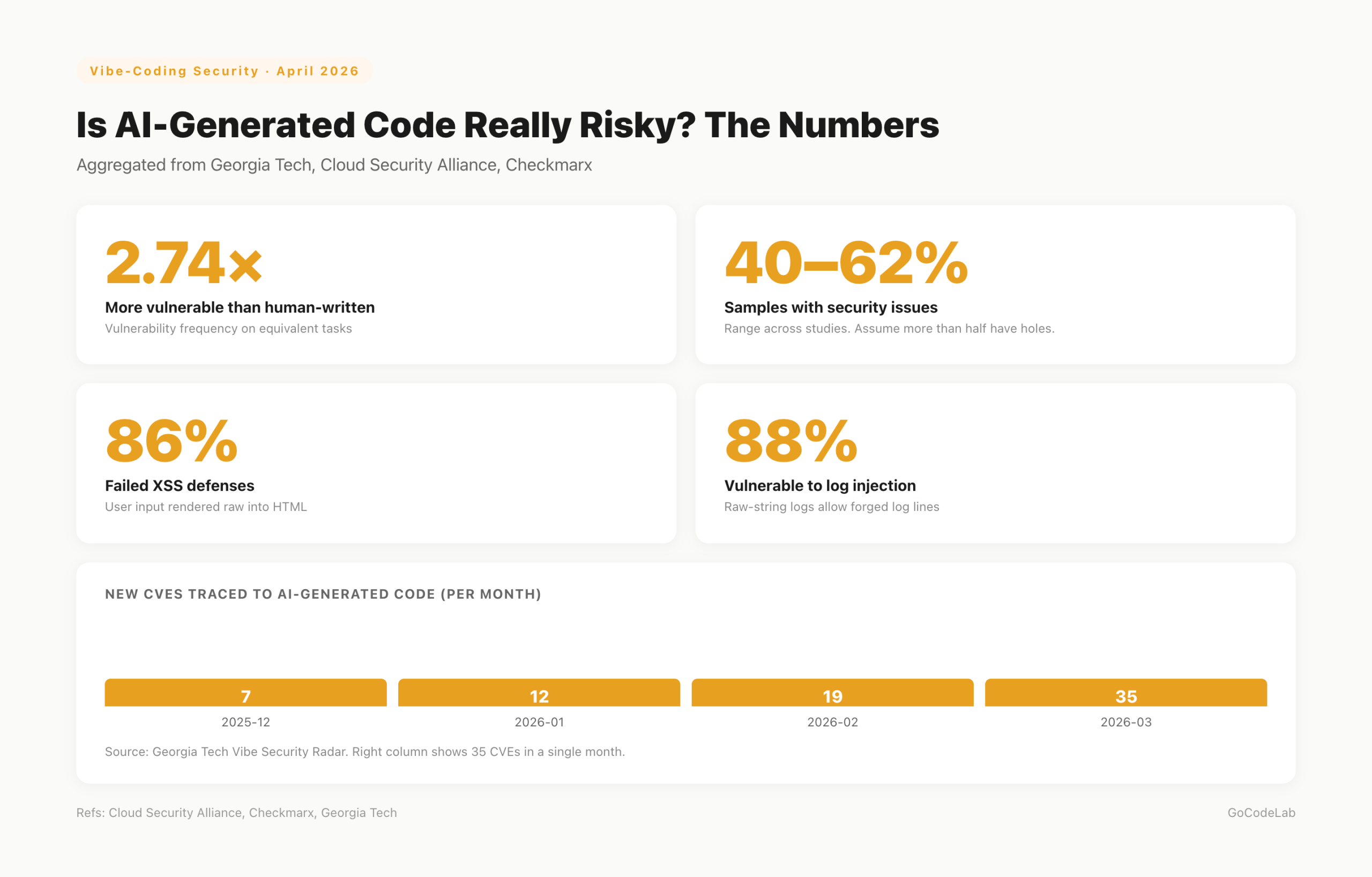
Don't assume "my code wouldn't be like that." This isn't a vibe check — it's measured. In 2026, multiple groups (Georgia Tech, Cloud Security Alliance, Checkmarx) analyzed AI-generated code and found security issues in 40–62% of samples. AI code was reported to be roughly 2.74x more vulnerable than human-written.
More specifically: 86% of samples failed XSS defenses, 88% were vulnerable to log injection. In March 2026 alone, 35 new CVEs tied directly to AI-generated code were tracked. One AI app leaked 1.5 million API keys right after launch — because the founder shipped without a security review.
Nobody's going to quit vibe coding after seeing these numbers. I'm not. But whether or not you spend 10 minutes before deploy is what decides your production's fate.
How AI Skips Security
Beginners get this wrong. The AI didn't make a mistake — it built what you asked for. "Make a user profile API" → it makes a user profile API. Auth wasn't requested, so it's not there. It leaves a // TODO: add auth here and moves on.
The feature works. Tests pass. But that TODO line becomes the attack surface. An endpoint anyone-with-the-URL can call goes straight to production. Feature-wise flawless, security-wise full of holes.
The fix is simple. Put security in the prompt from the start. "Include JWT auth middleware, read secrets only from env, no raw SQL, no TODO comments, ship complete code" — one line changes the output quality. Conditions in → matching code out.
Top 7 Mistakes — in the Order I Hit Them
These are patterns I hit in FeedMission/Apsity or find in every review. Ordered by frequency. If you're vibe coding, at least three of these are almost certainly in your repo right now.
| # | Mistake | What happens | Red flag |
|---|---|---|---|
| 1 | Hardcoded API keys | Scraped by bots within seconds | sk_, api_key= |
| 2 | Auth-less API routes | URL-only access to your DB | no session/auth/token references |
| 3 | NEXT_PUBLIC_ misuse | Service-role key shipped in browser bundle | NEXT_PUBLIC_*_SECRET/KEY |
| 4 | Raw SQL interpolation | SQL injection → full DB exfil | `SELECT ... ${}` |
| 5 | CORS wildcards | Any domain can hit your API | Allow-Origin: * |
| 6 | Missing XSS / log-injection defense | User input injected straight into HTML/logs | dangerouslySetInnerHTML, raw-string logs |
| 7 | Phantom packages (slopsquatting) | Malicious package installed under hallucinated name | unfamiliar packages, low downloads |
#1 and #3 hit you fastest post-deploy. The moment you push to GitHub, scraper bots scoop the key and spend it on crypto mining or burn your API quota. If you've never been hit, you've only been lucky.
One nuance on #3: with Supabase-style BaaS, NEXT_PUBLIC_SUPABASE_ANON_KEY is designed to ship to the client. The exposure itself is fine — but only on the assumption that RLS (Row Level Security) is enabled. Without RLS, the anon key is effectively a service-role key. The "client exposure is safe" guarantee collapses. Full review in the bonus section at the end.
When AI says npm install some-plausible-package, always check npmjs.com first — downloads, maintainers, issues. About 20% of AI-generated code references non-existent packages. Attackers register those names with malicious payloads, and you install them instantly. Unfamiliar? Ask the AI "does this package actually exist?" as a sanity check.
What Could Have Happened at FeedMission — the EP.06 Case
From the 7 above, FeedMission had #2, #3, #6, plus a few app-specific issues. Specifically:
- The Slack webhook URL rode on ProjectContext into the frontend bundle. An attacker could have blasted fake feedback into my workspace.
- The unsubscribe API took just an email address. Anyone's email → instant unsubscribe. I switched it to an
unsubscribeTokenflow. /api/feedback/minereturned the full admin reply text. Now it returnshasReply: booleanonly.- Team member auth checks were missing across several APIs. Either collaborators couldn't access what they should, or the opposite: endpoints were open to anyone.
.envwasn't in.vercelignore, so a symlink was about to get shipped in a Vercel build.
All fixed in one commit (52efb89). After that I built a routine so the same class of mistake doesn't recur. None of these are "too edge-case to happen to me." Ship any SaaS with vibe coding and you get similar combinations every time.
My 10-Minute Pre-Deploy Routine
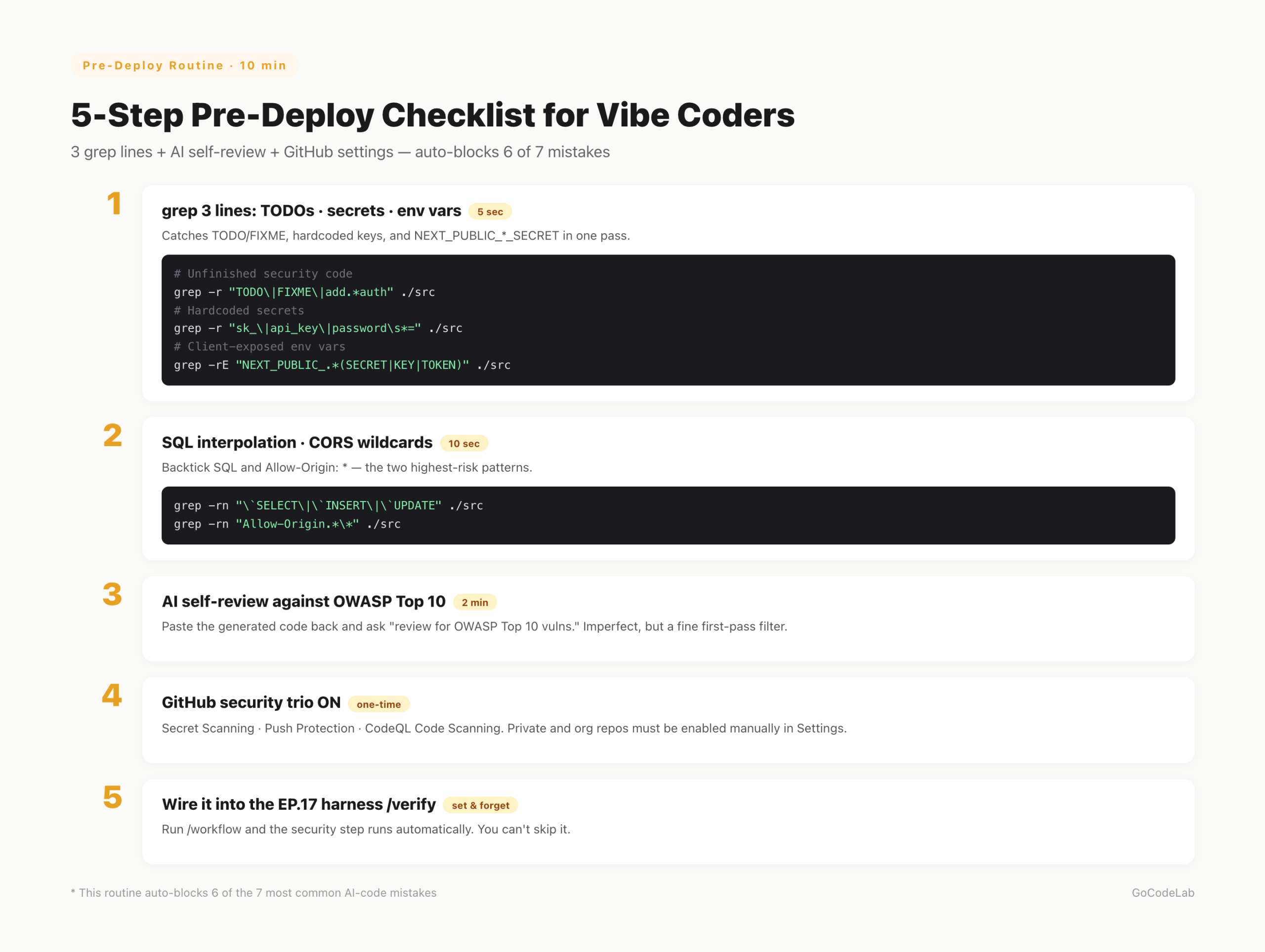
No fancy tooling. One shell one-liner, one AI self-review, three GitHub settings. Habitualize this and 6 of the 7 mistakes above are filtered automatically.
# Unfinished security code
grep -r "TODO\|FIXME\|implement.*later\|add.*auth" ./src
# Hardcoded secrets
grep -r "sk_\|api_key\|password\s*=" ./src
# Client-exposed env vars
grep -rE "NEXT_PUBLIC_.*(SECRET|KEY|TOKEN)" ./src
# 2. SQL interpolation and CORS wildcards
grep -rn "\`SELECT\|\`INSERT\|\`UPDATE\|\`DELETE" ./src
grep -rn "Allow-Origin.*\*" ./src
If all three pass, paste the generated code back to the AI and ask "review this code against OWASP Top 10 for vulnerabilities". Not perfect — AI sometimes misses its own bugs. But as a first-pass filter it's plenty.
On the GitHub side, turn on three things: Secret Scanning, Push Protection, CodeQL Code Scanning. That combo blocks key leaks at commit time and catches code-level vulns at push time. Dependabot and npm audit in CI track package vulns automatically.
I append this sentence to every code-generation prompt: "Include auth middleware; read secrets only from process.env and use NEXT_PUBLIC only for public values; always validate user input; no raw SQL; ship complete code without TODO/FIXME." The output quality changes visibly. Prompts don't need to be short just because it's vibe coding.
Bake It Into the Harness (EP.17) and You Can't Forget
The problem is us. We skip checks when we're busy. A grep line feels pointless when a hotfix is urgent. So I wired the security check into the /verify step of my EP.17 harness. Running /workflow "feature name" now goes: spec → implement → security grep → AI OWASP review → commit, all in one flow.
No way to forget. And if you try to, the harness reminds you. That's what "automate the annoying stuff" actually means across this series. Security reviews are annoying — so that's exactly what to automate first.
.claude/commands/verify.md: (1) run three grep lines, (2) ask the AI to review against OWASP Top 10, (3) confirm env vars and auth middleware exist, (4) on any finding, loop back to /tdd. If these four don't run, /commit is blocked.
Bonus — Using Supabase? RLS Is Its Own Chapter
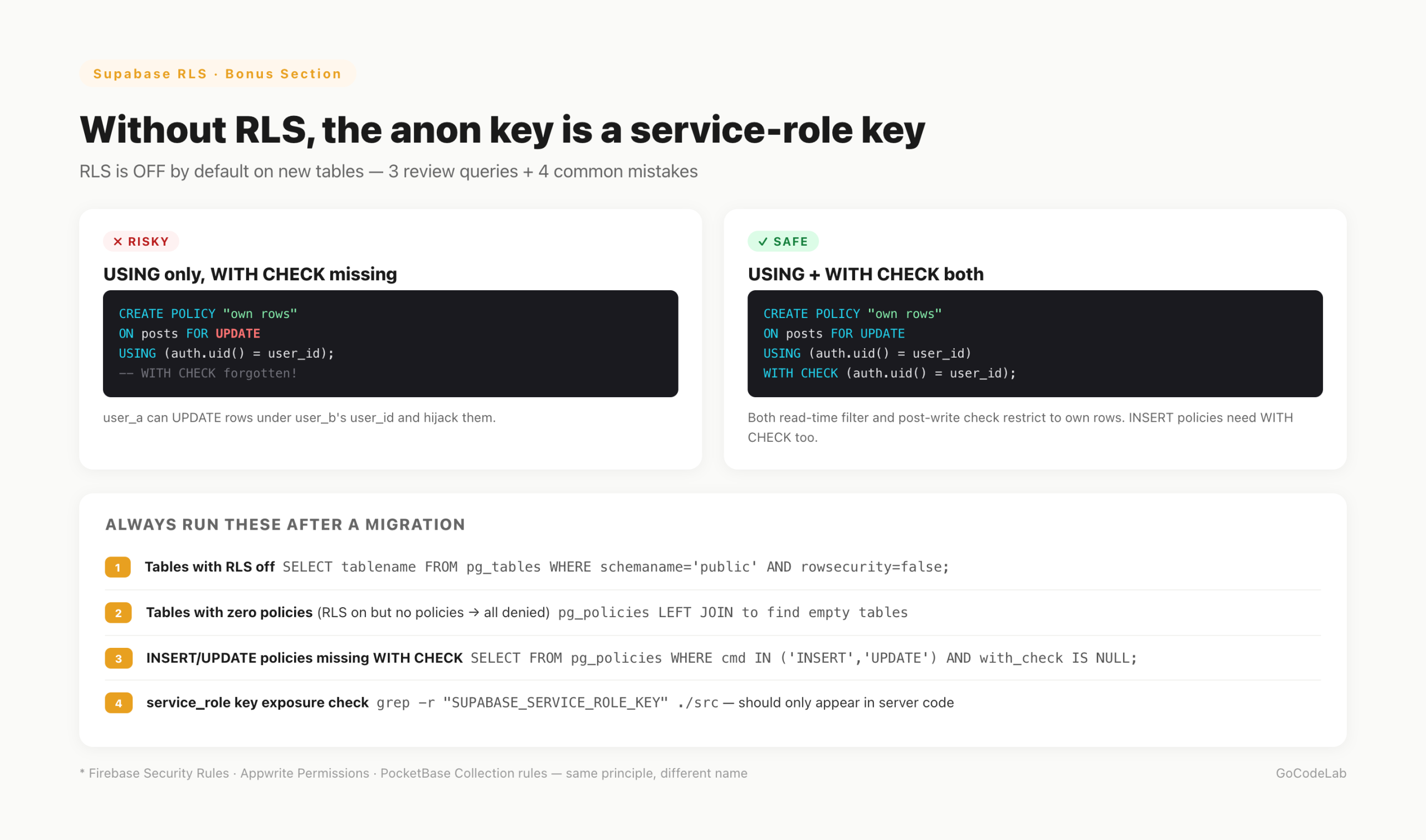
Next.js + Supabase is the default vibe-coder stack, so RLS gets its own section. RLS (Row Level Security) is PostgreSQL's built-in row-level access control. It enforces things like "this row is readable only by the user whose user_id matches" at the database layer.
Why a separate section? When you create a table in Supabase Studio, RLS is OFF by default. Ship the NEXT_PUBLIC_SUPABASE_ANON_KEY to the client in that state and anyone with that key can read or write every row in every table. The anon key effectively becomes a service-role key. Whatever assurance "client-side anon key is safe" gave you, it's gone.
Turning RLS on isn't enough. If you don't write any policy, every access is denied. So you typically write separate policies per action: SELECT, INSERT, UPDATE, DELETE. The most frequent mistake is writing USING (the read/delete-time filter) but forgetting WITH CHECK (the post-write validation). Without WITH CHECK, user_a can INSERT or UPDATE a row claiming user_b's user_id — so they can plant rows or hijack existing ones.
SELECT tablename, rowsecurity
FROM pg_tables
WHERE schemaname = 'public' AND rowsecurity = false;
-- 2. RLS on but no policies — everything is rejected
SELECT t.tablename
FROM pg_tables t
LEFT JOIN pg_policies p
ON t.schemaname = p.schemaname AND t.tablename = p.tablename
WHERE t.schemaname = 'public' AND p.policyname IS NULL;
-- 3. INSERT/UPDATE policies missing WITH CHECK
SELECT tablename, policyname, cmd, qual, with_check
FROM pg_policies
WHERE schemaname = 'public' AND cmd IN ('INSERT', 'UPDATE') AND with_check IS NULL;
Save these three queries in the Supabase SQL Editor and run them after every migration. Empty result on #1 means RLS is on for every table. Empty on #2 means each table has at least one policy. Empty on #3 means every INSERT/UPDATE policy has WITH CHECK.
- RLS off — new table, RLS forgotten. The anon key becomes a master key.
- Missing WITH CHECK — only USING is set. Attackers can INSERT/UPDATE rows under someone else's user_id.
- service_role key shipped to the client —
SUPABASE_SERVICE_ROLE_KEYmust never be NEXT_PUBLIC. Server routes or Edge Functions only. - Permissive anon-role policies — policies set to
truewithoutauth.uid() = user_idlet unauthenticated callers reach every row.
Other BaaS providers map directly: Firebase has Security Rules, Appwrite has Permissions, PocketBase has Collection rules. Different name, same principle — "if the client talks to the database directly, the database is the last line of defense." Leave that line empty and no upstream security matters.
FAQ
Q. Is AI-generated code really more vulnerable than human-written code?
Industry and academic studies report AI-generated code is roughly 2.74x more prone to vulnerabilities, with 40–62% of samples containing security issues. If your prompt doesn't demand security, the AI ships features only.
Q. What are the most common beginner mistakes?
Hardcoded API keys, auth-less API routes, misusing NEXT_PUBLIC_, installing packages that don't exist (slopsquatting), and raw SQL string interpolation. Those five show up constantly.
Q. What is slopsquatting?
When AI hallucinates a package name, attackers register that exact name and ship malicious code. About 20% of AI-generated code samples reference non-existent packages. If an AI-suggested package is unfamiliar, check its downloads, issues, and maintainers on npmjs.com first.
Q. What if .env is already committed?
Treat every key in it as leaked. Rotate immediately. Git history keeps the file even after git rm. Turn on GitHub Push Protection so the next attempt gets blocked at commit time.
Q. How do I automate this?
GitHub Secret Scanning + CodeQL + npm audit wired into GitHub Actions runs on every push. Secret Scanning is enabled by default for new personal public repos; private and org repos need to be turned on manually. Those three plus a grep one-liner is my minimum.
Wrap-up
Vibe coding didn't make security worse. The habit of deploying without review did. AI raised the speed. Raise your review speed with it. Three grep lines, one AI review, three GitHub settings. Ten minutes.
Skip those ten minutes and "1.5M API keys leaked" stops being someone else's story. It becomes yours. Spend them and you keep the vibe-coding speed with a baseline of defense in place. Beginners especially: pick safe, not easy.
Lazy Developer — Automate Everything
A log of things I couldn't be bothered to do manually.
Start from EP.01 →GoCodeLab Blog
Weekly AI news and dev automation stories.
Current as of April 2026. Industry figures come from Georgia Tech Vibe Security Radar, Cloud Security Alliance, and Checkmarx reports. Tool and platform policies change — always cross-reference the official docs for each service.
Last updated: April 13, 2026 · GoCodeLab