MCP Protocol Surpasses 97 Million Installs — Why It Became the New Standard for AI Agent Infrastructure
MCP Protocol Surpasses 97 Million Installs — Why It Became the New Standard for AI Agent Infrastructure
목차 (9)
March 28, 2026 · Trend
There’s been a lot of talk about AI agents lately. But how do agents connect to different tools? Connecting each tool in a different way gets really complicated. Model Context Protocol (MCP), created by Anthropic, is a standard designed to solve this problem.
News just came out that MCP has surpassed 97 million installs. This isn’t just a number — it’s the signal that an experimental tool has risen to become standard infrastructure in the AI industry. OpenAI and Google DeepMind have already declared their support. We break down why it’s being adopted so quickly and why even non-developers should care.
– MCP is an open protocol that connects AI agents and tools in a standardized way
– Think USB-C: “learn once, connect anywhere”
– 97 million installs = signal that it’s moved from experimental to industry standard
– OpenAI, Google DeepMind, Zapier, Figma, GitHub all support it
– Non-developers can start with Claude Desktop, no coding required
– Companies worldwide are gradually adopting — essential knowledge for AI automation roles
What Is MCP? — Understanding It Through the USB-C Analogy
The easiest way to explain Model Context Protocol is with an analogy: USB-C. If your laptop has one USB-C port, you can plug in a charger, an external SSD, and a monitor. One port does everything.
MCP plays exactly that role. If an AI agent (Claude, ChatGPT, Cursor, etc.) has an “MCP port,” it can connect to Google Drive, Slack, GitHub — anything. No need to find a different plug for each one.
Technically, here’s what it means. Until now, every time an AI agent needed to use an external tool, it had to learn each tool’s API documentation separately. Email works this way, Google Drive works that way, GitHub works differently again. That makes agents complex. MCP says: let’s connect all these tools in one consistent way. When AI says “hey tool, do this task” in a standard language, every tool responds the same way.
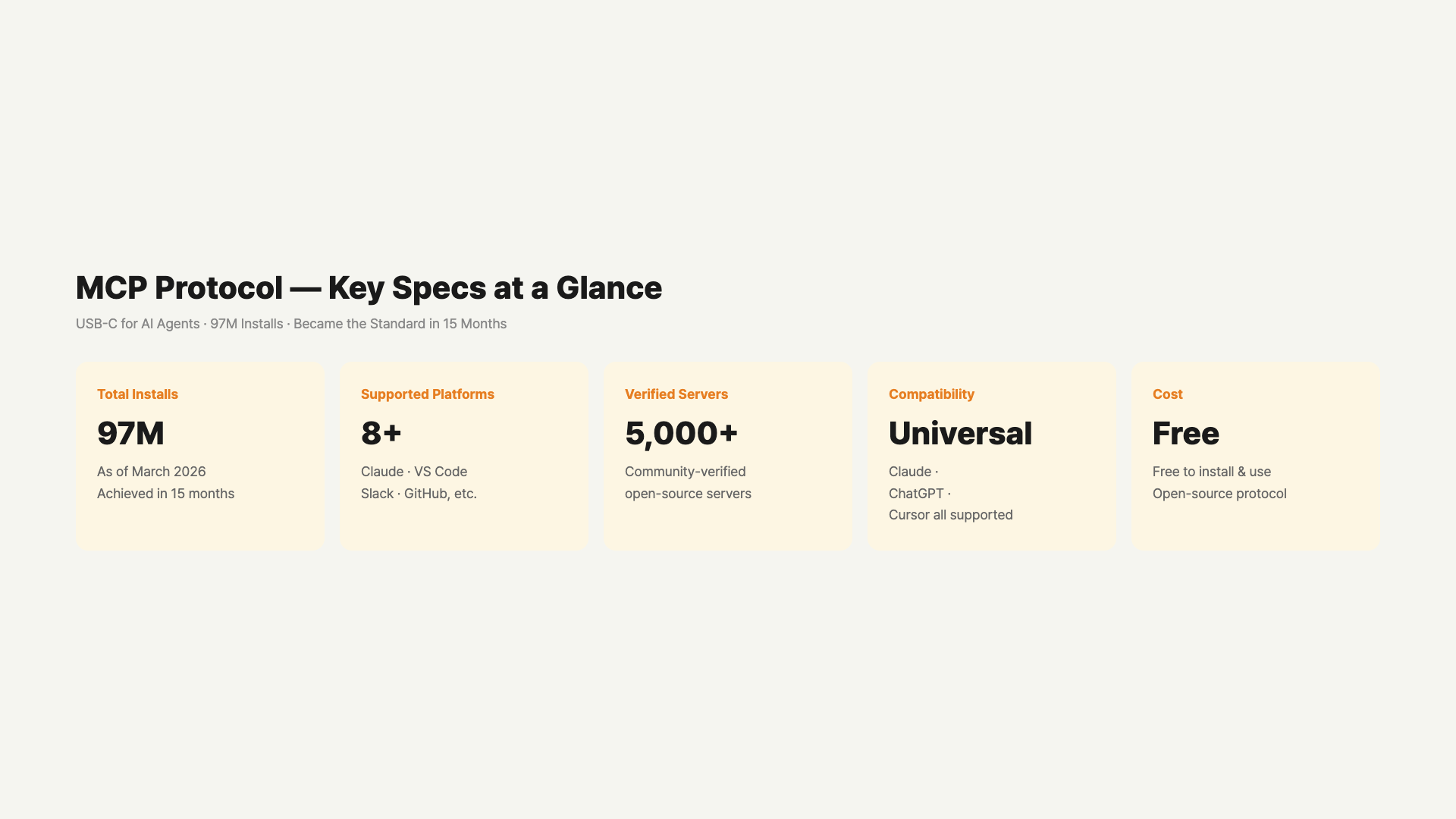
Why Do 97 Million Installs Matter?
MCP started as a really small project. When Anthropic announced it in late 2024, it was considered “experimental and developer-only.” Many doubted whether it would actually get used.
But in just a few months, it surpassed 97 million installs. This isn’t just download numbers — it means developers are actually using it as a standard protocol when building agents. From VS Code extensions to enterprise-grade tools, everyone supports MCP.
There’s a good phrase for this: “the tipping point needed to become a standard.” 97 million is well past that threshold. The question is no longer “should we use MCP?” but “will we fall behind if we don’t?” OpenAI and Google DeepMind’s official endorsements have accelerated this trend.
November 2024 launch → 50 million installs by February 2025 → 97 million installs by March 2026. In just 15 months, it’s showing signs of becoming the lingua franca of AI agents, much like HTTP did for the web.
Why Is MCP Winning the AI Agent Race?
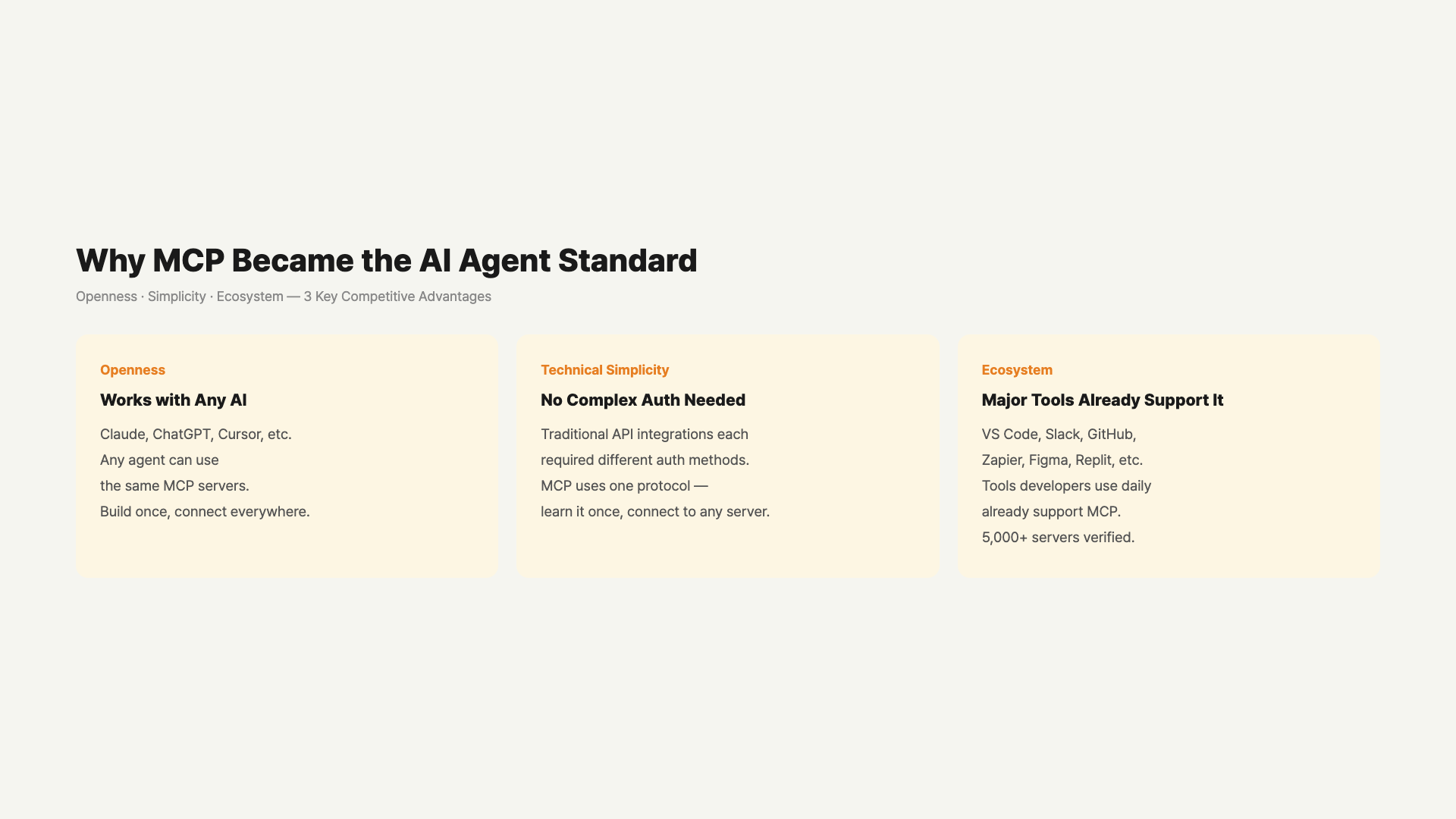
OpenAI makes agents, Google makes agents, Anthropic makes agents. So why is Anthropic’s MCP becoming the standard?
First, openness. MCP is an open standard. Anyone can build tools the MCP way. OpenAI’s tools are centered on OpenAI agents, and Google’s are the same. But MCP says “any agent can use this.” Developers love this freedom. An MCP server built for Claude works in Cursor or VS Code too.
Second, the technology is simple. No complex authentication procedures or special licenses. It’s just a standard protocol. From a developer’s perspective, it feels like “learn this once and use it everywhere.” The most popular MCP servers install with a single npm or pip command.
Third, the ecosystem already exists. Claude, VS Code, Slack, GitHub, Zapier, Figma, Replit, Sourcegraph — major tools already support MCP. When building new tools, the question has shifted from “should we support MCP?” to “will people not use us if we don’t support MCP?”
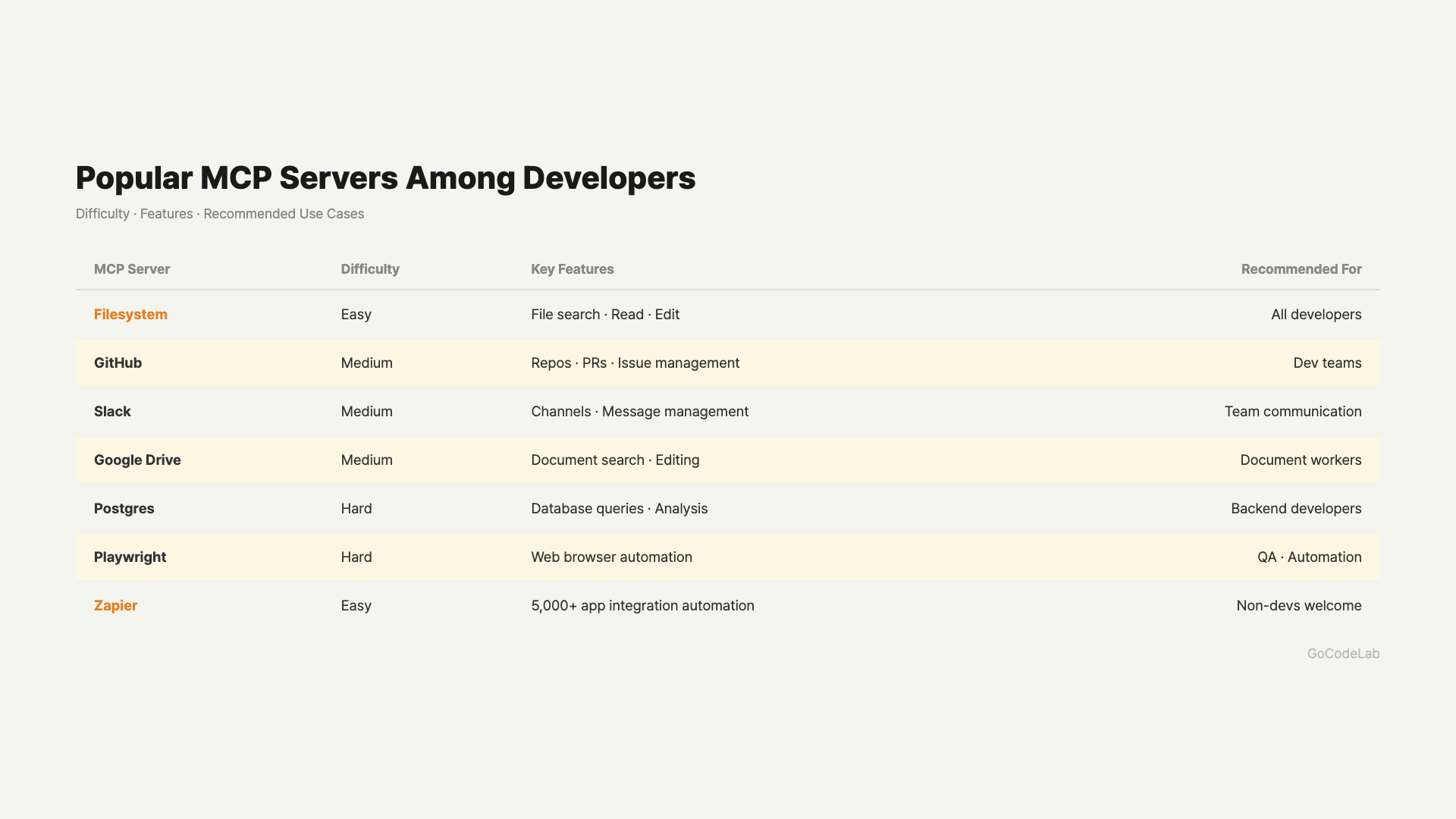
Popular MCP Servers Developers Use
The MCP ecosystem already has hundreds of servers. Here are the most popular ones that are useful for beginners too.
| MCP Server | What It Does | Difficulty |
|---|---|---|
| Filesystem | Read, write, and search files on your computer | ★☆☆ Easy |
| GitHub | Browse repos, commit, create PRs | ★★☆ Medium |
| Slack | Read channels, send messages, summarize threads | ★★☆ Medium |
| Google Drive | Search, read, and edit documents | ★★☆ Medium |
| Postgres/SQLite | Database queries and analysis | ★★★ Hard |
| Playwright | Web browser automation | ★★★ Hard |
| Zapier | 5,000+ app automation connections | ★☆☆ Easy |
If you’re starting out, the Filesystem server is the easiest. Connect it to Claude Desktop and you can immediately do tasks like “summarize the PDF files from this month in my Downloads folder.” The GitHub server is one developers get familiar with quickly — quite useful for auto-writing PR descriptions or summarizing issues.
You Don’t Need to Be a Developer to Use MCP
Many people hear “MCP” and think “difficult, developer-only.” But that’s not the case. Non-developers can start without any coding.
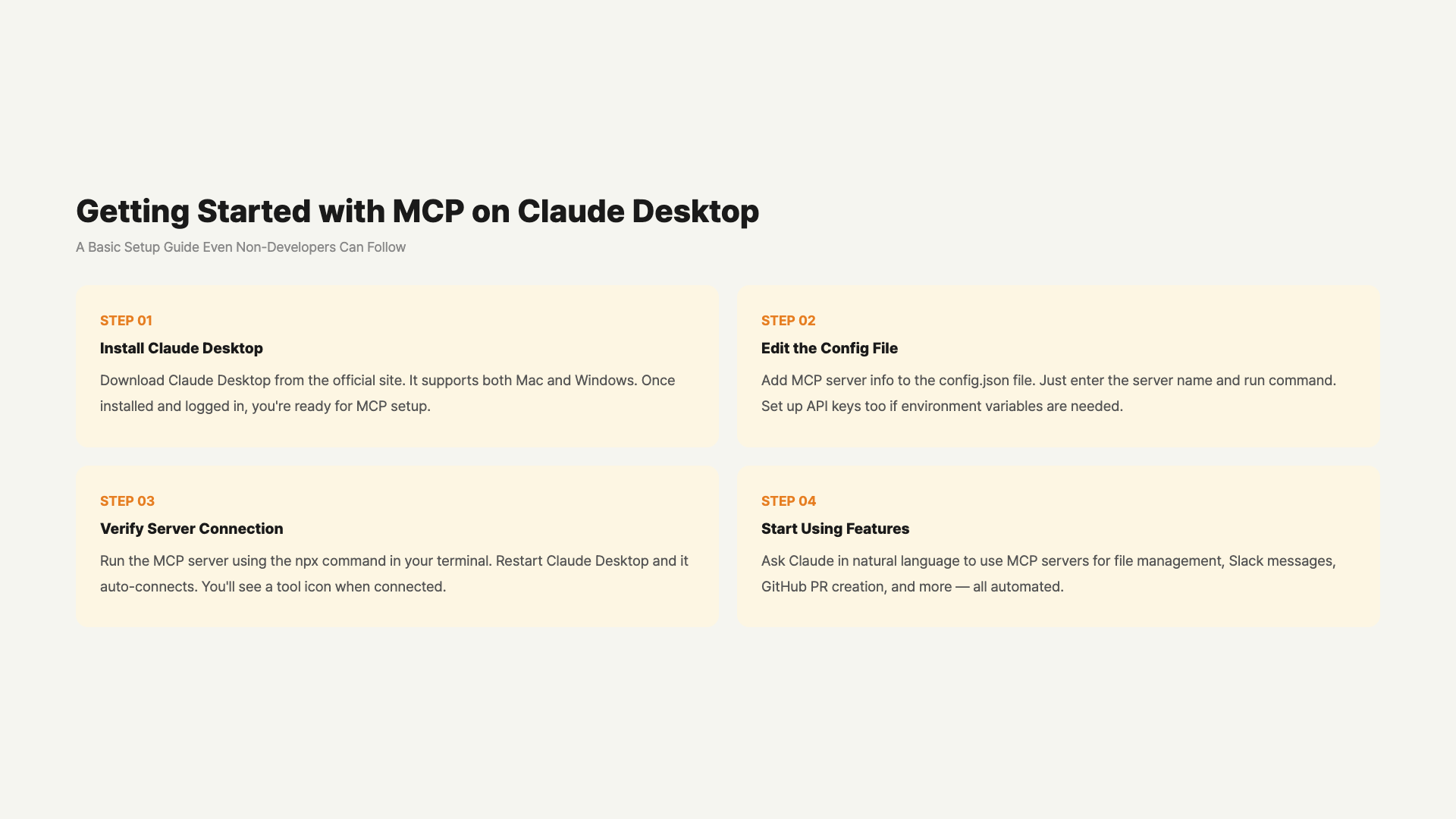
The easiest way is Claude Desktop. Claude Desktop supports the Filesystem MCP server right after installation. A small tweak to a JSON config file and you’re connected. Search “Claude Desktop MCP setup” for English guides.
There’s a popular combo among non-developers: Claude Desktop + Filesystem + Zapier. Connect Zapier MCP and Claude links to 5,000+ apps. Summarize emails, check calendar events, write Notion documents — all with a simple command.
1. Install Claude Desktop (free) → 2. Connect Filesystem MCP server (5 min JSON config) → 3. Try “list files modified today in my Documents folder” → 4. Once comfortable, add Zapier or Slack MCP
What Does MCP Mean for Enterprises?
Enterprise companies are looking at MCP and thinking “this is really good.” Two reasons: security and control become easier, and costs go down.
From a security perspective, if a company’s CRM system supports MCP, any AI agent can connect through a standardized permission system. Until now, each tool required separate decisions about “what data to expose to the agent” — which was complicated. With MCP, you can manage data security policies in one place and ensure all connections follow those policies.
For cost reduction, if a tool’s API pricing goes up or the service changes, you can easily switch to another tool that supports MCP. It frees you from vendor lock-in to some extent. Developers don’t need to learn separate API docs for each tool, reducing development costs. Companies that need to keep data internal can build their own MCP servers without going through external servers, securing data sovereignty.
MCP’s Limitations and Unsolved Problems
It wouldn’t be honest to only talk about the positives. When actually deploying in production, several concerns arise.
First is security vulnerability risk. As MCP becomes more standard, a single security vulnerability could affect all 97 million installs. In late 2025, permission bypass issues were found in some MCP implementations. They’ve been fixed, but as a widely-used standard, security audits need to be more rigorous.
Second is production stability. It works fine in development but can falter in actual production environments. Unexpected behavior can appear with large traffic volumes or complex workflows. Major stability improvements are planned through mid-2026.
Third is incomplete standardization. Authentication, authorization, and error handling still vary slightly between implementations. The big picture is standardized, but detailed implementations aren’t fully unified yet. Cross-server compatibility issues pop up occasionally.
FAQ
Q. What’s the difference between MCP and an API?
An API is an interface for using a specific service’s features. Each service defines it differently. MCP is a protocol that connects APIs in a standardized way. For example, Service A’s API might use JSON while Service B uses XML. MCP says “let’s all request the same way.” For developers, it means “you don’t have to learn each API separately.”
Q. I’m not a developer — should I use MCP?
You don’t need to build MCP servers with code. But if you’re already using apps like Claude Desktop that support MCP, you can connect a few servers for workflow automation. For roles that use AI tools heavily, knowing MCP is a competitive advantage. Especially for AI automation leads, operations teams, and data analysts — knowing MCP changes how you work.
Q. Will learning MCP help with my career?
Yes, it will. AI agent and automation fields are growing rapidly, and MCP is becoming the standard. AI startups and tech companies in particular are looking for developers with MCP experience. Even non-developers can differentiate themselves with experience in “designing workflow automation using MCP.”
Q. Are companies in Asia and worldwide also using MCP?
Many companies are still in the preparation phase. But startups that are aggressive about AI and automation are adopting quickly. Major tech companies are reportedly evaluating MCP compatibility for their internal AI agent tools. More companies will adopt it as time goes on.
Q. Could MCP disappear?
Unlikely. 97 million installs means too many projects already depend on MCP. With OpenAI and Google DeepMind endorsing it, disappearing would be very difficult. Just as HTTP became the web standard, MCP is solidifying as the communication standard for the AI agent era.
Q. Is it too late to start learning MCP now?
Not at all. Now is actually a great time to learn. MCP is becoming standardized, so demand will only grow. The community is growing and learning resources are expanding. Starting with Claude Desktop and gradually expanding your scope is the most practical approach.
Q. Does using MCP send my data to Anthropic?
The MCP protocol itself doesn’t route through Anthropic’s servers. MCP servers are installed locally or on your own servers. However, when AI processes queries through the Claude API or Claude Desktop app, it does go through Anthropic’s servers. If your data is sensitive, you can combine MCP with a local-only AI model for fully offline operation.
Wrap-Up
MCP surpassing 97 million installs isn’t just a number. It’s the signal that “something has become a standard.” Just as HTTP unified the web, MCP is becoming the unified language of the AI agent era. Anthropic started it, but OpenAI, Google DeepMind, Zapier, and Figma all jumping on board proves how necessary this standard was.
Developers no longer need to learn different approaches for each tool, and enterprises can manage security and control in one place. Even non-developers can enter workflow automation with Claude Desktop and a few basic servers. MCP still has security and stability challenges to solve, but the direction is clear.
When evaluating AI tools and agents going forward, “Does it support MCP?” will become a natural question — just like asking “Does this app support iOS?” That era has already begun.
In the AI agent era, MCP is becoming a standard, not a choice. Subscribe to GoCodeLab for the latest AI infrastructure news.
This article was written as of March 28, 2026. AI technology evolves rapidly, so the situation may change in the future.
Related: What Is Agentic AI? · Claude Cowork Guide · Cursor vs Windsurf vs Codex Comparison