I Shipped 3 Major Features in 3 Days
I shipped Keyword Search, an MCP server, and a monthly magazine in three days for Apsity — 41 commits, +15,380 lines. Here's how I sliced phases and ran Claude in tight loops.
On this page (10)
April 2026 · Lazy Developer EP.21
One major feature normally eats a week. Design, implementation, UI, i18n, marketing pages, docs. One at a time. That's the rule I learned. From April 28 to 30, I shipped three of them. Keyword Search, an MCP server, and a monthly magazine. 41 commits, +15,380 lines.
Up front: I didn't build all three with the same hands at the same time. I finished one per day. They landed in the same three days. The reason it worked was simple — I sliced each feature into phases, and the unit I gave Claude was small. This post is a record of those three days.
EP.02 was where I built the Apsity dashboard. EP.03 added AI insights on top. That's the base. The three things I shipped this week sit on top of that — keyword discovery, calling data from Claude directly, and an automated monthly magazine.
– April 28-30. 41 commits, +15,380 lines. Three major Apsity features at once
– Day 1: Keyword Search (14 tasks). 18 countries, Top 50, AI summary, watchlist
– Day 2: MCP server. Apsity data callable from Claude. FREE plan blocked at key issuance
– Day 3: Monthly magazine. Phases 1-7 in one day. Auto-sent on the 1st of each month
– What made it possible: phase slicing per feature + small Claude prompts
Why these three at once
They weren't separate items. They were a single flow. Apsity already shows registered apps well — revenue, downloads, keyword ranks, competitor changes. What was missing: "Where do I find new keywords?", "How do I use this data in other tools?", and "I want a one-page view of what happened this month."
Keyword Search is discovery. ASO ultimately comes down to picking which keywords to rank for. Looking only at registered keywords is a fishbowl. You need to see how other apps are showing up. So I pull iTunes Top 50 across 18 countries, let AI summarize, and let the user save promising keywords to a watchlist.
The MCP server is the exit door. Sometimes you want to ask the data in natural language from Claude instead of opening Apsity. "How was my revenue yesterday?" — Claude asks Apsity and answers. I'd been thinking about this since I built npm-subscriber-mcp in EP.15.
The monthly magazine is the look-back. Daily alerts came in EP.03. But daily is noisy. After a month, you want to look back and see what happened — and that data is scattered. Aggregate it on the 1st, send it as email, done.
Together: discovery → use → look-back. Both ends of a workflow that were missing. That's why they shipped together.
How concurrency was possible — slicing phases
Three week-long features in three days. The reason it worked is simple. I never looked at a feature as one big lump. I sliced it into small phases. Each phase ends with a working artifact and a commit.
The monthly magazine, for example, was sliced like this.
Phase 1 — Language setting (ko/en in Settings)
Phase 2 — Monthly aggregation function
Phase 3 — Claude generates the magazine body
Phase 4 — 4 card components (metrics/chart/reviews/suggestions)
Phase 5 — Magazine page render
Phase 6 — Email send (4 cards inline)
Phase 7 — CLI test tool
Phases 1 and 2 are independent. Phase 3 takes the output of 2. Phases 4 and 5 are built on Phase 3's result. The dependency graph looks serial, but Phase 2 and 4 can run in parallel. Define the data shape early, then build the aggregation query and the card UI separately.
Two benefits. First, the unit I throw at Claude shrinks. "Build me a magazine system" is too big. "Phase 4: just the metrics card component. Input is this object, output is a React component" is precise. Second, when something looks off, I can stop at that phase. I rarely lose a whole day.
Keyword Search was 14 tasks. MCP was 5 stages — server code, auth, gating, UI, docs. The big picture stays in my head, but execution moves in small steps. That's the whole trick.
Day 1 (4/28) — Keyword Search
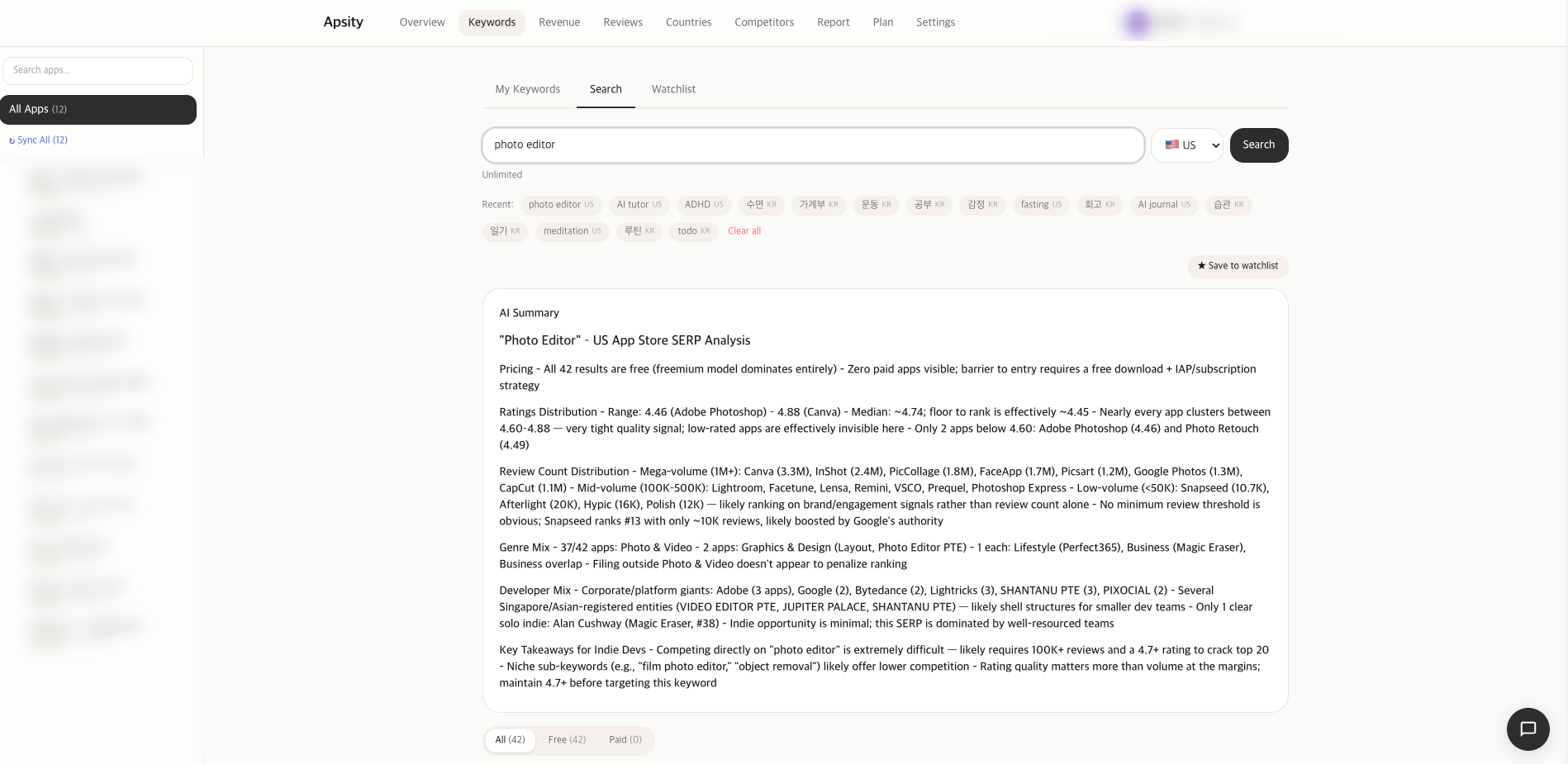
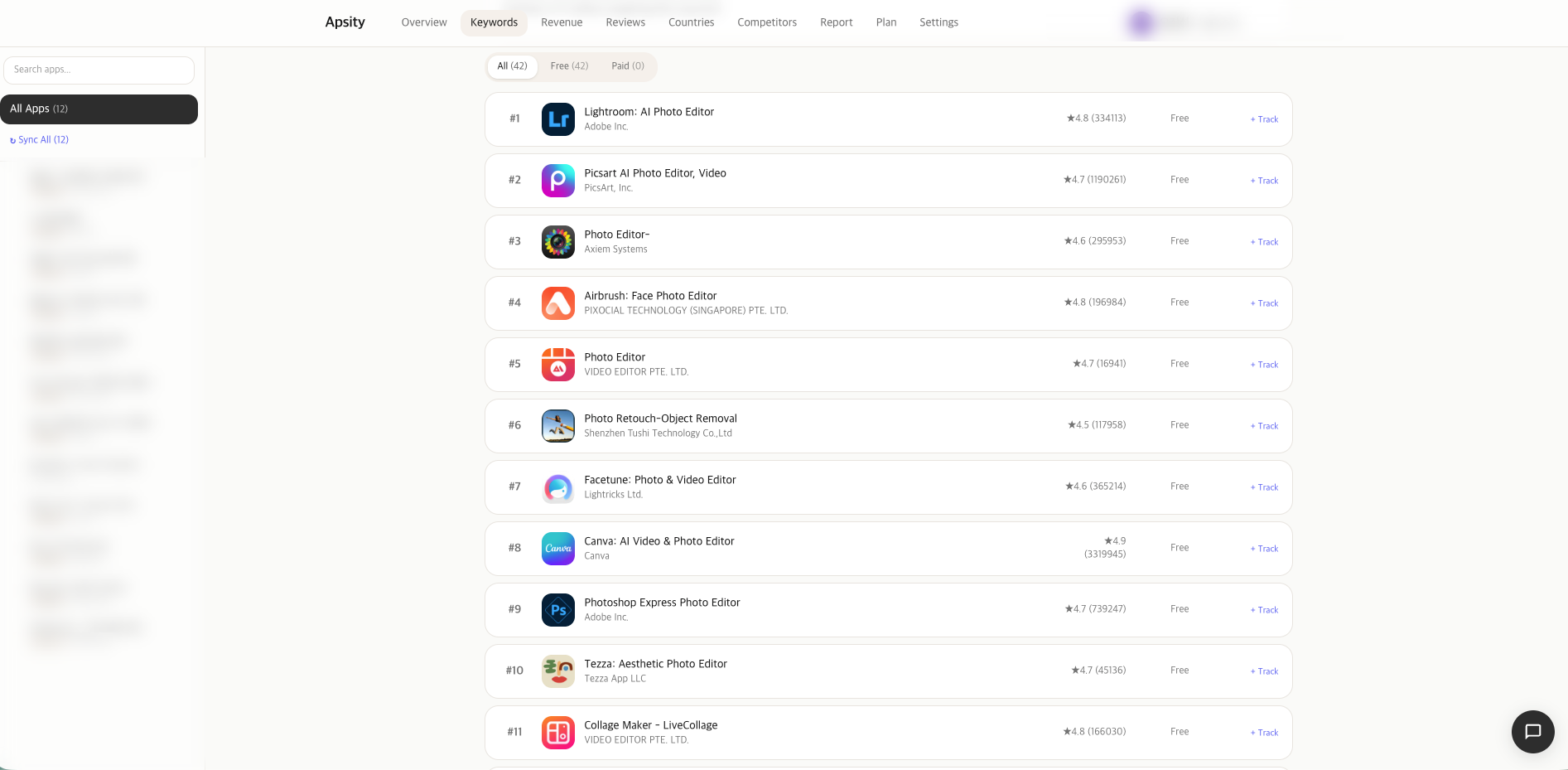
April 28 went entirely to keyword search. I shipped 14 tasks at once. It's a tool that searches iTunes Top 50 across 18 countries — not just registered apps, but any app worldwide, by keyword.
I started with requirements. Search form, results list, side panel on row click for app detail, AI summary, search history, watchlist. Free/paid filter, daily limit, input validation. Korean and English i18n. And marketing — Pricing page mention, landing demo, blog announcement in both languages.
Here are the 14 tasks.
Backend: iTunes Top 50 helper, daily limit, search history, validation
API: POST /api/keywords/search, history GET/DELETE, summary
DB: KeywordSearchHistory + plan-limits extension
Components: SearchForm, SearchResults, SearchHistory, AISummary, SearchTab
UI: /dashboard/keywords tab, side panel, free/paid filter, watchlist
i18n: full ko/en split
Marketing: Pricing/Landing/Blog ko·en
The core was gating. Daily limits sit in plan-limits. FREE gets N per day, STARTER and up get more. Side panel detail is STARTER+. Watchlist plus daily snapshots are PRO-gated. The UI blocks, the API blocks again. That's the pattern I learned in EP.07 with LemonSqueezy. If you only block at the UI layer, someone routes around it.
Three follow-up fixes after launch. AI summary came back as markdown so asterisks were rendering literally — added a markdown renderer. SWR cache flickered on every search — keepPreviousData option. Side panel scrolled the page background — body overflow lock. None of these show up unless you actually use the thing. The gap between "code that runs" and "product I'd use" is exactly here. Ship 80% fast, fix the last 20% when real problems show up.
Day 2 (4/29) — MCP server
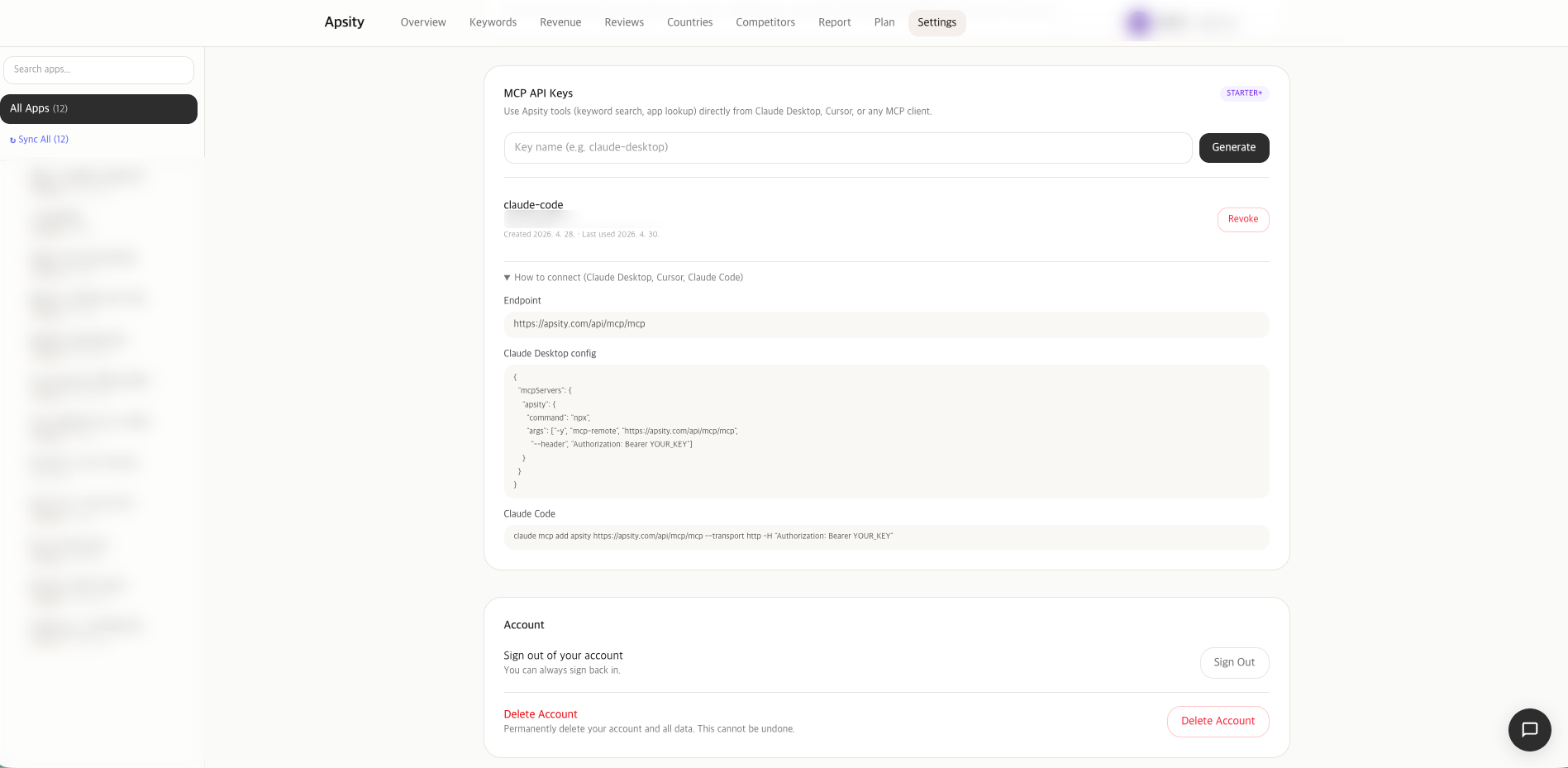
April 29 went to MCP. EP.15 already taught me the pattern with npm-subscriber-mcp. That one exposed npm download data to Claude. This one exposes Apsity data.
The server itself is a two-day job at most. Use @modelcontextprotocol/sdk to build a stdio server, define tools, and have handlers call the Apsity API. Where I actually spent time was gating.
The problem: MCP is called from external clients like Claude. The key runs in an environment the user doesn't directly control. If a FREE-plan user calls it without limits, costs leak. So how do we block it?
Layer 1 — Settings UI: issue button disabled on FREE
Layer 2 — POST /api/mcp/keys: server checks plan, blocks
Layer 3 — On MCP call: validate key + re-check plan
Layer 4 — Per-tool gating (PRO-only tools separated)
If you bypass the UI and hit the API directly, blocked. If you grab a key while on STARTER, downgrade, and try to call it, blocked. Security can't sit in one place. EP.06 and EP.07 taught me that.
UI is a new tab in Settings. Issue API key, list issued keys, revoke. Key is shown once. Afterwards only the last 4 chars. That's the GitHub Personal Access Token pattern.
Marketing got an MCP demo section on the landing page and a guide at /docs/mcp in both languages. Claude Desktop config JSON, example conversations, issuance walkthrough. Ship without marketing and nobody knows it exists.
Day 3 (4/30) — monthly magazine
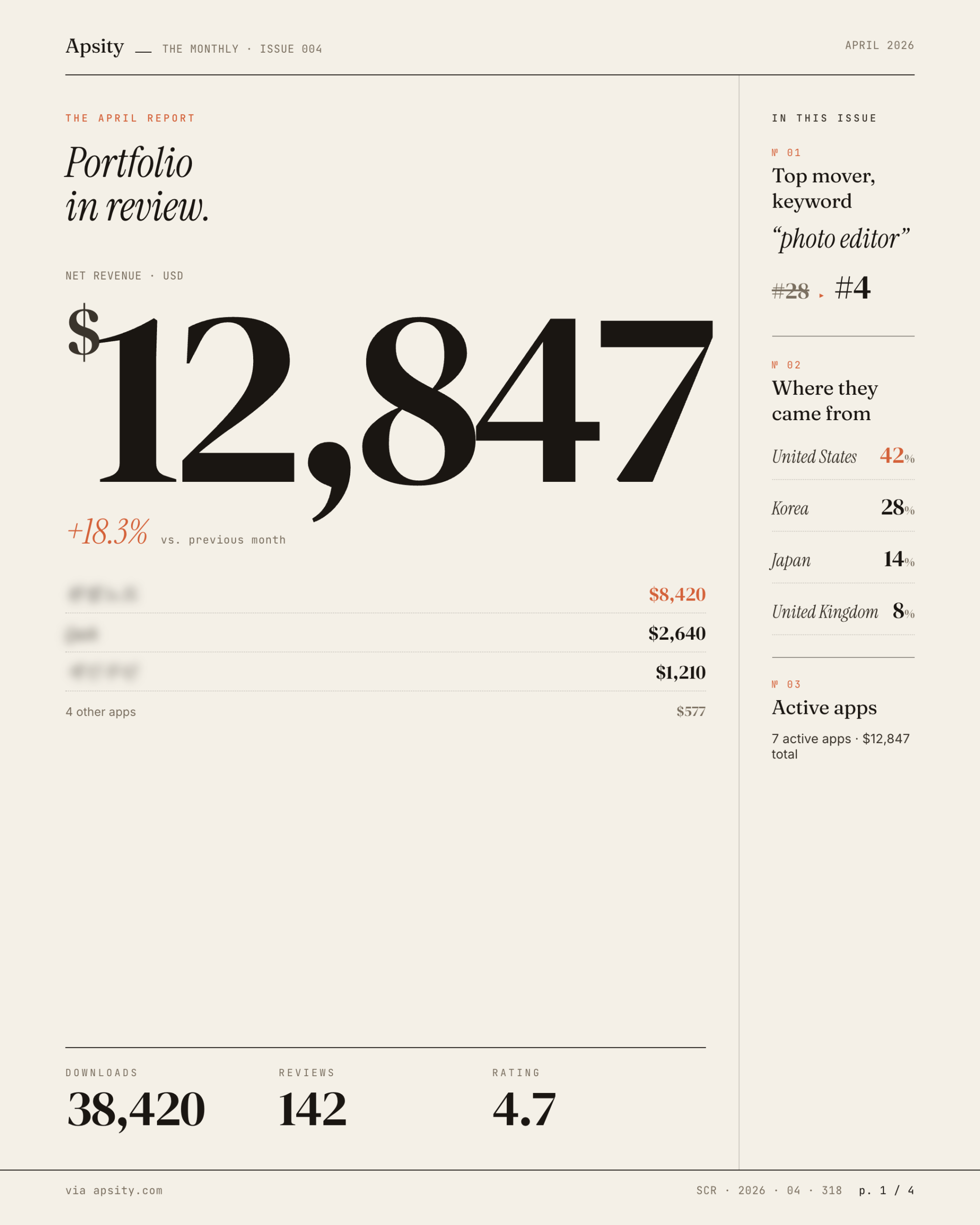
April 30 — monthly magazine. Phases 1-7 from above, all in one day. It worked because the magazine doesn't generate new data; it organizes existing data. Revenue, downloads, reviews, keywords — already there. Aggregate, summarize with AI, render as cards, email it.
Phases 1-3 were the data pipeline. Add a magazine language setting, build the monthly aggregation, generate the body with Claude. This is where currency conversion came in for the first time. KRW and USD revenue mixed; if magazine display currency is KRW, USD has to be converted. Exchange rate cached at the 1st-of-month value. Plus subscription deduplication — same payment recorded twice in some edge cases.
Phases 4-7 were the output. Four card components — key metrics, trend chart, review highlights, next-month suggestions. Magazine page render. Email send via Resend with all four cards inline. CLI test tool to preview an arbitrary month.
The real cron runs at 5am KST on the 1st of each month. But I shipped on the 30th and couldn't wait until the 1st to verify. So I added a one-time cron that runs only on May 1st, sending myself the magazine in both Korean and English. After verification, only the regular monthly cron stays.
The magazine is data aggregation plus auto-send, but to a user it's just "an email shows up on the 1st." The four cards inside, the FX handling, the dedup — all invisible. Time goes into invisible details. EP.04 was the first time I felt this with FeedMission. Going from MVP to product takes longer than the MVP itself.
Things that snuck in
Three things crept in around the major work.
One — auto-recovery for paid-but-not-signed-up edge case. Sometimes payment goes through before signup completes. Used to be manual. Built a PendingSubscription model — store payment temporarily, match on signup, auto-activate. I knew about this case from EP.07 but had pushed it off.
Two — VAT/tax disclaimer near pricing. Tiny addition on the Pricing page. Skipping it means post-purchase emails asking "why did the price go up?"
Three — Korean translations of 9 English posts. Marketing blog had been English-first, but Korean users need Korean. Translated 9. Plus fixed Korean detection by reading the entire navigator.languages array — some browsers don't put ko-KR first.
These slip in between major work. One hour at a time. "Doing one thing at a time" is a fantasy; in reality, small things move alongside the big ones.
Retrospective — what really made it work
Reasons three in three days worked:
One — no new stack. Next.js + Supabase + Vercel + Prisma + Resend. All running since EP.02. No learning tax. MCP I'd already done in EP.15, so the pattern was familiar.
Two — small phases. Each phase finishes in 30 minutes to 2 hours. That keeps the prompt to Claude small and the verification fast. "Build a magazine system" becomes "write a function that generates magazine body via Claude. Input is this object, output is markdown."
Three — verify every phase. Don't run end to end and pray. EP.04 was the lesson: 52-minute MVP, then 6 more days of work. Fast generation isn't fast completion. Fast verification is fast completion.
Four — marketing in the same loop. Usually you build the feature, then make marketing pages, then more days disappear. This time Pricing/Landing/Blog ko·en were folded into the feature task list. Shipping = feature + marketing + docs. That's a real ship.
Coming next
How keyword search actually works, the MCP server architecture, the magazine data pipeline — each is its own deep-dive. EP.22 onward will go into one at a time. This post is just the record of how I ran three at once.
That's how the last week of April ended. May 1, 5am KST — the magazine sends itself for the first time. If that goes through, it's truly shipped.
FAQ
@modelcontextprotocol/sdk. The hard part was auth and gating. Users get an API key from the Settings UI, and FREE plan key issuance is blocked at the API layer too — defense in depth. UI gate plus server gate.