Planning to Open MCP to Subscribers
I am planning to open my MCP tools to SaaS subscribers via npm packages. API key auth, plan-based tool access, and the initial structure are in place. Still early stage -- no public launch yet.
On this page (10)
April 2026 · Lazy Developer EP.15
In EP.10, I built an MCP for my own use. In EP.11, I connected my SaaS data. The next thought was natural: “Could I open this up to my subscribers too?”
To be clear upfront: this is still a plan. I built the structure but have not opened it to subscribers. That said, the packages are on npm and API key authentication works. Here is what I have done so far.
– @lazydeveloper/mcp-apsity and @lazydeveloper/mcp-feedmission published to npm (0.1.0)
– API key auth: ask_ (Apsity) / fmk_ (FeedMission) + UUID
– Plan-based tool access: Starter gets 3 tools / Pro gets 6
– Still early stage. Not open to subscribers. Structure only.
The Idea: MCP Instead of a Dashboard
Most SaaS products give you a dashboard. Open a browser, log in, click through menus, look at charts and tables. I have dashboards for Apsity and FeedMission too. But after connecting my own data to MCP in EP.11, something clicked.
A dashboard requires you to go to it. Open the browser, log in, navigate. MCP is the opposite. Say “How was revenue this week?” and the AI brings the data to you. The data comes to you. That felt like the right direction.
So I could give subscribers the same thing. They connect my MCP to Claude, and they can query their own app data in natural language. No dashboard needed.
What npm Is
Since we are getting into developer territory, a quick glossary.
npm is like an app store for developers. Run “npm install something” and you can pull someone else’s code into your project. Like installing an app from the App Store, but for code. Over 3 million packages are published there.
npx runs an npm package without installing it first. “npx @lazydeveloper/mcp-apsity” starts an MCP server right there. No setup. Always the latest version.
An API key is an access badge. You need a badge to enter a building. You need an API key to access your data. Each key carries a label — “this person is on Starter” or “this person is on Pro.” Like access levels that determine which floors you can reach.
What I Built: Two npm Packages
I created two packages. @lazydeveloper/mcp-apsity and @lazydeveloper/mcp-feedmission. Each is an MCP server for one of my SaaS products. Both are at version 0.1.0 on npm.
I originally tried @lazydev as the scope name. But someone had already claimed that organization on npm. So I switched to @lazydeveloper. Naming is always the hardest part.
From a subscriber’s perspective, setup is minimal. Add a few lines to the Claude config.
{
“mcpServers”: {
“apsity”: {
“command”: “npx”,
“args”: [“@lazydeveloper/mcp-apsity”],
“env”: {
“APSITY_API_KEY”: “ask_your-key-here”
}
}
}
}
That is it. Save the config, open Claude. Say “Show me this week’s revenue” and Claude calls apsity_revenue to answer. Same workflow I described in EP.10. The only difference is that subscribers see their own data only.
Authentication: Badge Check at Startup
The very first thing the MCP server does when it starts is verify the API key.
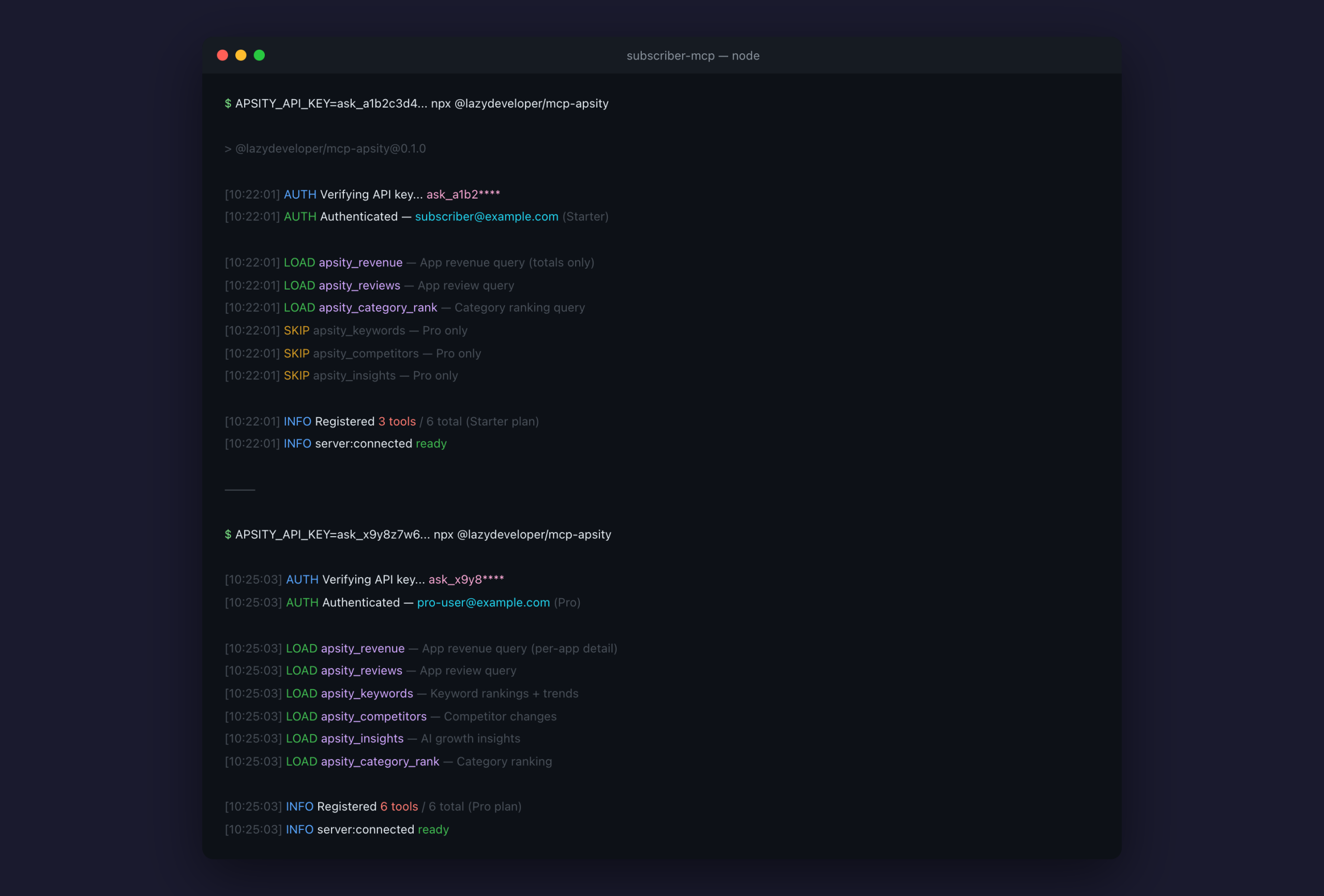
On startup, the server reads the API key from environment variables. Keys starting with ask_ are Apsity keys. Keys starting with fmk_ are FeedMission keys. A UUID follows the prefix. No key, no tools — just an info message and exit.
If a key is present, the server sends a POST to the SaaS backend. The endpoint is “/api/mcp-keys/verify.” The backend checks the key and returns three things: whether the key is valid, who it belongs to (userId), and which plan they are on.
After authentication, tools are registered based on the plan. Starter gets 3, Pro gets 6. Tools not registered are invisible. Claude cannot even call them.
const PLAN_ACCESS = {
apsity_revenue: [‘STARTER’, ‘PRO’],
apsity_reviews: [‘STARTER’, ‘PRO’],
apsity_category_rank: [‘STARTER’, ‘PRO’],
apsity_keywords: [‘PRO’],
apsity_competitors: [‘PRO’],
apsity_insights: [‘PRO’],
}
Short code. If the plan name is in the array, the tool is available. If not, it is not. That is the entire permission system. No need to overcomplicate it.
Plans: Starter vs Pro
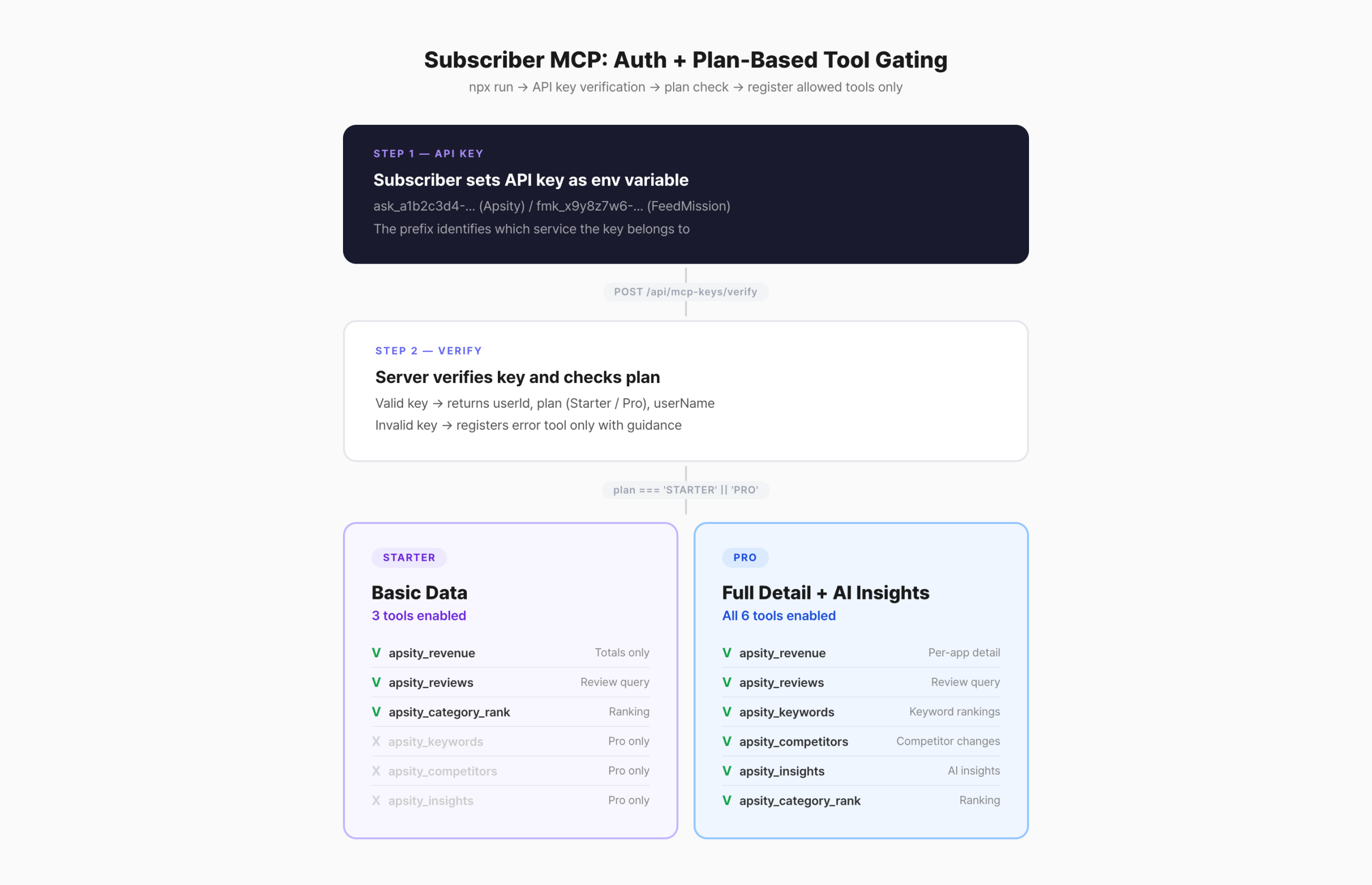
Using Apsity as an example. There are 6 tools total.
– apsity_revenue: Total revenue only. No per-app breakdown.
– apsity_reviews: App reviews.
– apsity_category_rank: Category rankings.
Covers the basics. Enough for “What was this week’s revenue?”
– All 3 Starter tools included. Revenue shows per-app detail.
– apsity_keywords: Keyword rankings + trend tracking.
– apsity_competitors: Competitor metadata change detection.
– apsity_insights: AI-generated growth insights.
Adds analysis and insights. Supports questions like “What did the competitors change?”
Even the same tool behaves differently by plan. Take revenue: Starter shows only the aggregate total. “This week’s total revenue: $120.” Pro breaks it down by app. “App A $80, App B $25, App C $15.” The code checks the plan value and adjusts the query accordingly.
npm Publishing: What Went Wrong
This was my first time publishing to npm. A few things tripped me up.
2FA issue. I had two-factor authentication enabled on my npm account, so the CLI kept asking for an OTP during publish. Annoying in automation scripts. I ended up using a Granular Access Token instead — a token with publish-only permissions that bypasses the OTP prompt.
Scope name. The @lazydev situation I mentioned. On npm, the part after @ is the organization name. If someone already created @lazydev, I cannot use it. I wrote all the code first without checking, then had to rename everything.
bin field. For npx to work, package.json needs a bin field pointing to the entry file. Without it, npx does not know what to execute. I forgot this at first and nothing ran.
{
“name”: “@lazydeveloper/mcp-apsity”,
“version”: “0.1.0”,
“bin”: {
“mcp-apsity”: “dist/server.js” // This is what npx runs
},
“publishConfig”: {
“access”: “public” // Scoped packages default to private
}
}
Scoped packages (the @something/name format) default to private on npm. Without access: “public” in publishConfig, npm demands a paid plan. That caught me off guard the first time too.
What Is Not Done Yet
Being honest. Right now it is just a skeleton. To actually open this to subscribers, the following is still needed.
– API key provisioning UI: A dashboard screen for creating and managing keys
– Documentation: Installation guide, tool descriptions, troubleshooting
– Rate limiting: Request throttling to prevent abuse
– Error handling: Key expiration, DB connection failure, edge cases
– Stability testing: Verifying concurrent multi-subscriber usage
– Pricing: Monthly fees for Starter and Pro tiers
The packages are on npm. The authentication code works. But there is no UI for subscribers to generate their own keys. Right now, I would have to create keys manually. That is not a service.
Rate limiting is also missing. If someone calls a tool 100 times per second, the database goes down. Fine while I am the only one testing, but required before any public launch.
Why Build It Now
You might ask: if you are not opening it yet, why build it now?
I wanted the structure in place first. If I wait until “okay, let’s open it” to start, I would have to build auth, access control, and plan tiers all at once. With the skeleton ready now, all that remains is the UI and docs. Easier to add flesh when the bones are already there.
I also wanted to validate by using it myself. I created an API key for my own account, ran it with npx, and confirmed the tools work correctly. The same approach from EP.11 — I am my own first user.
It is still early stage. I have not decided when to open it. But the structure exists. When the time is right, I can move quickly.
FAQ
Q. What is npm?
An app store for developers. Run “npm install something” and you pull in someone else’s code. Over 3 million packages are available worldwide.
Q. What is npx?
A command that runs an npm package without installing it. “npx @lazydeveloper/mcp-apsity” starts the MCP server immediately. Always the latest version.
Q. What is an API key?
An access badge. Required to reach your data. Each key contains plan information, so Starter and Pro users get different sets of available tools.
Q. Is this available now?
Not yet. The npm packages exist and authentication works, but there is no key provisioning UI, documentation, or stability testing yet. It is a planning-stage structure only.
Related posts
Lazy Developer · Automate Everything · EP.15