Emails Weren’t Sending, So I Tore Apart Production
Emails Weren’t Sending, So I Tore Apart Production
목차 (9)
- I Designed 4 Email Types
- I Built the Email System with Resend
- User Input Goes Into Emails — XSS Prevention
- Email Delivery Goes Background with after()
- Emails Didnt Send in Production — The 11-Minute War
- While Fixing Emails, I Fixed Security Too
- Security Is Not a Feature — Its a Defense
- Frequently Asked Questions
- Related Posts
April 2026 · Lazy Developer EP.06
In a SaaS, email is a lifeline. If feedback comes in and the developer doesn’t know, it’s meaningless. If a changelog ships and users aren’t notified, nobody knows. I decided to build an email notification system for FeedMission. I needed 4 types.
I built them, and they worked fine in dev. Deployed to production — they didn’t. While fixing that, I found security vulnerabilities too. This post covers building the email system, breaking it, fixing it, and patching the security holes along the way.
– 4 email types: new feedback (developer), daily digest (developer), changelog (user), reply (user)
– Resend SDK + shared layout function + XSS escape e() function
– after() pattern for background email delivery on feedback submission
– Emails silently failed in production — a wrapper swallowing errors was the cause. Fixed in 11 minutes
– Found 7 security vulnerabilities in the process: Open Redirect, HMAC crash, middleware bypass, etc.
– Email masking handled server-side — raw addresses never reach the client
I Designed 4 Email Types
I started by mapping out who gets what and when. I asked Claude “what email types does a SaaS feedback tool need?” and it broke them down into developer-facing and user-facing. Made sense, so I went with it.
Types 3 and 4 are the important ones. If a user submits feedback and votes but never hears back, they think “what’s the point.” Letting them know when a feature actually ships — that’s what drives the next round of feedback.
I Built the Email System with Resend
I chose Resend for the email service. I’d used it in EP.03 for weekly reports in Apsity, so it was familiar. Add the API key, call emails.send(), done. The hard part wasn’t sending — it was the HTML templates.
Email HTML is not web HTML. Flexbox doesn’t work. CSS file imports don’t work. Inline styles only. Every email client renders differently. I told Claude “build me a clean template using only CSS that’s safe for email.”
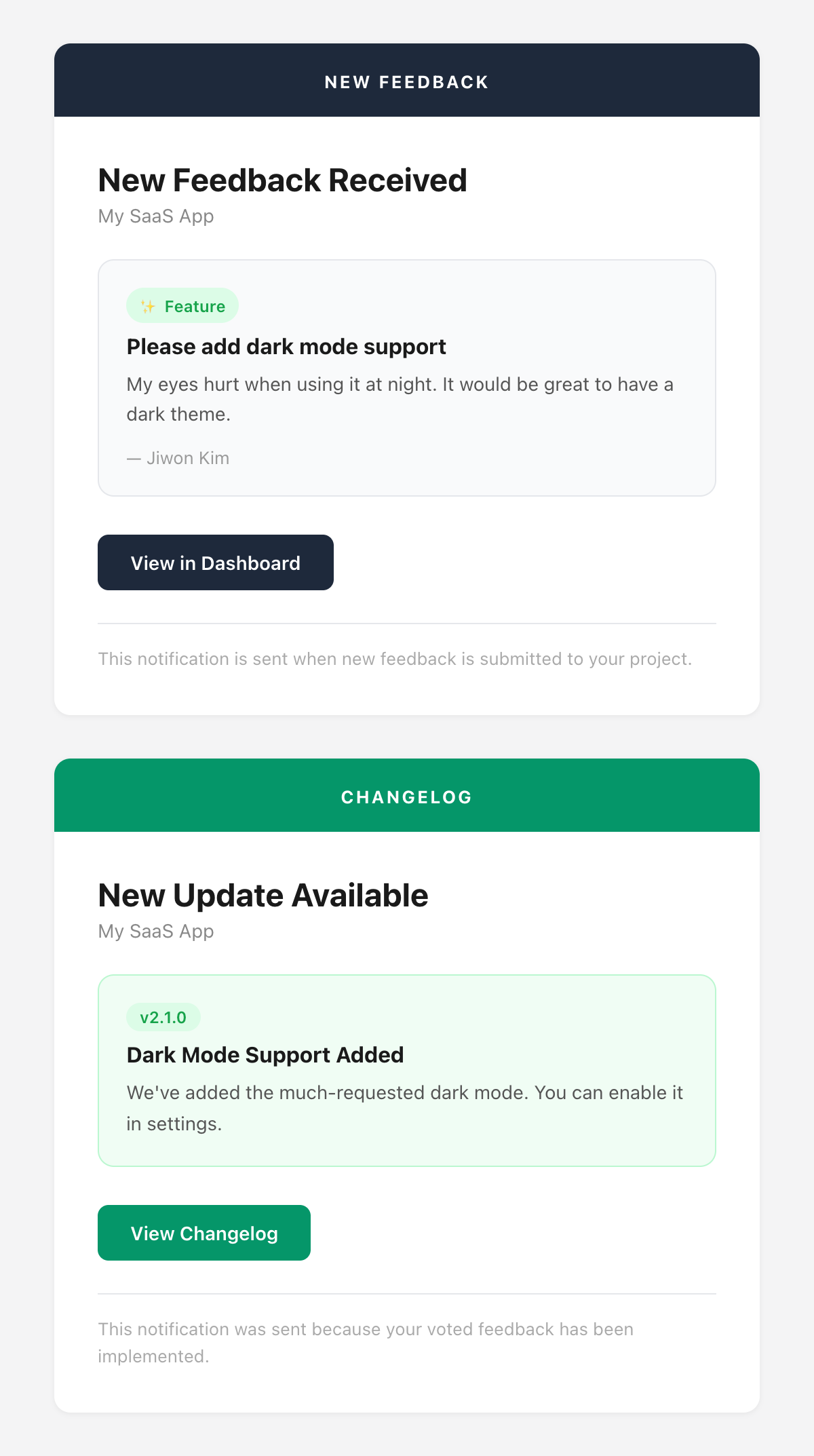
I built a shared layout function. A 520px max-width card with a colored header, body, button, and footer. All 4 email types share this layout.
function layout(content) { // 520px card wrapper }
function header(color, label) { // colored header bar }
function body(content) { // 28px padded body }
function button(text, href) { // CTA button }
// 4 email types
newFeedbackEmail() — header: #1e293b (dark)
dailyDigestEmail() — header: #1e293b + vote table
changelogPublishedEmail() — header: #059669 (green)
feedbackReplyEmail() — header: #6366f1 (indigo)
User Input Goes Into Emails — XSS Prevention
While building templates, one thing I was careful about. Feedback titles and body text are written by users. If that goes straight into the email HTML, there’s a problem. Someone puts <script> in the title and the HTML breaks. Most email clients block scripts, but HTML tags can still break layouts or inject phishing links.
function e(str) {
return str
.replace(/&/g, ‘&’)
.replace(/</g, ‘<’)
.replace(/>/g, ‘>’)
.replace(/”/g, ‘"’)
}
Feedback titles, body text, email addresses, project names. Every place user input appears goes through e(). Since < becomes <, nothing gets interpreted as an HTML tag. The cost is nearly zero, so there’s no reason not to do it everywhere.
Email Delivery Goes Background with after()
When feedback comes in, I need to email the developer. But if sending takes 1-2 seconds, the user has to wait after hitting “Submit Feedback.” Same pattern as EP.05, where I used after() for AI clustering.
const feedback = await prisma.feedback.create({ … })
const response = NextResponse.json(feedback, { status: 201 })
after(async () => {
await processFeedbackAsync(feedback.id) // AI clustering
await sendEmail(newFeedbackEmail({ … })) // email delivery
})
return response // user gets immediate response
For changelog publishing, I gather voter and feedback author emails and batch-send. Since one failure shouldn’t block the rest, I used Promise.allSettled. Promise.all fails the whole batch if one fails, but allSettled returns individual results.
I also added duplicate delivery prevention. A @@unique([email, refId]) constraint on the NotificationLog table ensures the same email+changelog combination never gets sent twice.
Emails Didn’t Send in Production — The 11-Minute War
It worked in dev. Deployed to production — it didn’t. No error messages. Nothing in the logs. I opened the email sending function.
} catch (err) {
console.error(`[Email] Failed:`, err)
return { success: false } // doesn’t throw
}
The catch block only returned { success: false }. The caller knew “it failed” but not why. On top of that, if the API key wasn’t set, there was a branch that silently skipped the send attempt entirely.
In 11 minutes I pushed 3 commits. I temporarily opened a test endpoint in production, called the Resend SDK directly to get the detailed error, fixed it, then locked the test endpoint back down. The wrapper swallowing errors was the problem. Fixing it came with a lesson: errors must be surfaced clearly.
While Fixing Emails, I Fixed Security Too
Debugging the email issue meant combing through the whole codebase. There were security TODOs from the 5 days of EP.04 development. I tackled them at the same time.
OAuth Callback Open Redirect
The ?next= parameter that redirects users back after login — if you don’t validate it, ?next=//evil.com sends them to an external site. I asked Claude for a defense pattern. It checks three things: starts with //, starts with /\, and whether the parsed URL origin matches my domain. Anything suspicious goes straight to /dashboard.
HMAC timingSafeEqual Length Crash
The LemonSqueezy webhook HMAC verification uses crypto.timingSafeEqual(), which throws if the two Buffers have different lengths. A forged signature with a different length, or even an empty string, crashes the server. I added a hmacBuf.length !== sigBuf.length check before the call, using OR short-circuit evaluation so timingSafeEqual is never reached when lengths don’t match.
Middleware Auth Bypass
If the Supabase Auth call failed, the catch block just let the request through. That meant accessing the dashboard without authentication. I changed it to always redirect to /login in the catch block. The principle: “when in doubt, deny.”
NEXT_PUBLIC_ Checkout URL Exposure
The LemonSqueezy checkout URL was prefixed with NEXT_PUBLIC_, exposing it in the client bundle. I moved it to a server-side API route (/api/checkout) so the redirect happens on the server.
Error Message Dev/Prod Split
Including detailed info in API error responses is great for debugging, but in production it’s giving attackers hints. I built a safeErrorResponse() function that returns detailed errors in dev and generic messages in production.
Server-Side Email Address Masking
When showing feedback author emails on the dashboard, client-side masking means the raw address is visible in the network tab. I mask on the server when building the API response — user@example.com becomes us****@example.com before it ever leaves the server.
Security Is Not a Feature — It’s a Defense
None of these are visible in “working code.” The features run fine. But security needs aren’t felt until an attack comes. This is the concrete meaning of “after MVP is the real work” from EP.04. If you use AI-generated code as-is, you miss these things. You have to use it yourself, read the code, and ask “what happens if this gets exploited?” — that’s when they become visible.
Next episode covers the payment system and plan design. LemonSqueezy webhook integration, free plan abuse prevention, and how I changed the pricing 3 times in 4 hours.