LTX 2.3 — Free AI Video Generation, Can It Replace Sora?
We compare LTX 2.3 (open-sourced March 2026) directly with Sora, Kling, and Runway Gen-3. Can you really generate 4K video with audio for free? A thorough breakdown of real performance, specs, and use-case differences.
On this page (10)
March 20, 2026 · Comparison
This week saw a quiet but major shift in AI video generation. Lightricks released the local version of LTX 2.3 as open source. It’s a 22B parameter model that generates 4K video with audio simultaneously. Until now, AI video generation required a paid subscription to be usable — that formula is being disrupted.
The real question is simple: can it replace paid services like Sora, Kling, and Runway Gen-3?
– LTX 2.3: 22B parameters, Apache 2.0 license, 4K + integrated audio generation
– Helios: Co-developed by ByteDance, Peking University, and Canva, up to 60-second videos
– Sora: Requires OpenAI paid subscription, top quality, up to 20 seconds
– Kling: Credit-based free plan available, up to 60 seconds
– Runway Gen-3: Starting at $12/month, cinema-grade quality
LTX 2.3 — What’s Different?
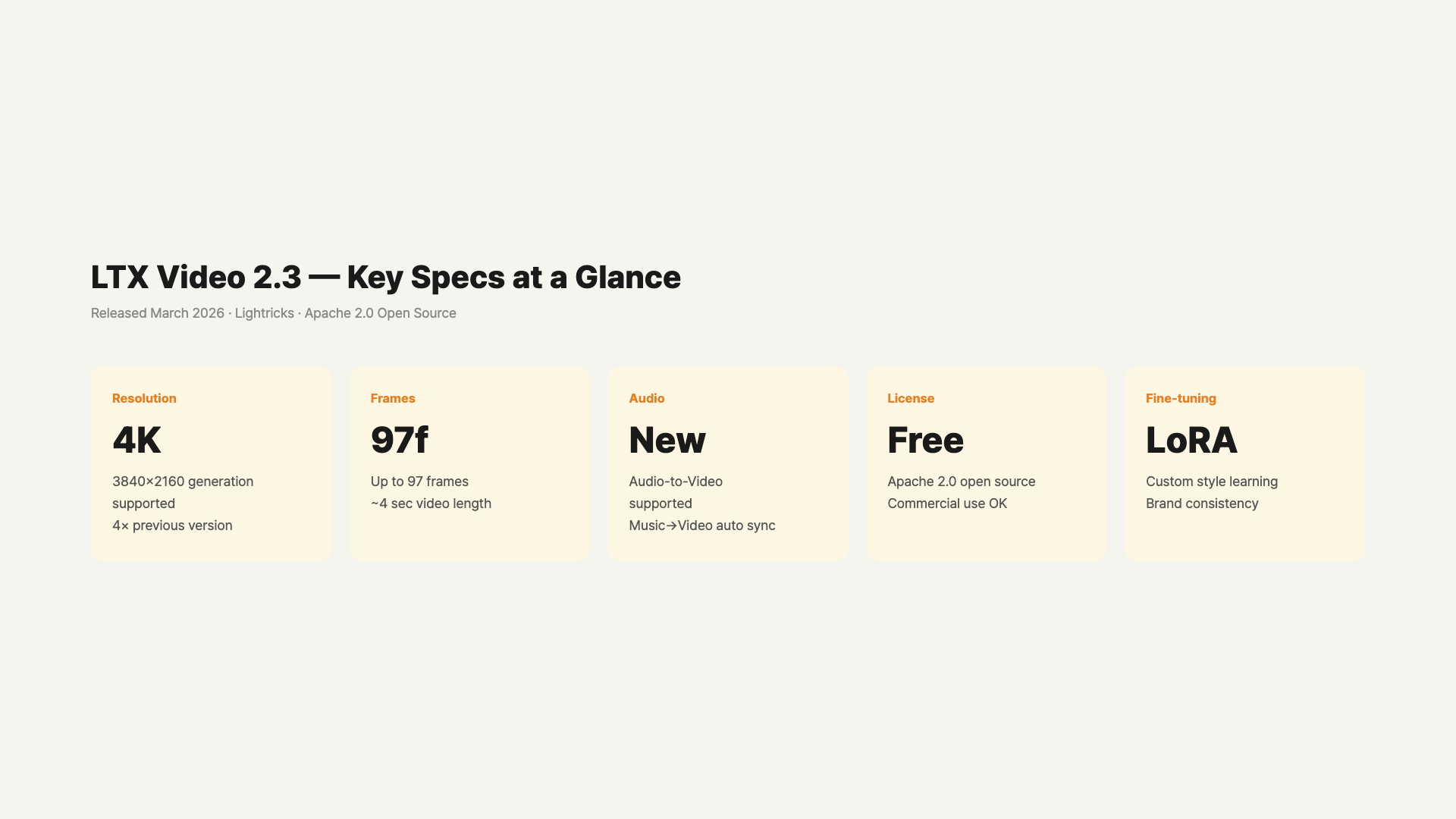
On March 17, Lightricks released the local deployment version of LTX 2.3. Two features stand out most.
First, it generates audio along with video. Previous AI video tools required creating video and sound separately. LTX 2.3 handles both at once.
Second, Apache 2.0 license. Commercial use is fine, and you can modify the code. No terms-of-service restrictions like OpenAI or Runway.
Here are the technical specs.
- Parameters: 22B
- Max Resolution: 4K
- Max Video Length: 20 seconds
- Supported Features: text-to-video, image-to-video, audio-to-video, video extend, retake
- FPS Options: 24fps / 48fps
- LoRA Fine-tuning Support
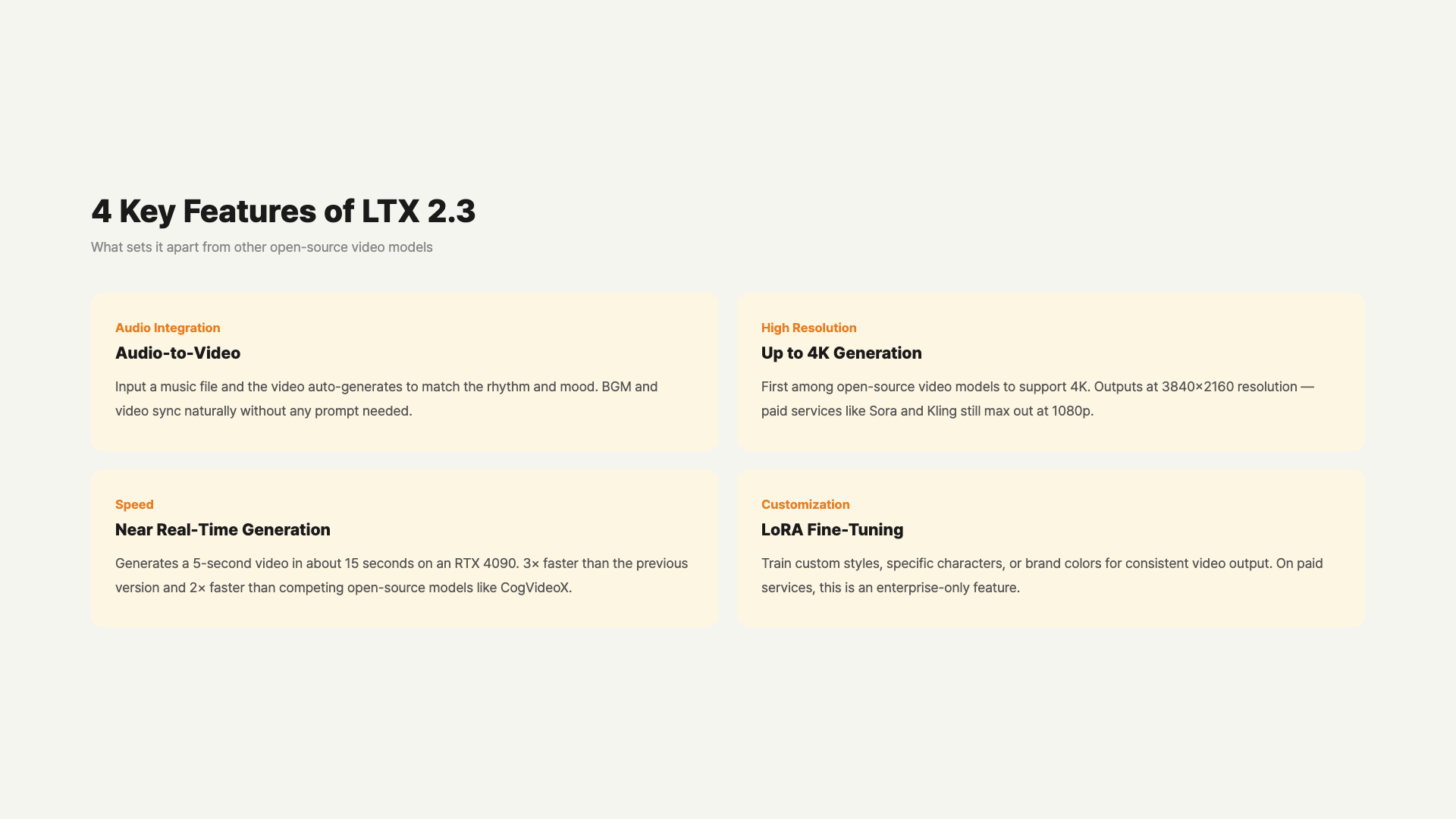
LoRA support is particularly important. You can train the model in your own style. This is a feature that’s impossible with paid services. It’s an advantageous setup for creators and brand video producers.
Compared to previous versions, a new VAE was added making visual details much sharper. It also supports the vertical 9:16 aspect ratio, so you can create Reels and Shorts videos directly.
Helios Also Appeared
Around the same time, Helios — co-developed by ByteDance, Peking University, and Canva — was also released. It’s a 14B parameter model capable of creating up to 60-second videos. It generates at 19.5 frames per second on a single NVIDIA H100 GPU. Rendering 1,440 frames at 24fps gives exactly 60 seconds of content.
It uses an autoregressive diffusion method, creating frames sequentially while referencing previous ones. This keeps consistency even in longer videos.
Looking at LTX 2.3 and Helios together, open-source AI video generation has finally entered production-level territory.
Direct Comparison With Paid Services
Sora (OpenAI)
Requires ChatGPT Plus ($20/month) or Pro ($200/month) subscription. Quality is currently the industry’s best. Especially strong in facial expressions and complex action scenes. Currently limited to 20 seconds at 1080p. Audio generation is not yet supported.
Kling (Kuaishou)
Has a free plan. Converts to paid when credits run out. The ability to create up to 60-second videos is a major advantage. No Korean interface available. Video quality is lower than Sora but quite usable.
Runway Gen-3 Alpha
A paid service starting at $12/month. Popular when you want cinema-like aesthetics. Max 16 seconds at 1080p. Detailed editing features and frame-by-frame control are its strengths. Widely used in content creation and advertising.
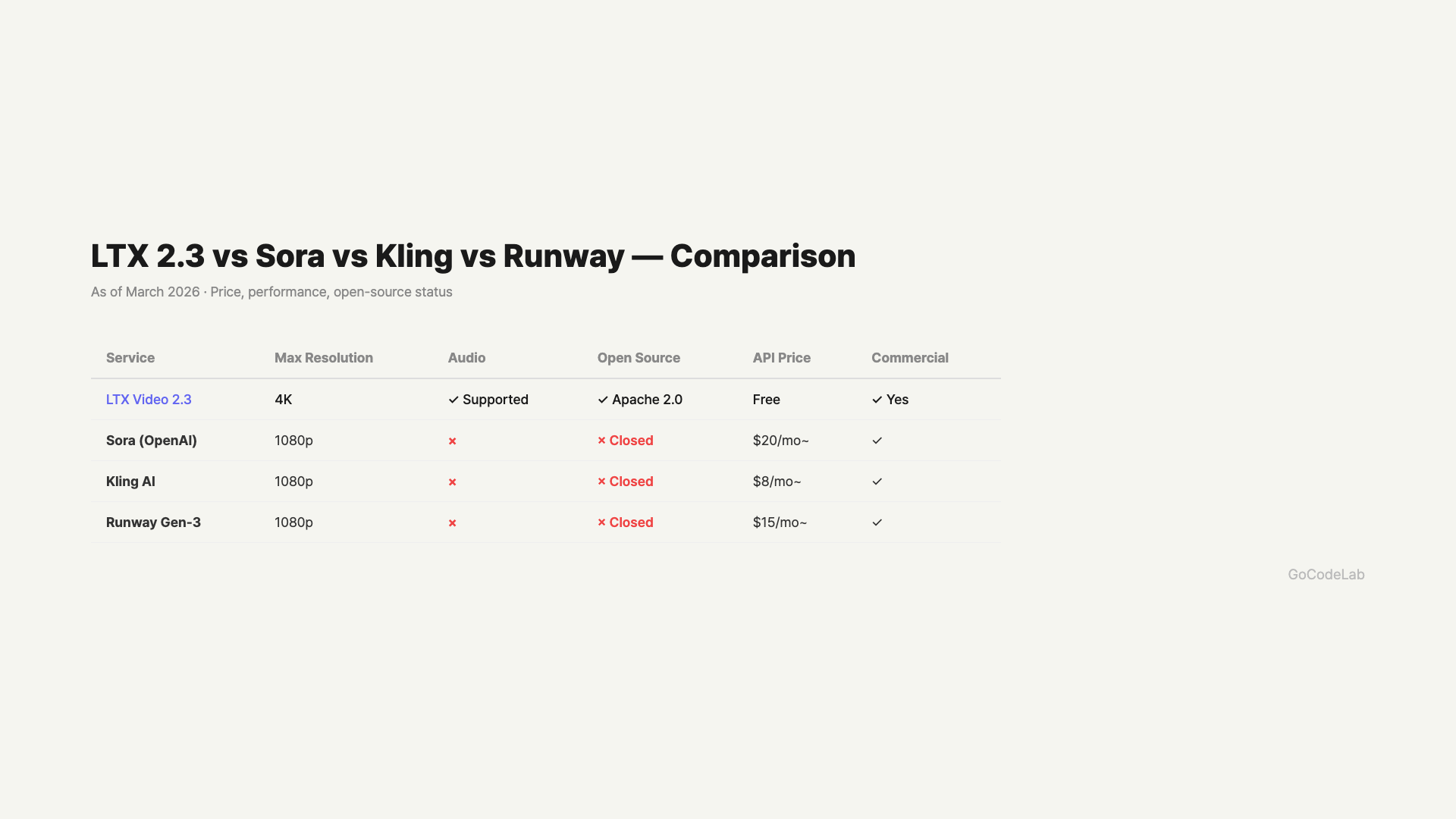
Price, resolution, audio, and open-source — 4-model comparison / GoCodeLab
Side-by-Side Comparison
| Model | Price | Max Length | Max Resolution | Audio | License |
|---|---|---|---|---|---|
| LTX 2.3 | Free (Local) | 20s | 4K | Included | Apache 2.0 |
| Helios | Free (Open Source) | 60s | 1080p | Undisclosed | Open Source |
| Sora | $20+/mo | 20s | 1080p | Not Included | Closed |
| Kling | Credit-based | 60s | 1080p | Not Included | Closed |
| Runway Gen-3 | $12+/mo | 16s | 1080p | Not Included | Closed |
Which One for Which Situation?
No budget or personal projects: LTX 2.3. Install locally and use for free. Just need a GPU.
When you need longer videos: Helios or Kling. LTX 2.3 is limited to 20 seconds.
When you need top quality: Sora or Runway. For human videos and complex motion, paid services still lead.
When you want audio included: LTX 2.3 is currently the only option. It’s the first open-source model with integrated video-audio generation.
Customizing to your brand style: Only LTX 2.3 officially supports LoRA. You can train specific styles or characters.
How to Get Started With LTX 2.3
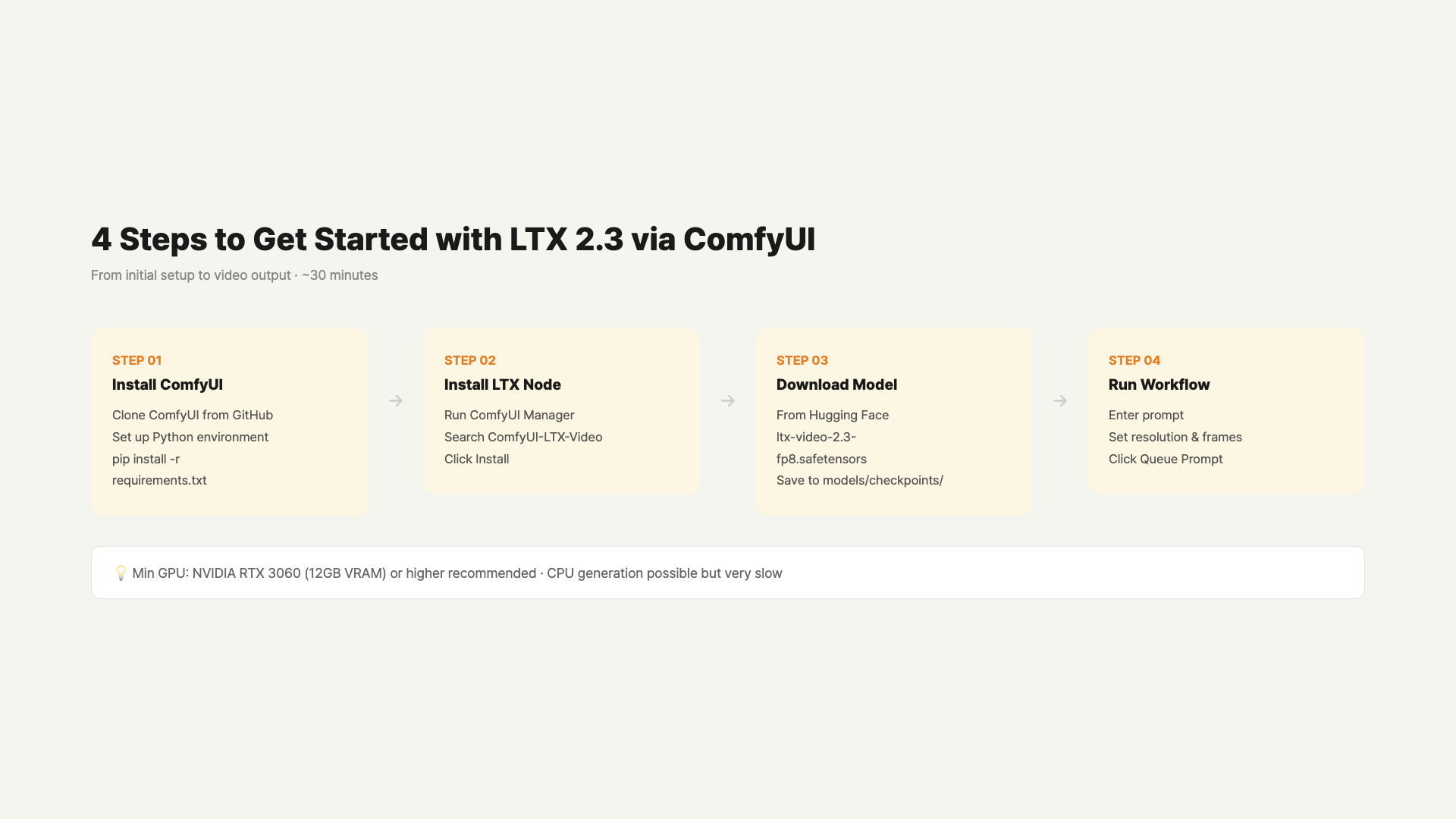
There are two ways to install locally. Install directly in a Python environment, or use a GUI through ComfyUI.
Starting With ComfyUI Is Easiest
ComfyUI is an open-source tool that lets you handle AI image and video generation through a node-based GUI. You can try LTX 2.3 right away without coding.
- Install ComfyUI. Get it from GitHub, or install the ComfyUI Desktop version for easier setup.
- Search for “LTX-Video” in ComfyUI Manager and install it.
- Download LTX 2.3 model weights from HuggingFace and place them in the models/video_models folder.
- Load the LTX 2.3 workflow JSON and you can start generating videos immediately.
On first run, you’ll need to download model files (about 12GB). With 24GB GPU VRAM, 4K generation is possible. 16GB limits you to 1080p, and 8GB to 720p or below.
What Exactly Is Audio-to-Video?
LTX 2.3’s audio features work in two directions.
First, generating video from audio input. Feed in a music file or sound, and it automatically creates video matching that audio. Useful for making music videos or audio visualizers.
Second, generating video and background audio simultaneously. Just enter a text prompt and matching background audio is generated alongside the video. Previously you needed two steps — create video → add music separately. Now it’s done in one go.
This matters because LTX 2.3 is effectively the only open-source model currently supporting integrated audio generation.
Practical Use Cases for LTX 2.3
Feature lists don’t tell the whole story, so here are concrete usage scenarios.
YouTubers & Content Creators
Perfect for those who film background footage or buy stock video every time for intro clips. Just enter a text prompt and get a 1080p-4K video in seconds. Add a background music file and the audio syncs to the video. More than sufficient for intro videos, logo animations, and B-roll purposes.
Brand Video Managers
LoRA Fine-tuning Support is the key feature here. Once you train it on your brand colors, logo style, or specific people, you can automatically generate consistent videos. Paid services require an enterprise contract to use this feature. LTX 2.3 is free.
Developers & Researchers
Apache 2.0 means you can directly modify the model architecture or integrate it into other pipelines. Build workflows freely with ComfyUI’s node-based system, and it also integrates directly via Python API.
No GPU? You can try LTX 2.3’s demo version for free on Hugging Face Spaces. However, there are resolution limits and wait times may apply.
FAQ
Q. What GPU do I need to run LTX 2.3?
NVIDIA GPUs with 24GB+ VRAM are recommended. RTX 3090, RTX 4080, and RTX 4090 run it comfortably. 8GB VRAM can run at lower resolutions. Mac M-series support is still limited. AMD GPU support is still unstable.
Q. How big is the quality gap between Sora and LTX 2.3?
Facial expressions, detailed hand movements, and physics simulation are areas where Sora still leads. For landscapes, abstract scenes, and animation styles, LTX 2.3 holds its own quite well. There’s definitely a quality gap, but it’s impressive for a free open-source model. The gap will likely narrow further in 6 months.
Q. Can I upload LTX 2.3 videos to YouTube?
Apache 2.0 license allows commercial use. However, platform policies may require labeling AI-generated content. YouTube currently recommends disclosing AI-generated videos. Monetization itself is not blocked.
Q. Where can I download Helios?
You can get the code from the official GitHub repo. No official demo website yet. Installation may be more complex than LTX 2.3. Model weights are expected to be uploaded to HuggingFace in the future.
Q. Should I cancel my Runway or Sora subscription and switch to LTX 2.3?
No rush yet. If professional video production is your goal, paid services still have the quality edge. LTX 2.3 is suitable for experiments, prototypes, and personal projects. The answer might change in 6 months to a year.
Wrap Up
LTX 2.3’s arrival has lowered the barrier to AI video generation. A year ago, you needed a monthly subscription for this level of video. Now you can create 4K videos for free with just a GPU.
If you want the highest quality, Sora and Runway still lead. But if open source catches up at this pace, the landscape will shift within 1-2 years. The fact that Helios released 60-second video generation as free open source is already that signal.
Want the latest AI video generation news? Subscribe to the GoCodeLab blog.
This article was written on March 20, 2026. AI models update rapidly, so check each official site for the latest information.
At GoCodeLab, we try AI tools hands-on and share honest reviews. Subscribe for more AI news.