Claude Code vs Cursor vs Windsurf vs Copilot — The Big 4 AI Coding Tools Compared (April 2026)
We compare
On this page (9)
April 2026 · AI Trends
An AI coding tools comparison has never been more needed. Claude Code, Cursor, Windsurf, GitHub Copilot — you’ve heard all the names, but what’s actually different?
So we gave them the same task: “Build a React counter component.” A simple request, but each tool’s personality comes through clearly.
Quick Summary
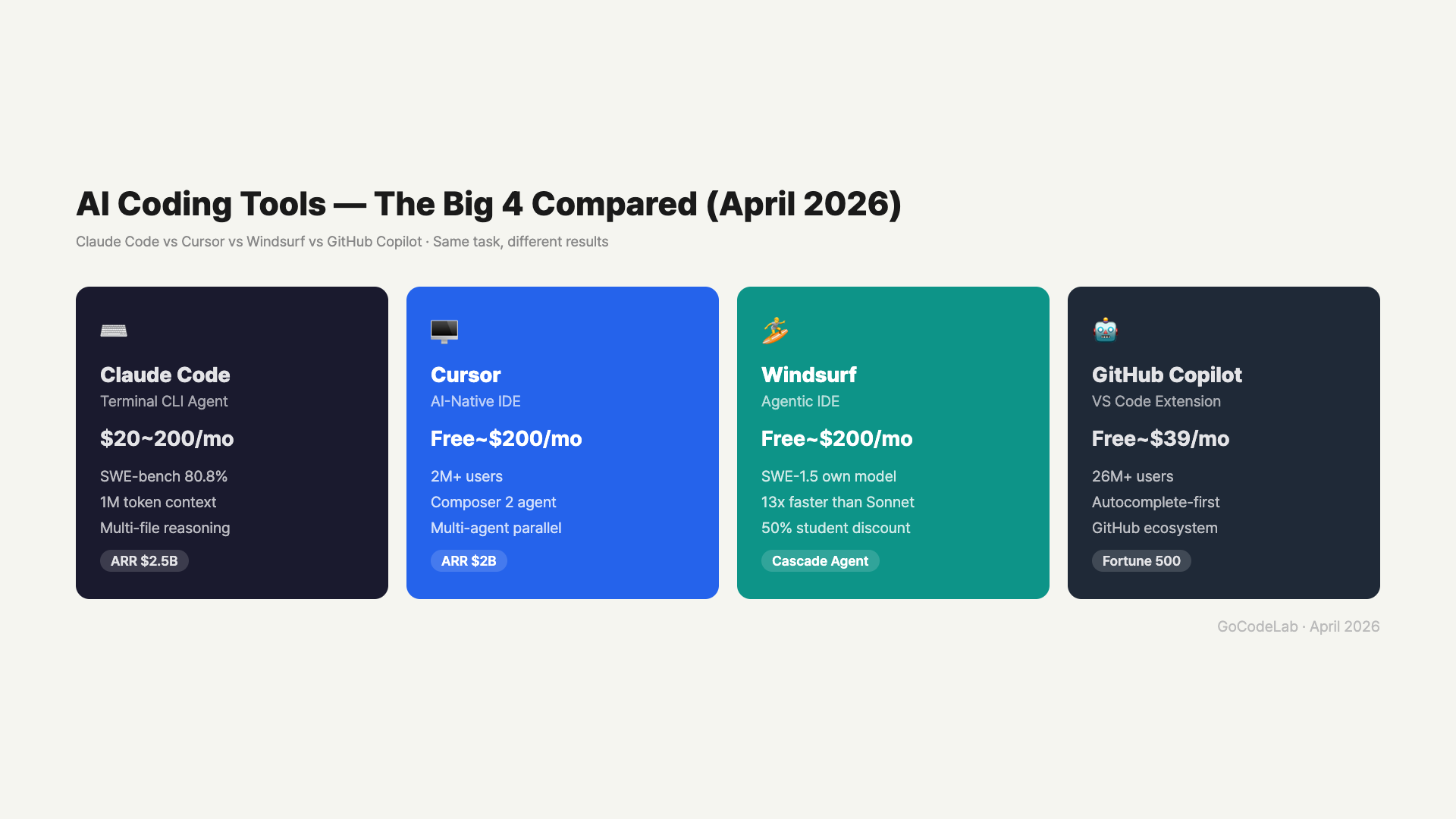
• Claude Code — Terminal agent, SWE-bench 80.8%, best for complex refactoring
• Cursor — IDE, 2M+ users, Composer 2 for agent coding
• Windsurf — IDE, custom SWE-1.5 model, 13x faster speed
• Copilot — VS Code extension, 26M+ users, autocomplete pioneer
• All 4 offer free plans. Pro starts at $10~$20/mo
1. Claude Code — The Terminal Agent
Claude Code isn’t an IDE. It’s a CLI agent that runs in your terminal. Type claude and it starts. It reads your entire project, creates files, edits code, and even commits — all autonomously.
For the counter task, Claude Code first reads App.tsx to understand the structure. Then it creates Counter.tsx and adds the import to App.tsx. 8.2 seconds, $0.03.
The real strength shows at scale. When refactoring touches auth layers, API routes, middleware, database queries, and frontend components — 40+ files — other tools start losing context. Claude Code handles it comfortably with its 1M token context window, analyzing roughly 30,000 lines of code at once.
SWE-bench 80.8% — Currently #1 on the benchmark that measures how well AI can automatically solve real GitHub issues. Based on the Opus 4.6 model.
2. Cursor — The Most Popular AI IDE
Cursor is a VS Code fork with AI deeply integrated. 2 million users, $2B ARR. Over half the Fortune 500 uses it.
For the same request, Cursor processes it in the Composer panel. It creates Counter.tsx and edits App.tsx, with each step shown in the right panel. You see the result instantly in the editor — that’s the IDE advantage.
Composer 2, launched February 2026, goes all-in on agents. You can run multiple agents in parallel — one refactoring, one fixing tests, one polishing UI. Like a small dev team working alongside you.
3. Windsurf — The Speed-First Agentic IDE
Windsurf is also a VS Code fork IDE. Its biggest differentiator: the custom SWE-1.5 model. Sonnet-level coding quality at 13x the speed.
The same request via Cascade finishes in 3.1 seconds. Compared to Claude Code’s 8.2 seconds, the difference is noticeable. The code style differs though — inline styles instead of Tailwind, for example.
Students take note: verify with a .edu email and get 50%+ off the Pro plan. Around $7-8/month for full premium model access.
4. GitHub Copilot — The Autocomplete Pioneer
Copilot takes a different approach. It’s not a standalone IDE — it’s a VS Code extension. 26 million users, the largest user base of any AI coding tool.
For the counter request, Copilot explains the code in the Chat panel while showing ghost text autocomplete in the editor. Just press Tab to apply. This “don’t break the flow” autocomplete is Copilot’s core strength.
Agent capabilities are still limited though. It can’t autonomously edit multiple files like Cursor or Claude Code. But GitHub integration is unmatched — PR reviews, issue linking, Actions triggers.
5. Detailed Comparison Table
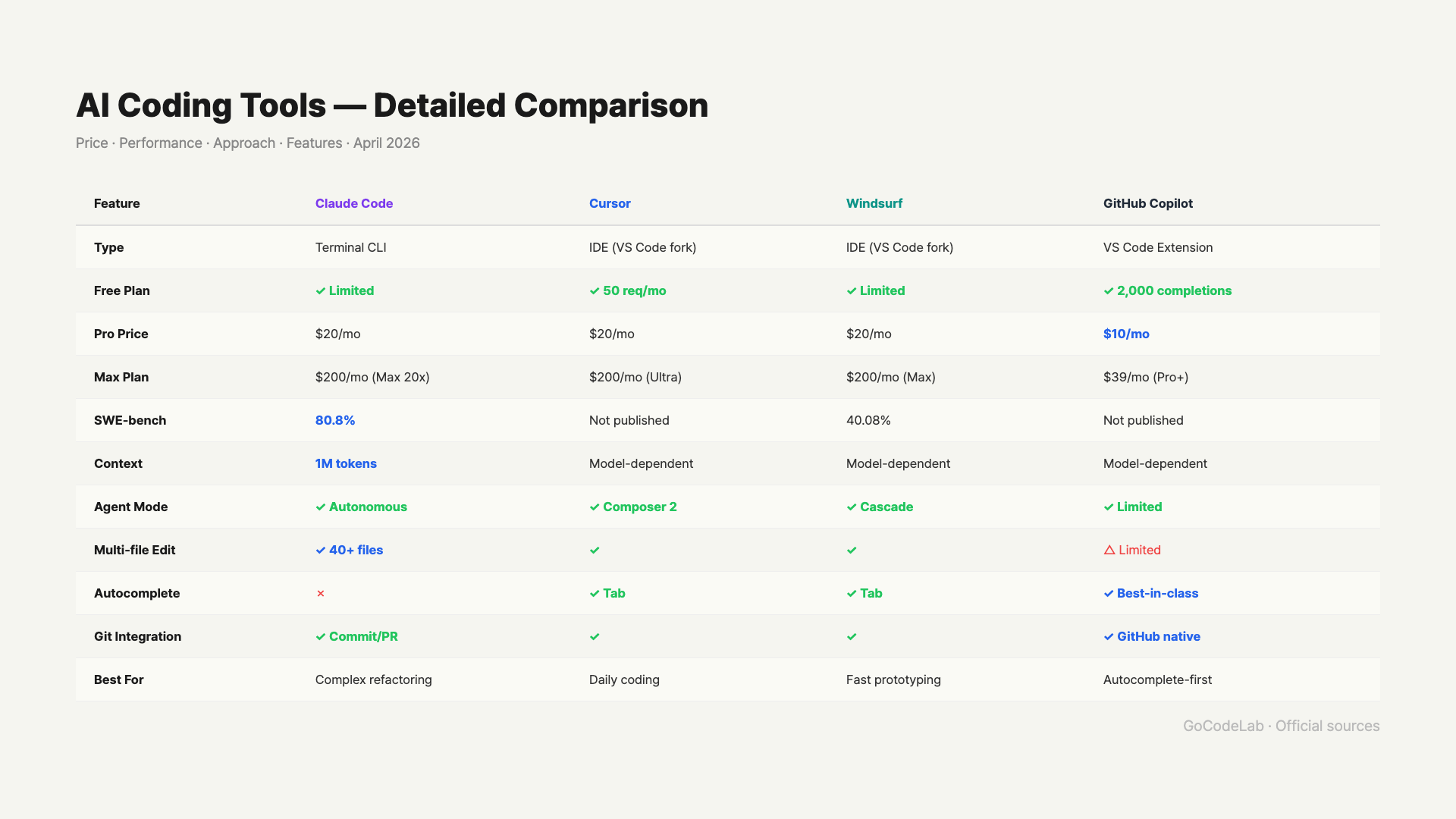
| Feature | Claude Code | Cursor | Windsurf | GitHub Copilot |
|---|---|---|---|---|
| Type | Terminal CLI | IDE (VS Code fork) | IDE (VS Code fork) | VS Code Extension |
| Free Plan | ✓ Limited | ✓ 50 req/mo | ✓ Limited | ✓ 2,000 completions |
| Pro Price | $20/mo | $20/mo | $20/mo | $10/mo |
| Max Plan | $200/mo (Max 20x) | $200/mo (Ultra) | $200/mo (Max) | $39/mo (Pro+) |
| SWE-bench | 80.8% | Not published | 40.08% | Not published |
| Context | 1M tokens | Model-dependent | Model-dependent | Model-dependent |
| Agent Mode | ✓ Autonomous | ✓ Composer 2 | ✓ Cascade | ✓ Limited |
| Multi-file Edit | ✓ 40+ files | ✓ | ✓ | △ Limited |
| Autocomplete | ✗ | ✓ Tab | ✓ Tab | ✓ Best-in-class |
| Git Integration | ✓ Commit/PR | ✓ | ✓ | ✓ GitHub native |
| Best For | Complex refactoring | Daily coding | Fast prototyping | Autocomplete-first |
6. So Which One Should You Use?
There’s no absolute winner. It depends on your use case, and many developers actually combine two tools.
Recommendations by Use Case
• Complex refactoring, large codebases → Claude Code
• Daily coding, vibe coding → Cursor
• Fast prototyping, students → Windsurf
• Autocomplete-first, GitHub power users → Copilot
• Most common combo → Cursor (daily) + Claude Code (complex tasks)
One thing is certain: the era of coding without AI is over. You’re probably already using at least one of these tools. The question is which one fits you best — and hopefully this comparison helped you figure that out.
FAQ
Q. Which AI coding tool is the cheapest?
GitHub Copilot Pro at $10/month. Includes unlimited autocomplete + 300 premium requests.
Q. What’s the biggest difference between Claude Code and Cursor?
Claude Code is a terminal CLI, Cursor is an IDE. Complex multi-file refactoring → Claude Code. Quick coding inside an editor → Cursor.
Q. Which tool is best for non-developers?
Cursor. You can describe what you want in plain language and it generates code directly in the IDE.
Q. Is Windsurf better than Cursor?
Windsurf’s SWE-1.5 model is 13x faster and offers 50% student discounts. Trade-off is a lower SWE-bench score.
Q. Can I use multiple tools together?
Yes. “Cursor for daily coding + Claude Code for complex tasks” is the most popular combo among developers.
7. Real-World Combos — How Developers Actually Use These
Few developers stick to just one tool. In practice, most combine 2-3 tools depending on the situation.
Daily coding → Cursor (work directly in IDE)
Complex refactoring → Claude Code (large-scale changes in terminal)
Autocomplete → Copilot (fast Tab input)
// Student / beginner combo
Prototyping → Windsurf ($7-8/mo student discount)
Learning → Copilot Free (free tier)
The key insight: don’t pick one — use each tool’s strengths for the right situation. Refactor 40 files with Claude Code, fine-tune details in Cursor, fill in boilerplate with Copilot.
2026 Trend: We’re moving from “AI that answers” to “AI that gets things done.” All four tools are pushing agent capabilities, and the competition is shifting to “who can autonomously complete code better.”
This article was written on April 7, 2026. AI coding tools update frequently, so pricing and features may have changed.