GPT Image 1.5 vs Midjourney v7 — Same Prompt, Completely Different Results
GPT Image 1.5 and Midjourney v7 compared across 7 criteria. Text rendering, photorealism, speed, pricing, API support — find which tool fits your needs, with prompt tips and API code included.
April 7, 2026 · Comparison · ~12 min read
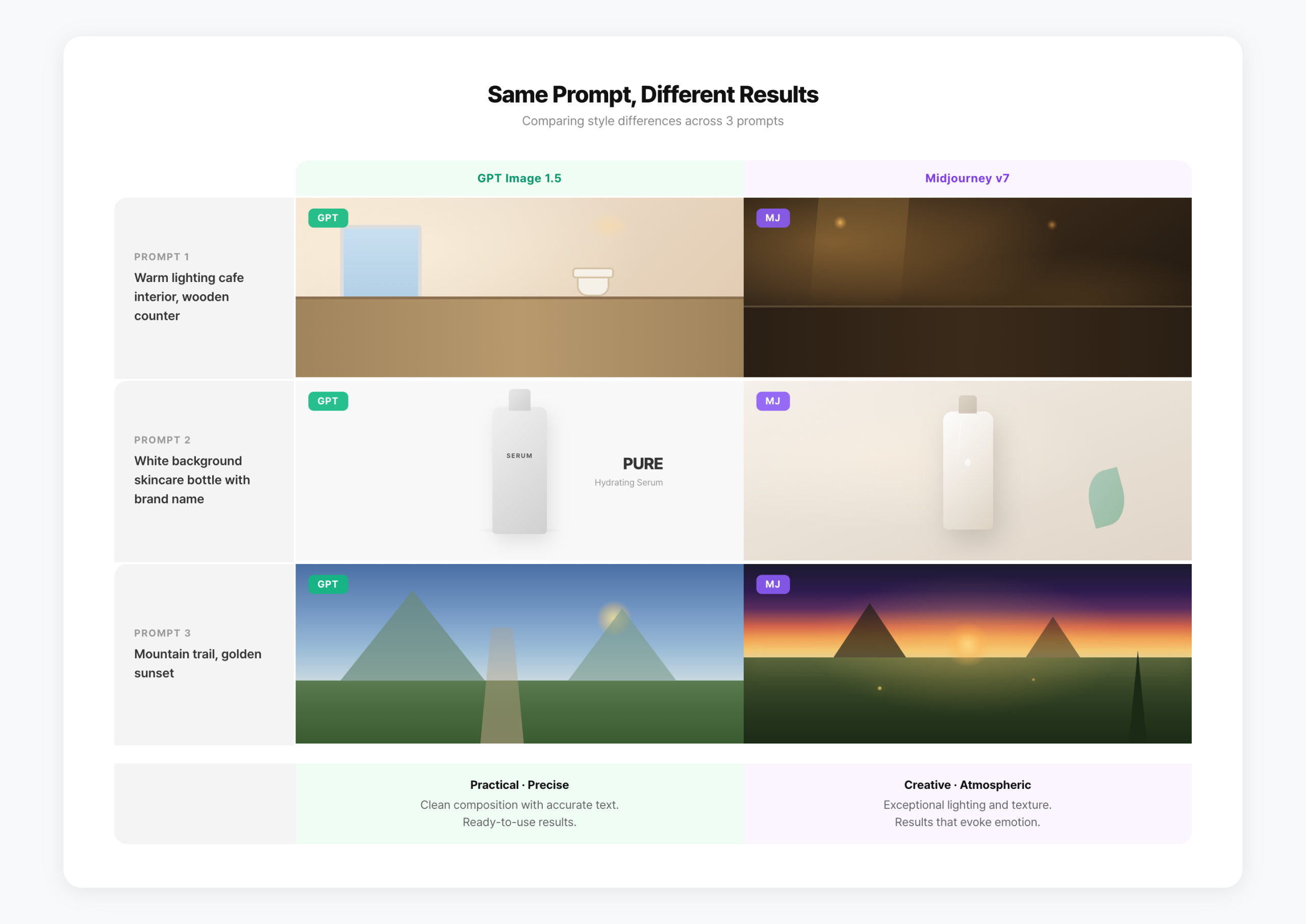
GPT Image 1.5 vs Midjourney v7 — type “make me a cafe sign image” into both and the results are completely different. One gives you a clean sign with perfectly rendered text. The other gives you an atmospheric photo with moody lighting and vintage vibes.
GPT Image 1.5 launched in December 2025 and has since rolled out to free users. Midjourney v7 has been the default model since mid-2025, with v8 Alpha now available too. Both tools have evolved significantly in 2026.
This guide compares the two across 7 criteria. Not “which is better” — but “which fits your specific use case.” Prompt tips and API integration code are included at the end.
– GPT Image 1.5: Best text rendering, conversational editing, free tier, API available
– Midjourney v7: Best artistic quality, Omni Reference, personalization, photorealism
– Text, banners, SNS thumbnails → GPT Image 1.5
– Concept art, photorealism, creative work → Midjourney v7
– API integration / automation → GPT Image 1.5 (Midjourney has no official API)
– Cost: GPT Image 1.5 starts free; Midjourney starts at $10/month
GPT Image 1.5 — What Changed?
GPT Image 1.5 launched on December 16, 2025. It’s 4x faster than the previous model (GPT Image 1), and API prices dropped 20%. Type “iPhone mockup on a white background” in ChatGPT and you get a result in 4-5 seconds.
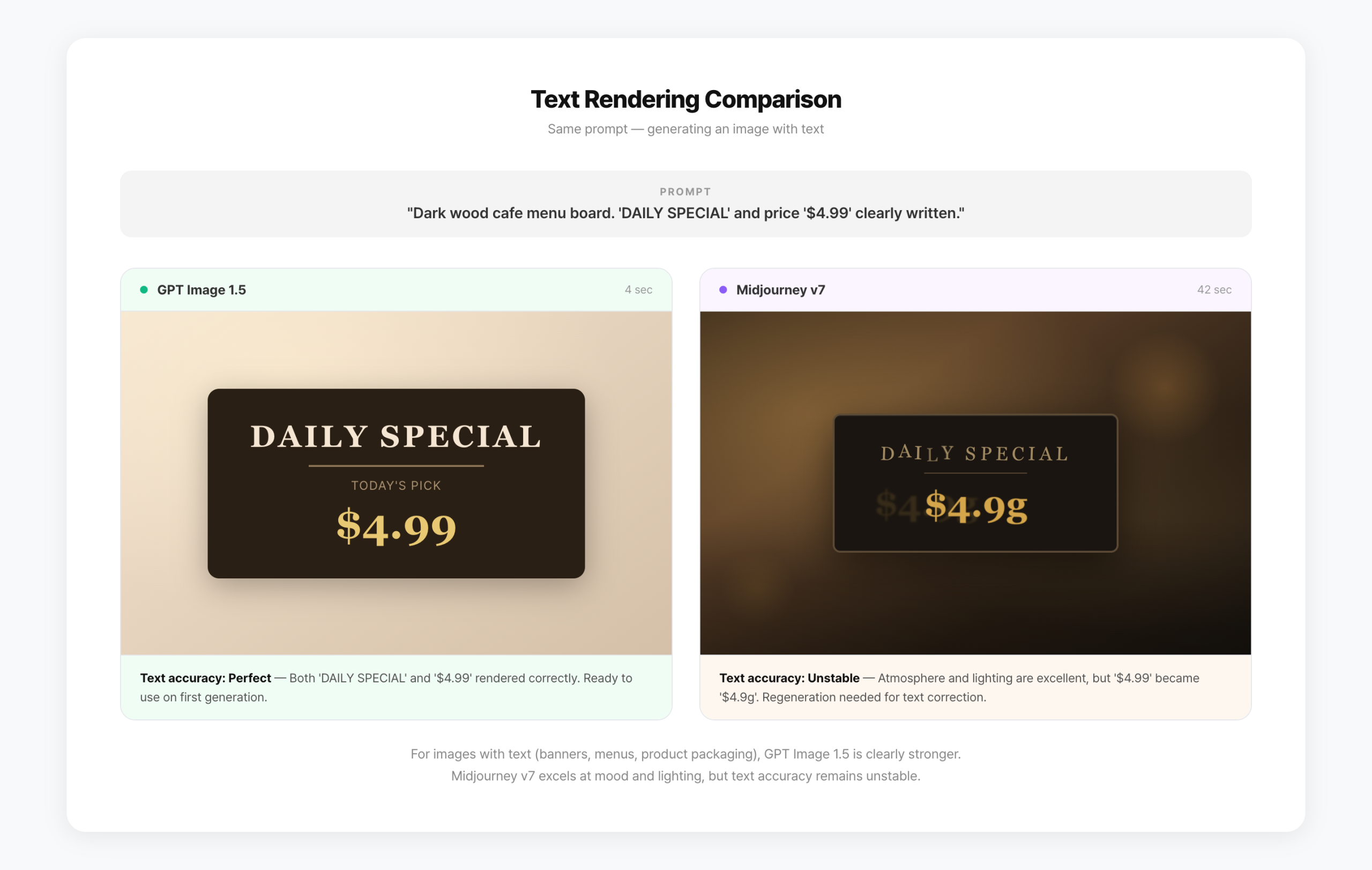
The biggest upgrade is text rendering. AI image generators have historically struggled with text in images. GPT Image 1.5 can reliably render text on magazine covers, product packaging, and ad banners. It currently holds the #1 spot on LM Arena’s image generation leaderboard with an ELO score of 1,264.
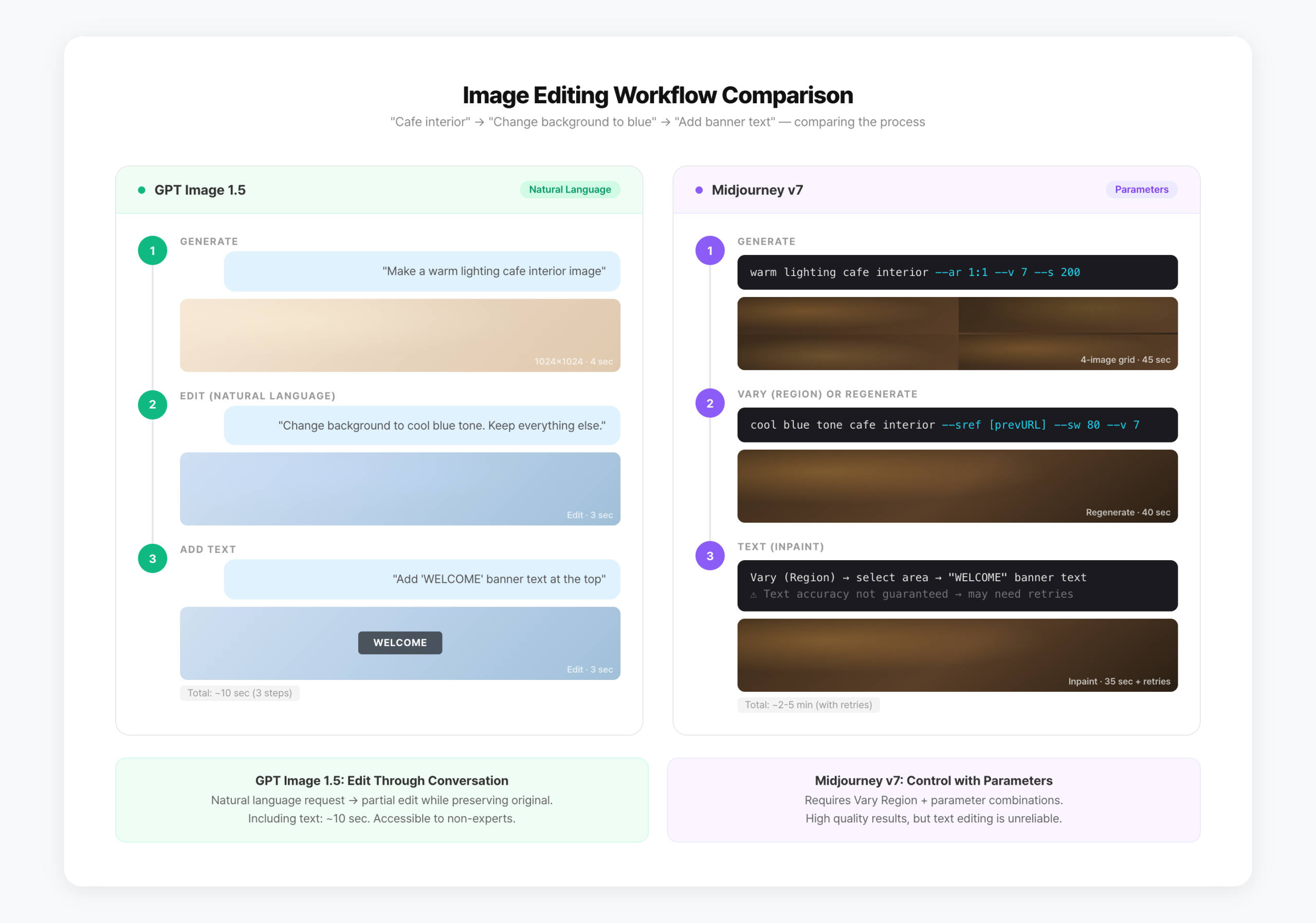
Conversational editing is another key feature. After generating an image, you can say “make the background blue” or “move the person to the right.” It changes only what you asked while keeping everything else intact. No Photoshop needed — iterate directly in the ChatGPT chat window.
Free users can access it too. The free plan allows 2-3 images per day, Plus ($20/month) gives higher limits, and the newer Go plan ($8/month) sits in between. If you already have a ChatGPT subscription, you can start generating images with no extra cost. (Curious how ChatGPT compares to Claude and Gemini for text? See our AI chatbot comparison.)
Midjourney v7 — Where Does It Stand?
Midjourney v7 launched in alpha in April 2025 and is now the default model. Midjourney themselves called it “a totally different architecture” — the gap from v6 is significant.
The core addition is Omni Reference (--oref). It replaces the previous --cref (character reference) while expanding scope. Beyond characters, you can now extract and reference objects, vehicles, and non-human creatures from source images. Combine it with Style Reference (--sref) for precise control: “this character, in this style.”
Photorealism took a noticeable step up. In a 30-prompt comparison test, v7 produced more realistic results than v6 in 23 cases (77%). Skin texture, fabric detail, and shadow rendering are measurably improved.
Personalization is on by default in v7. Midjourney learns from images you react to, gradually tailoring results to your aesthetic preferences. The difference is subtle at first but becomes noticeable after a few weeks of use.
Draft Mode is built for rapid exploration. It renders 10x faster at half the GPU cost. Use it to explore directions quickly, then switch to standard mode only for final renders.
7-Criteria Comparison
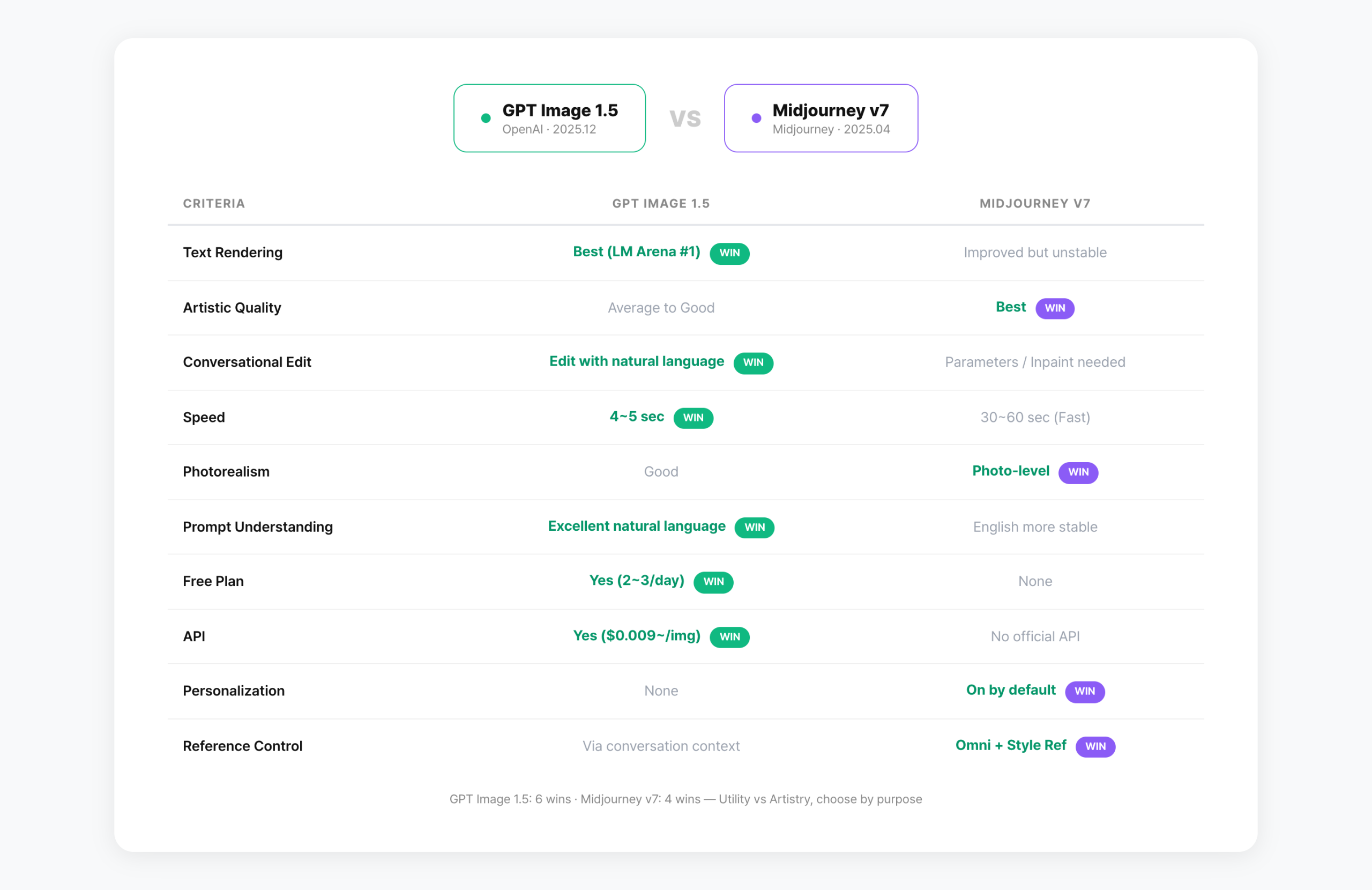
Using both tools for the same purpose reveals clear differences in strengths.
Text Rendering — GPT Image 1.5 wins decisively. Ask for a banner with “New Product Launch Event” text and it renders correctly on the first try. Midjourney v7 has improved over v6, but still requires multiple regenerations for clean text.
Artistic Quality — Midjourney v7 leads. Given the same prompt, Midjourney produces more compelling composition, lighting, and color. The gap is most visible in concept art, cinematic scenes, and abstract work.
Conversational Editing — GPT Image 1.5 is far more intuitive. Natural language commands like “change the background color” or “leave space for a logo on the left” work reliably. Midjourney requires Vary, Inpaint, and parameter adjustments.
Speed — GPT Image 1.5 generates in 4-5 seconds per image. Midjourney v7 Fast mode takes 30-60 seconds. Draft Mode makes Midjourney faster, but at reduced quality.
Photorealism — Midjourney v7 produces more convincing results. Skin textures, fabric details, and environmental lighting approach photograph quality. GPT Image 1.5 is good, but the difference is visible in side-by-side comparisons.
Prompt Understanding — GPT Image 1.5 handles complex, natural language prompts better, thanks to ChatGPT’s language comprehension. Midjourney works best with structured English prompts and parameters.
Consistency — GPT Image 1.5 maintains composition and mood across multiple edits within a conversation. Midjourney achieves similar consistency via Omni + Style Reference, but requires manual parameter setup each time.
| Criteria | GPT Image 1.5 | Midjourney v7 |
|---|---|---|
| Text Rendering | Best (LM Arena #1) | Improved but unstable |
| Artistic Quality | Average to good | Best in class |
| Conversational Edit | Natural language | Parameters / Inpaint |
| Speed | 4-5 sec | 30-60 sec (Fast) |
| Photorealism | Good | Photo-level |
| Prompt Understanding | Excellent | English works best |
| Free Plan | Yes (2-3/day) | None |
| API | Yes ($0.009+/img) | No official API |
| Personalization | None | On by default |
| Reference Control | Via conversation | Omni + Style Ref |
Pricing — What Do You Get for Your Money?
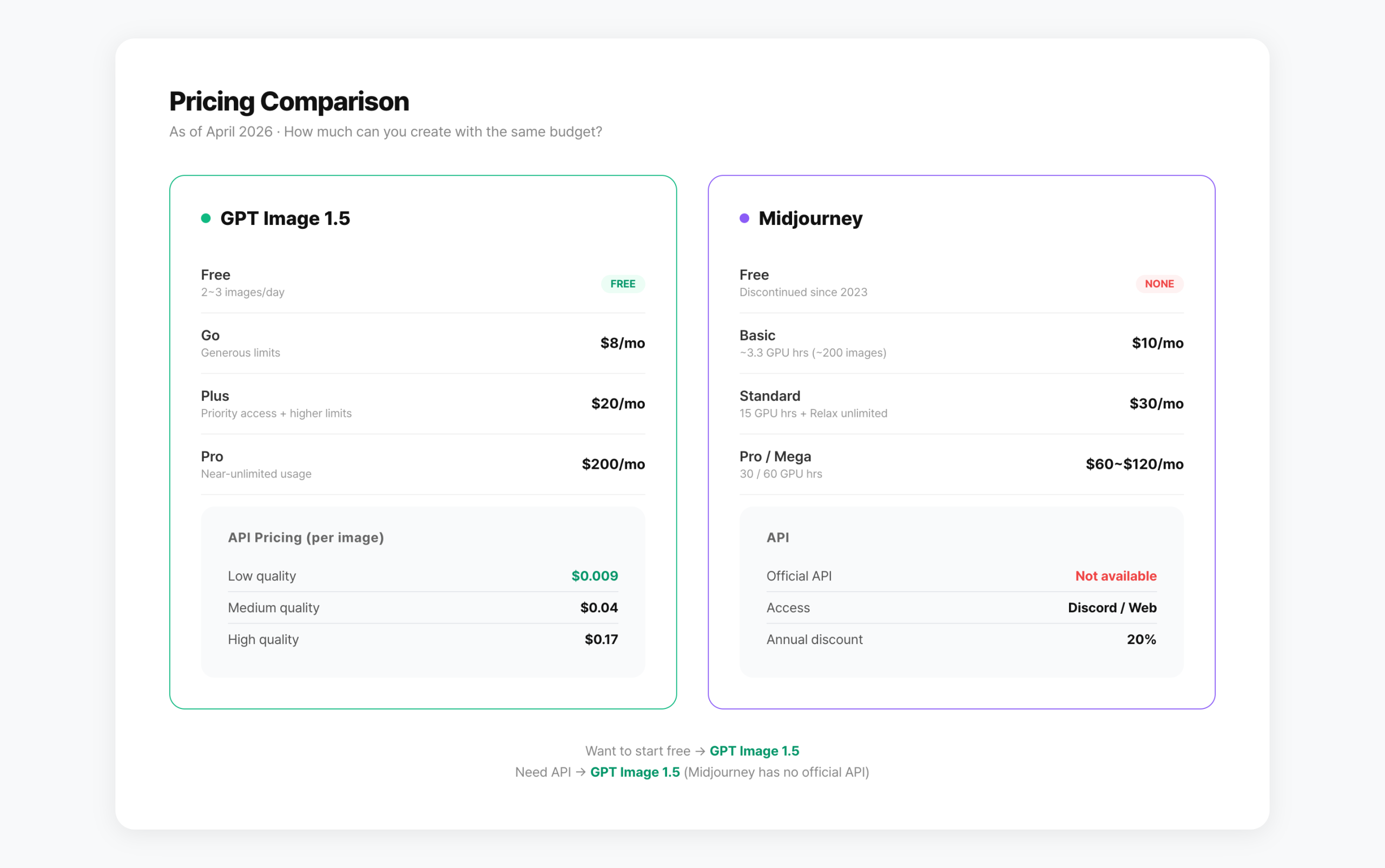
GPT Image 1.5 is available on ChatGPT’s free tier with a 2-3 images/day limit. The Go plan ($8/month) offers a generous allowance, while Plus ($20/month) provides priority access and higher limits. If you already subscribe to ChatGPT, image generation costs nothing extra.
API pricing is tiered by quality. Low quality costs ~$0.009 per image, Medium ~$0.04, and High ~$0.17. These are about 20% cheaper than the previous GPT Image 1 model. At 100 images per day on Low quality, that’s roughly $27/month.
Midjourney has no free plan — free trials were discontinued in 2023 due to abuse. Basic starts at $10/month ($8 on annual billing) with ~3.3 GPU hours, enough for roughly 200 images. Standard ($30/month) includes 15 GPU hours plus unlimited Relax mode, which takes 3-5 minutes per image but has no cap.
Pro ($60/month) and Mega ($120/month) offer more GPU hours and team features. Annual billing saves 20% across all plans.
| Plan | GPT Image 1.5 (ChatGPT) | Midjourney |
|---|---|---|
| Free | 2-3 images/day | None |
| Entry Paid | Go $8/mo | Basic $10/mo (~200 imgs) |
| Standard Paid | Plus $20/mo | Standard $30/mo (Relax unlimited) |
| Premium | Pro $200/mo | Pro $60/mo · Mega $120/mo |
| API Price | $0.009-$0.17/img | No official API |
| Annual Discount | None | 20% off |
Prompt Tips You Can Use Right Now
The same tool can produce vastly different results depending on how you write your prompt. Here are patterns optimized for each tool.
GPT Image 1.5 — Be conversational and specific
GPT Image 1.5 excels at understanding natural language. Write prompts like you’re describing what you want to a designer.
“Make me a cafe image”
// Strong — specific with text
“Bright wood-tone cafe interior, menu board on counter.
The board reads ‘DAILY SPECIAL’ in chalk lettering.
A latte sits on the right side of the counter.
Warm tone, natural light coming from the left.”
// Edit — just describe the change
“Change the menu text to ‘TODAY’S COFFEE’. Keep everything else.”
Tip: When including text in images, wrap the text content in quotes. Like “50% OFF EVENT”. GPT Image 1.5 recognizes quoted text and renders it accurately.
Midjourney v7 — Parameters are your power tools
Midjourney works best with structured English prompts combined with parameters. v7 interprets prompts more literally than previous versions.
warm-toned coffee shop interior, wooden counter,
natural light from left window, latte on counter
–ar 16:9 –v 7 –s 200
// Omni Reference for character consistency
same character sitting in the cafe
–oref [imageURL] –ow 100
// Draft Mode for quick exploration
cafe interior concept
–draft
// Key parameters
–ar aspect ratio (16:9, 1:1, 9:16)
–s stylize (0-1000, default 100)
–oref Omni Reference (character/object)
–sref Style Reference (mood/tone)
–draft Draft Mode (10x faster, half cost)
Tip: v7 is sensitive to --s (stylize). Start at 100 (default), then go up to 200-400 for more artistic flair. At 1000, Midjourney largely ignores your prompt and does its own thing.
API Integration Guide for Developers
If you need to integrate image generation into a service, GPT Image 1.5 API is your option. Midjourney has no official API.
import OpenAI from ‘openai’;
const client = new OpenAI();
const response = await client.images.generate({
model: “gpt-image-1.5”,
prompt: “Bright cafe interior, DAILY SPECIAL menu board”,
quality: “medium”, // low | medium | high
size: “1024×1024”,
});
// response.data[0].url → generated image URL
// Cost: low ~$0.009, medium ~$0.04, high ~$0.17
Blog thumbnails (Medium, 10/day): $0.04 x 10 x 30 = $12/month
E-commerce product images (Low, 100/day): $0.009 x 100 x 30 = $27/month
Which Tool Is Right for You?
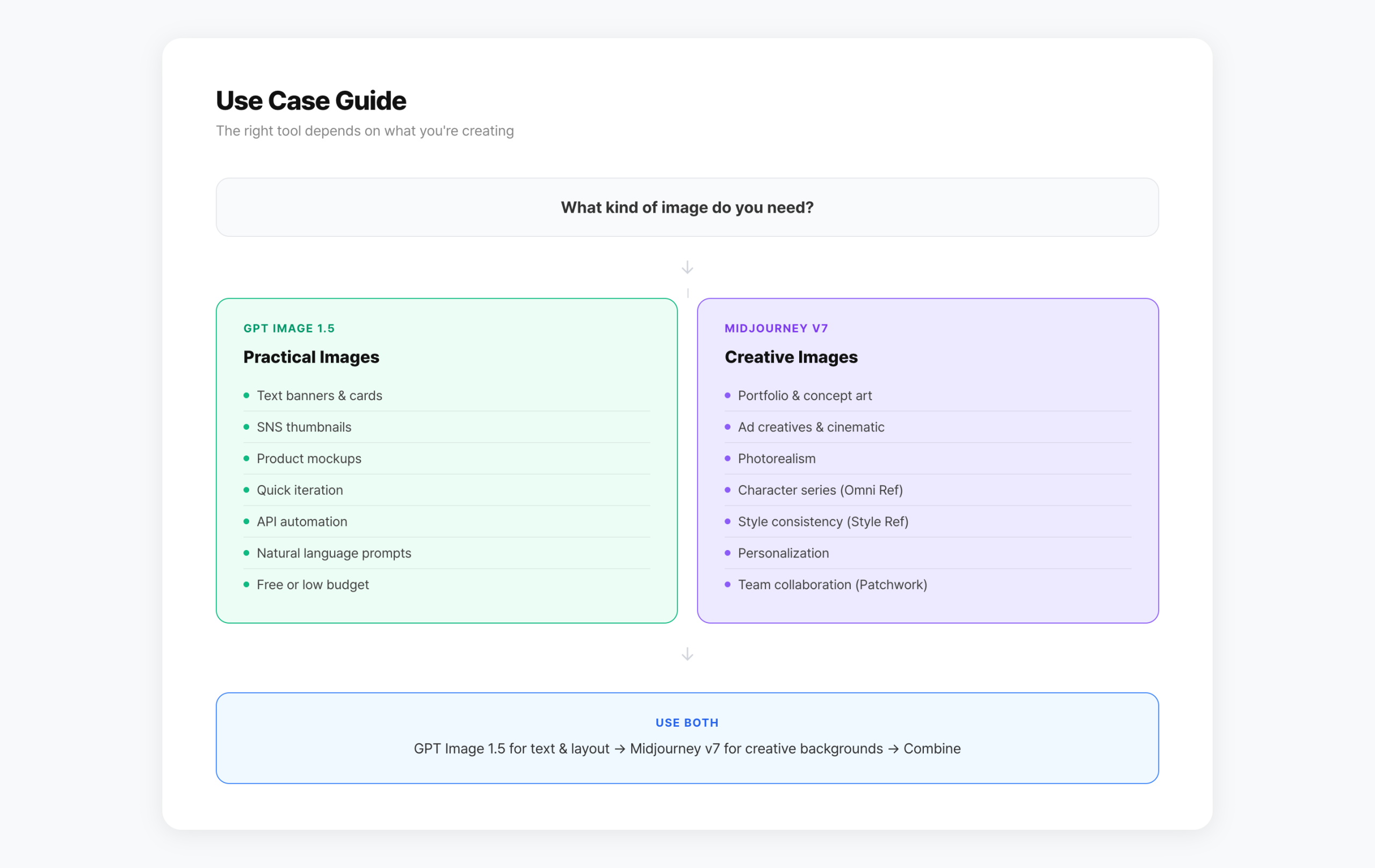
The answer depends on what you’re creating.
– Images with text (banners, cards, SNS thumbnails)
– Product mockups (e-commerce, packaging)
– Fast iteration (multiple drafts quickly)
– API integration for automated generation
– Natural language prompting (any language)
– Free or low-budget start
– Portfolio work, concept art, ad creatives
– Photo-level realism
– Consistent characters/styles across a series (Omni + Style Ref)
– Aesthetic personalization that improves over time
– Artistic quality as the top priority
Note: Midjourney v8 Alpha Is Here
Midjourney v8 Alpha launched on March 17, 2026. It’s 4-5x faster than v7 and accessible at alpha.midjourney.com. However, it’s still in alpha — features like Omni Reference aren’t fully supported yet.
For production work, v7 remains the safer choice. Think of v8 Alpha as a preview of what’s coming. When v8 reaches stable release, we’ll update this comparison.
FAQ
Q. Can I use GPT Image 1.5 for free?
Yes. ChatGPT free accounts can use GPT Image 1.5 with a limit of 2-3 images per day. For heavier use, consider Go ($8/month) or Plus ($20/month). Click the image icon at the bottom of the ChatGPT chat to start.
Q. Does Midjourney v7 have an official API?
No. As of April 2026, Midjourney doesn’t provide a public API. Access is limited to Discord and the web interface. Third-party unofficial APIs exist but violate Midjourney’s terms of service and aren’t recommended for production use.
Q. Can I use GPT Image 1.5 images commercially?
Yes. OpenAI’s terms allow commercial use of generated images. Be cautious with images that resemble real people or imitate brand logos. For marketing materials, thumbnails, and product mockups, there are no restrictions.
Q. Midjourney v8 Alpha is out — is v7 still worth using?
v8 Alpha is faster but still incomplete. Key features like Omni Reference aren’t fully supported. For reliable, production-quality work, stick with v7. Use v8 Alpha for experimentation and to preview the direction Midjourney is heading.
Q. Which tool is better for product mockups?
GPT Image 1.5 is more practical. It handles text reliably — ask for “skincare bottle on white background with brand name text on the right” and it delivers in one shot. Midjourney produces more artistic product shots but text rendering is inconsistent, and refinement requires parameter adjustments.
Q. Can I use both tools together?
Yes, many creators use a combined workflow. GPT Image 1.5 for text placement and layout, Midjourney v7 for atmospheric backgrounds. This lets you leverage each tool’s strengths while compensating for their limitations.
Wrap-Up
GPT Image 1.5 and Midjourney v7 serve fundamentally different purposes. GPT Image 1.5 excels at practical, immediately usable images. Midjourney v7 excels at images that evoke an emotional response.
If you already use ChatGPT, try GPT Image 1.5 first. It’s free to start, and the text rendering plus conversational editing alone produce solid results. If artistic quality is your top priority, start with Midjourney v7 Basic at $10/month.
Whichever tool you choose, writing specific prompts makes the biggest difference. Try the prompt tips above — the same tool can produce dramatically different results.
GPT Image 1.5 is free to try right now in ChatGPT.
Midjourney v7 starts at $10/month at midjourney.com.
Written on April 7, 2026. Features and pricing for GPT Image 1.5 and Midjourney v7 may change. Check each service’s official site for the latest information.
GoCodeLab — honest reviews of AI tools we actually use.