Claude Dispatch vs OpenClaw — Remote AI Control From Your Phone, Which One Is Right?
Comparing Claude Dispatch (released March 17, 2026) with open-source OpenClaw. We cover setup difficulty, features, pricing, and security differences to help you choose the right remote AI control tool.
March 22, 2026 · Comparison
On March 17, 2026, Anthropic released Claude Dispatch. It lets you remotely control desktop Claude Cowork sessions from your phone. Just scan a QR code and you’re ready to go.
But there’s already a tool that does something similar. It’s OpenClaw, an open-source project with 320K GitHub stars. It lets you send commands to AI from WhatsApp, Slack, Telegram, and more.
Both aim to let you “give tasks to AI from your phone,” but they take very different approaches. Let’s figure out which one fits your situation right now.
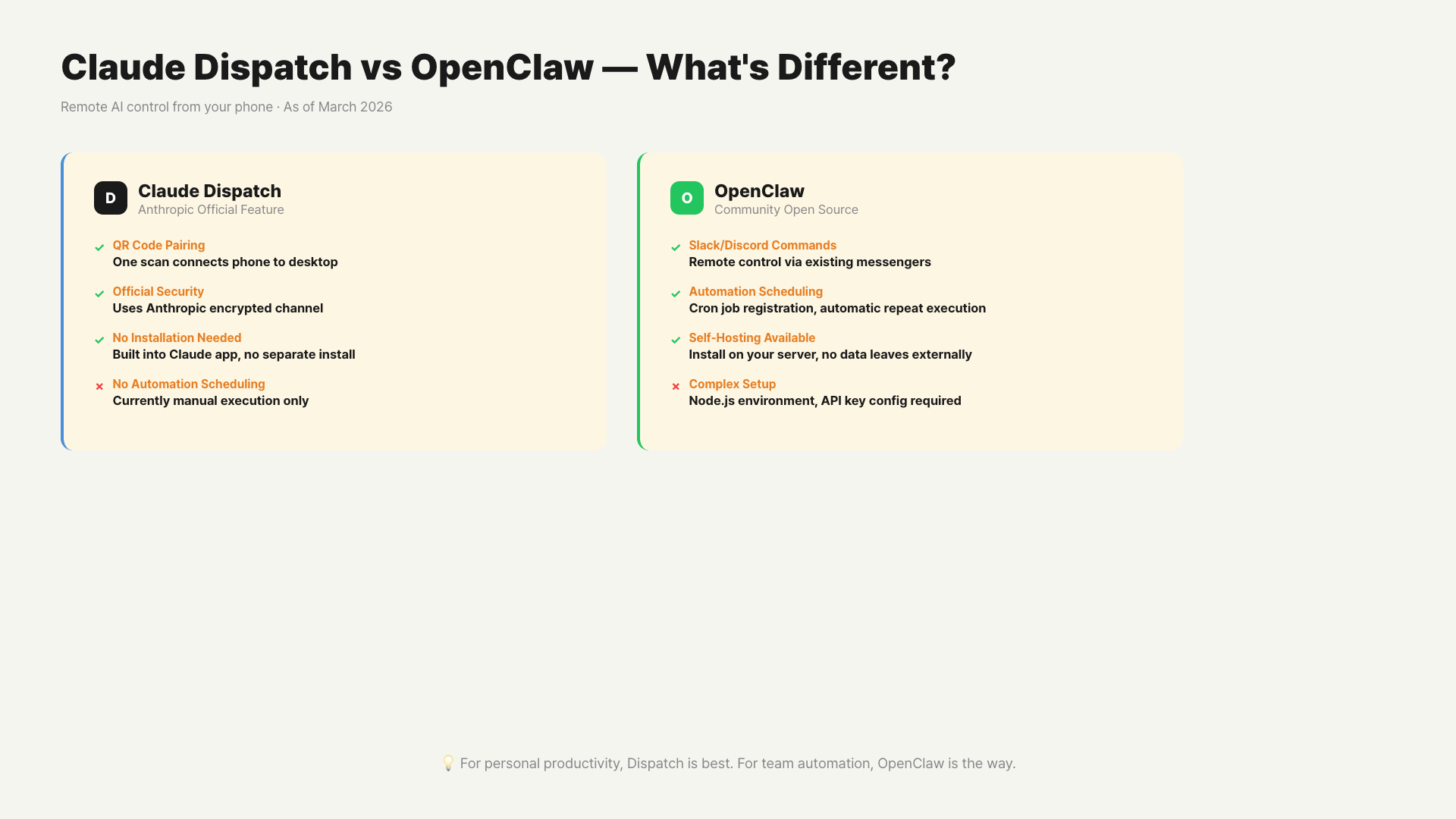
– Claude Dispatch: Setup done with a QR code scan. Requires Pro/Max subscription. Mac only for now.
– OpenClaw: Free and open-source. Requires terminal installation. Supports Windows/Mac/Linux.
– Non-developers should go with Dispatch; automation power users should pick OpenClaw.
– Using both tools together is also a solid approach.
What Is Claude Dispatch?
Claude Dispatch connects the Claude mobile app and desktop Cowork sessions into one. If you ask Claude to write a document from your phone during a meeting, the result will be waiting on your desktop when you get back.
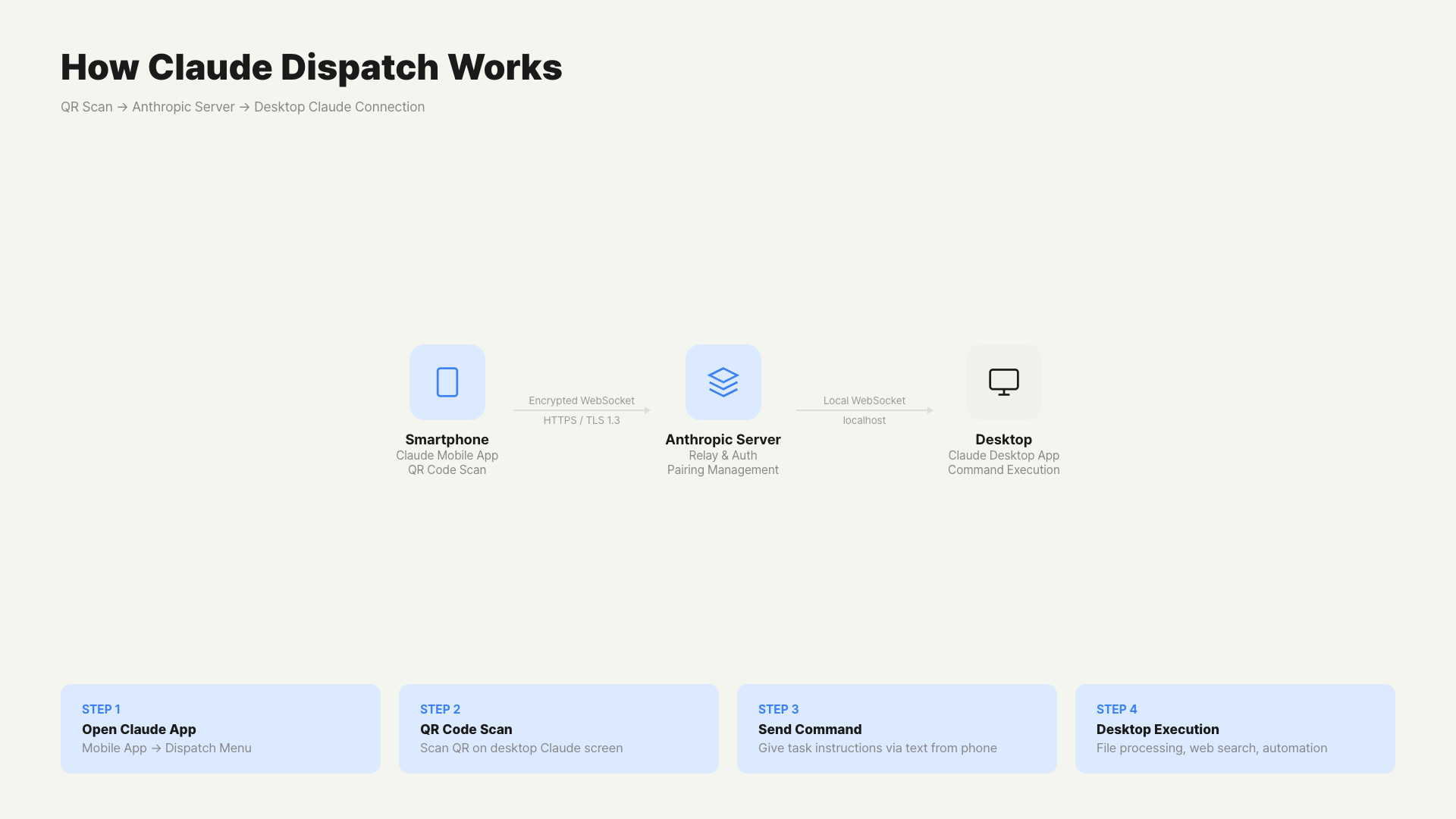
The mechanism is simple. A single persistent conversation session opens between mobile and desktop. Messages sent from your phone appear on the desktop as-is. Claude’s responses display simultaneously on both screens.
Setup Method
Setup takes three steps. Update the Claude desktop app to the latest version. Open Cowork and you’ll see the new Dispatch option. Scan the QR code with your phone and you’re connected. Takes 2 minutes total. No API keys, no config files.
Tasks You Can Delegate From Your Phone
You can delegate tasks like analyzing and summarizing local spreadsheets, extracting key information from Gmail or Slack, drafting presentations, and organizing and renaming local files. When Dispatch runs, it uses all files, connected apps, and plugins on your desktop.
How Is OpenClaw Different?
OpenClaw is an open-source tool that lets you use AI agents through messenger apps. It’s freely available under the MIT license.
It connects to over 19 platforms including WhatsApp, iMessage, Slack, Telegram, Discord, and Microsoft Teams. You can send commands to the same AI from any app. It’s not limited to Claude — you can freely switch models.
Setup is done through the terminal. You need to configure API keys, register bots, and handle server maintenance yourself. It’s a developer-friendly structure. There’s a barrier to entry for non-developers.
Here’s where OpenClaw has an edge over Dispatch. It supports browser automation. You can set up scheduled tasks via Webhooks. It integrates with development tools like GitHub, Notion, and Gmail. You can use any model — GPT, Gemini, Claude, and more.
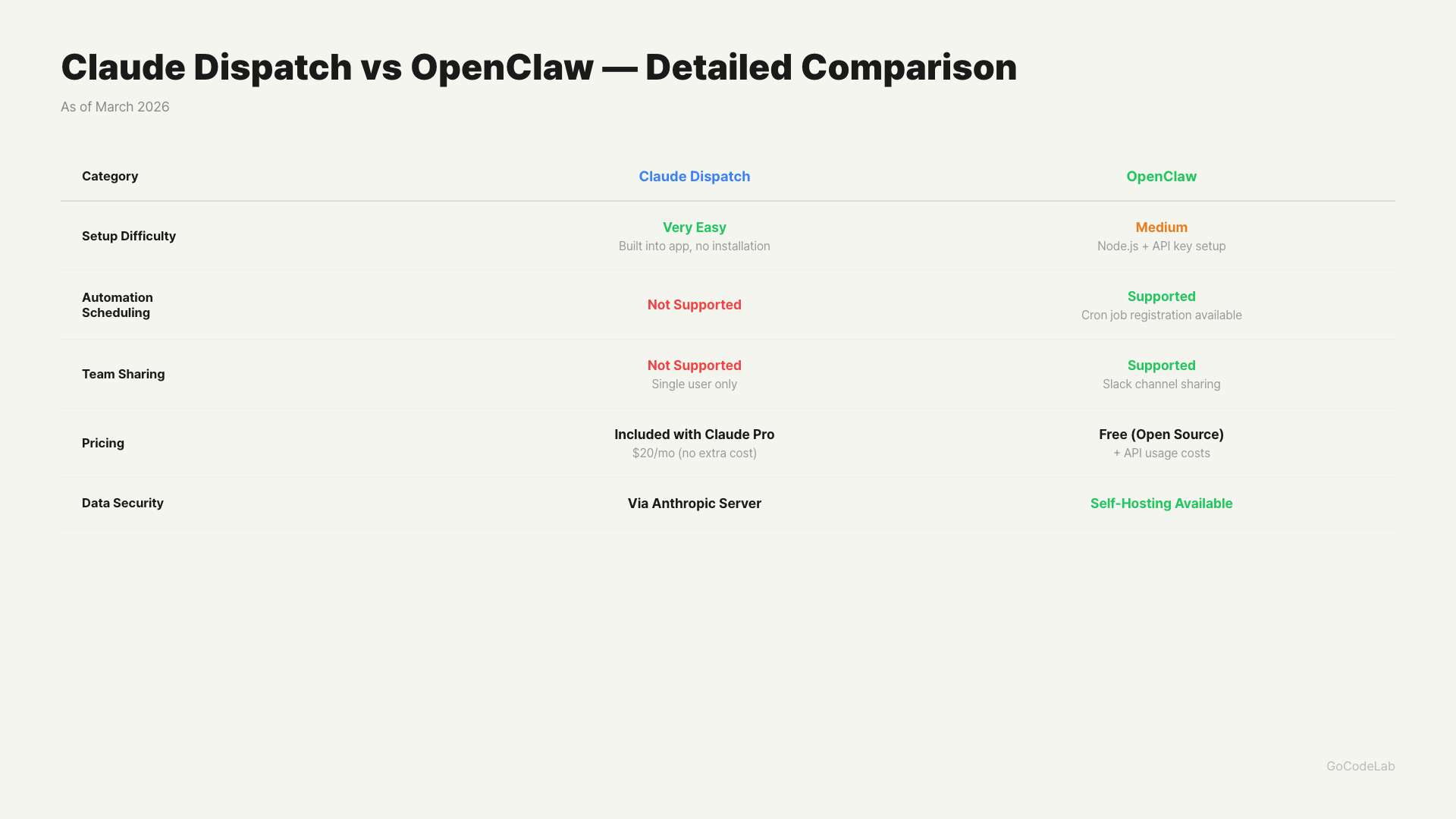
Setup difficulty, automation scheduling, team sharing, pricing, recommended users / GoCodeLab
Key Differences Compared
| Category | Claude Dispatch | OpenClaw |
|---|---|---|
| Release Date | March 17, 2026 | 2025 (Open Source) |
| Setup Method | QR Code Scan (2 min) | Terminal Install + API Setup |
| Interface | Claude Mobile App Only | WhatsApp, Slack, etc. 19+ |
| Browser Control | No | Yes |
| Scheduled Tasks | No | Yes (Webhook) |
| AI Model | Claude Only | Free Model Choice |
| Price | Pro $20/mo or Max $100/mo | Free (API costs separate) |
| Supported Platforms | Mac Only (currently) | Mac / Windows / Linux |
| Security Method | QR Direct Pairing | WebSocket Gateway |
| Open Source | No | Yes (MIT) |
How Do Prices Compare?
Claude Dispatch is included in the Claude Pro ($20/month) or Claude Max ($100/month) plans. Max users can use it immediately, and Pro is rolling out gradually. If you’re already subscribed, there’s no extra cost.
OpenClaw itself is free. However, AI model API call costs are separate. Light usage runs about $5/month, heavy usage around $15-20/month. If you need your own server, additional costs may apply.
If you don’t have a Claude subscription, OpenClaw might be cheaper. On the flip side, if you’re already on Claude Max, Dispatch is essentially free.
How Does Security Differ?
Claude Dispatch directly connects two devices via QR code pairing. It doesn’t go through third-party servers. API keys are never exposed externally during connection. You don’t need to worry about security settings.
OpenClaw communicates through a WebSocket gateway. Since it’s open source, you can inspect and audit the code yourself. However, you’re responsible for managing your self-hosted server’s security. Misconfiguration can create security vulnerabilities.
If you’re a non-developer who values security, Dispatch is the safer choice.
Who Should Use Which?
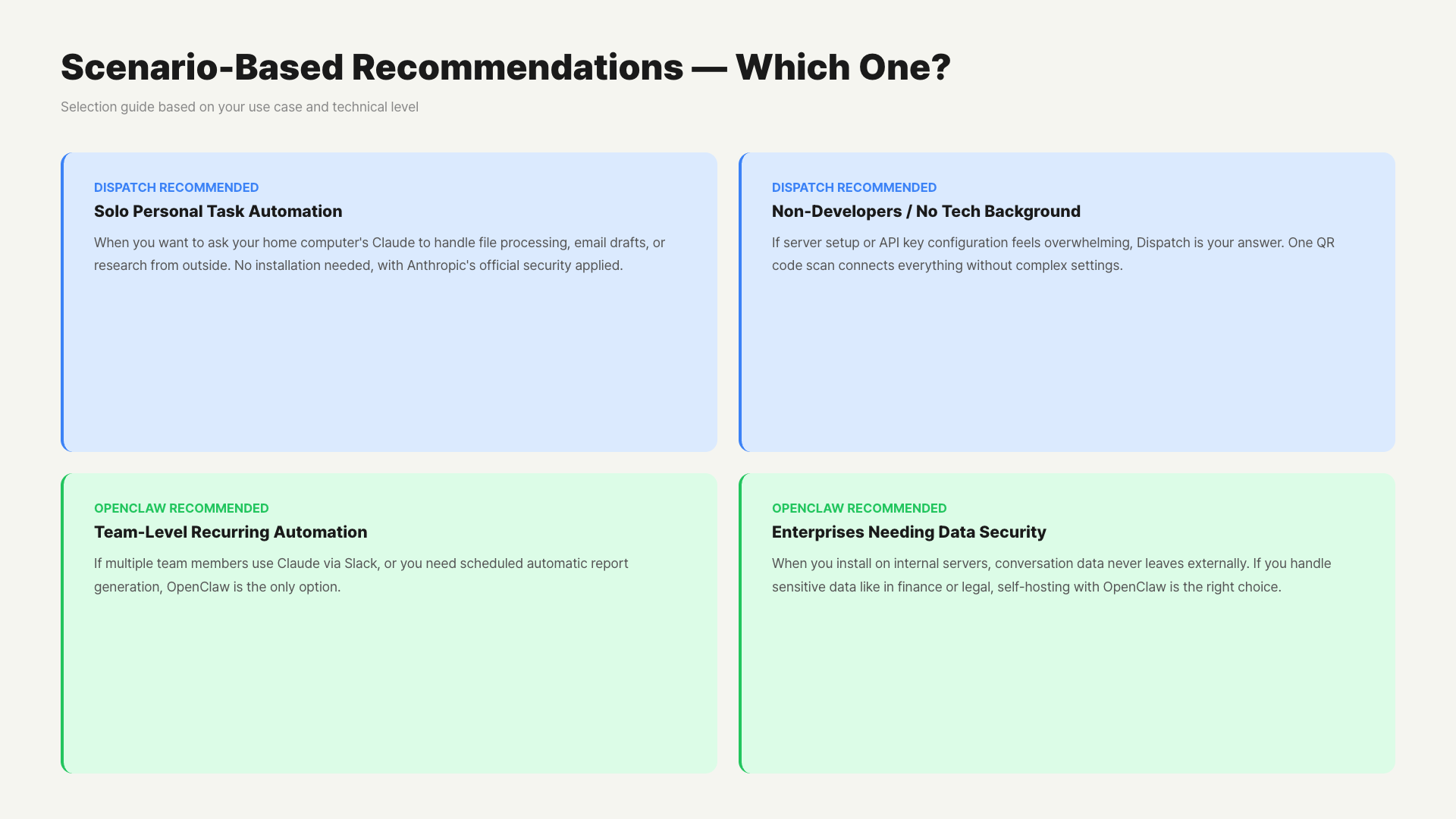
When Claude Dispatch Is Right
You already use Claude Cowork. You want to start immediately without setup. You’re not a developer. You’re a Mac user. You’re concerned about security. If any of these apply, Dispatch is worth trying first.
When OpenClaw Is Right
You want to control AI from a messenger app you already use. You need browser automation or scheduled tasks. You want to use AI models beyond Claude. You use Windows or Linux. You want to avoid subscription fees. If these conditions apply, OpenClaw is a better fit.
Using both tools simultaneously is also an option. Handle quick personal tasks with Dispatch and set up complex automation with OpenClaw.
How Should You Actually Use Them?
Concrete scenarios are better than theory. Let’s look at some real-world examples.
Scenario 1 — Starting a Report During a Meeting (Dispatch)
During a morning team meeting, you suddenly need a report by this afternoon. Your laptop is at your desk. You open the Claude app on your phone and type through Dispatch: “Open the Q1 revenue data file and draft a summary report.” When the meeting ends and you return to your desk, the report draft is ready on your desktop. Work started during the meeting without you touching the computer.
Scenario 2 — Automated Daily Morning News Briefing (OpenClaw)
Set up OpenClaw’s Webhook schedule. Every day at 7 AM, it crawls designated news sources, summarizes them, and sends them to your Slack DM. You don’t need to do anything on your phone. Information comes to you automatically. This is a combination of browser automation and scheduling. Dispatch doesn’t have this capability yet.
Scenario 3 — Using AI in Your Existing Messenger (OpenClaw)
Your team already uses Slack. You don’t want to install a new app. Connect an AI bot to Slack via OpenClaw. Type “@AI summarize this contract” in a Slack channel and AI responds immediately. You’re using AI within your existing workflow without switching apps.
How to Use Both Tools Together
If you use Claude Max and have development experience, it’s best to use both tools separately. Handle quick personal tasks (file summaries, document writing) with Dispatch. Set up repetitive automation, team-shared workflows, and browser tasks with OpenClaw. It’s not about choosing a tool — it’s about distributing them.
Current Limitations of Dispatch
Claude Dispatch is in research preview. You should be aware of a few limitations.
It’s currently Mac only. No Windows support timeline has been announced. If your Mac goes to sleep or the Claude app closes, the Dispatch session disconnects. Browser automation is not supported. Remote control is only possible within the scope of what Claude Cowork can do.
Once these limitations are addressed, it’ll become a much more powerful tool. For now, it’s best suited for Mac users within the Claude ecosystem.
What About Security?
It’s natural to worry about security when remotely controlling AI from your phone. Here’s a breakdown of how each tool handles security.
Claude Dispatch
It goes through Anthropic servers. After QR code pairing, it uses an encrypted WebSocket channel. Anthropic’s existing security policies apply as-is. Since data passes through Anthropic servers, it’s not fully local processing. Without an enterprise contract, you can’t control where data is processed.
OpenClaw
Self-hosting is possible. Install it on your own server and data doesn’t leave your network. However, since commands are relayed through Slack or Discord bots, you also need to consider the messaging platform’s security policies. Misconfiguration can create even bigger security vulnerabilities.
For tasks involving important work files or internal company data, building a self-hosted OpenClaw on an internal server is safer. Claude Dispatch is currently best suited for personal productivity use.
FAQ
Q. Can I use Claude Dispatch for free?
Dispatch is not a free feature. You need a Claude Pro ($20/month) or Max ($100/month) plan. There are currently no plans to offer it on the free plan. If you’re already subscribed to Pro or Max, you can use it at no additional cost.
Q. How do I install OpenClaw?
Clone the OpenClaw repository from GitHub and run the installation script in the terminal. Then set up the API key for the AI model you want to use and connect your preferred messenger bot. With development experience, you can complete it in about 30 minutes.
Q. What tasks can I delegate through Dispatch?
You can remotely delegate any task that Claude Cowork can do. This includes writing documents, analyzing spreadsheets, organizing files, creating presentations, and sorting emails. You give instructions from your phone, and it executes on your desktop. It can use all local files and connected apps on your desktop.
Q. Can I use Claude Dispatch without a Mac?
Currently, you need a Mac with the Claude desktop app installed. Windows support may be added within 2026, but no official timeline has been announced.
Q. Can OpenClaw use Claude too?
Yes, OpenClaw supports the Claude API. Besides Claude, you can also choose other models like GPT-5.4, Gemini 3.1, DeepSeek V4, and more. The model-agnostic architecture is one of OpenClaw’s key strengths.
Wrap Up
Claude Dispatch is a well-built tool for users within the Claude ecosystem. Setup is simple, security is solid, and you can use it right away. OpenClaw is a tool for developers and automation power users. It supports more platforms and can automate more things.
Neither tool is absolutely better than the other. Just pick the one that fits your situation. If you already use Claude Cowork, I recommend trying Dispatch first. Spend 2 minutes on setup and you’ll see right away.
GoCodeLab will soon cover Claude Dispatch setup guides and real-world use cases. Subscribe to the blog so you don’t miss it.
This article was written on March 22, 2026. Claude Dispatch is currently in research preview, and features and policies are subject to change. Check the official Anthropic channels for the latest information.
At GoCodeLab, we try AI tools hands-on and share honest reviews. Subscribe to our blog if you’re curious about more AI news.