A Week with Apsity MCP — 8 Real Cases I Ran with keyword_search & app_lookup
I spent a week using the Apsity MCP server I shipped in EP.21. Four tools — keyword_search, app_lookup, list_supported_countries, keyword_search_history — covered market discovery, deep analysis, and meta-pattern extraction in one chat window. Eight real cases with screenshots.
On this page (13)
- 1. "Validate a new app name — conflict + visibility"
- 2. "Compare 3 markets → pick one"
- 3. "Competitor descriptions → keywords missing from mine"
- 4. "Tracked competitors → threat & next move"
- 5. "Build me a launch-week baseline"
- 6. "Top 10 meta → my app's design guide"
- 7. "History → next-week research plan"
- 8. "20-country sweep → top market + plan"
- Why four tools is enough
- Why MCP actually helps
- Next episode
- FAQ
- Related
May 2026 · Lazy Developer EP.22
In EP.21 I bolted an MCP server onto Apsity. Four tools: keyword_search, app_lookup, list_supported_countries, keyword_search_history. While building it I half-doubted I'd actually use it. Then I used it for a week.
Here's the result: I use it more than I expected. With only four tools, the flow from market discovery to entry decision lands inside one conversation. A keyword search is one line, deep-checking the Top 5 is another line, comparing markets is another. The dashboard is for visual exploration; MCP is for fast ask-and-answer — the two channels split naturally.
This post is the eight prompts I actually ran during that week. Discovery, multi-region, deep dive, tracked competitors, newcomer detection, meta patterns, search history, and a 20-country sweep. Each case shows which tool gets called and what the answer looks like — full screen.
– 4 Apsity MCP tools — keyword_search · app_lookup · list_supported_countries · keyword_search_history
– A week in: chat-window queries handle more work than I expected
– 8 cases — Discovery, Multi-region, Deep dive, Tracked competitors, Newcomers, Meta patterns, History, 20-country sweep
– Why it helps: deciding and querying happen at the same time, so the friction drops
– Next episode (EP.23) goes deep on gap analysis & idea validation
1. "Validate a new app name — conflict + visibility"
The lightest but most frequent question right before launch. "Is this name available? Does anyone else use it? Will it surface in search?" These decisions are hard to undo post-launch, so verifying first is cheap insurance.
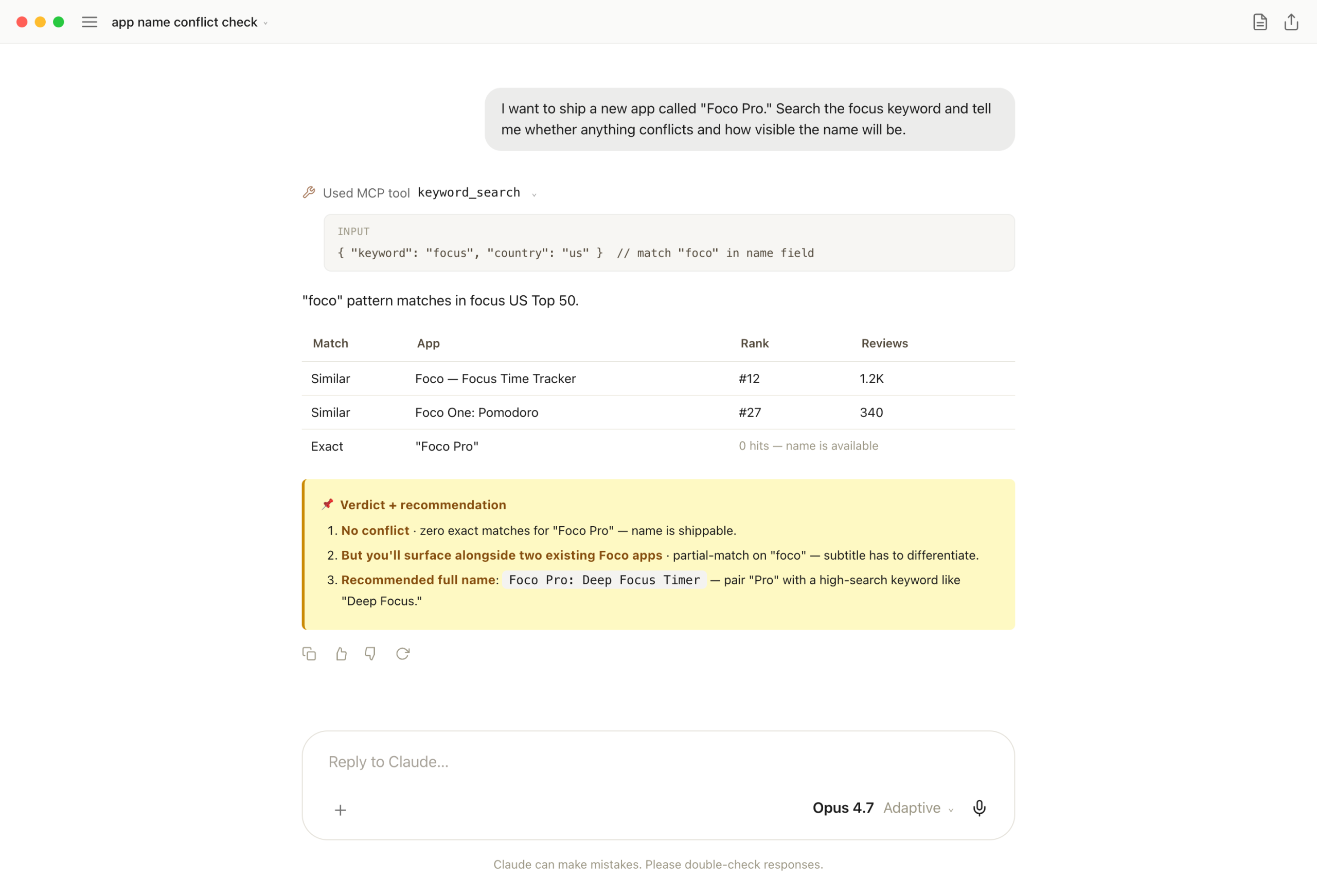
One keyword_search call. Claude pattern-matches the name field for exact and partial hits. Zero exact = available; partial hits = subtitle has to differentiate — "Foco Pro is available, but it'll surface alongside two existing Foco apps, so pair it with a high-search keyword like Deep Focus Timer."
One-liner: a decision that's hard to reverse after launch finishes in one chat exchange. Light query, heavy consequence.
2. "Compare 3 markets → pick one"
Same keyword, three markets. Comparison alone is just data. Going one step further to "which market should a solo indie enter, and why" turns it into a decision. So I ask for the recommendation in the same prompt, not a follow-up.
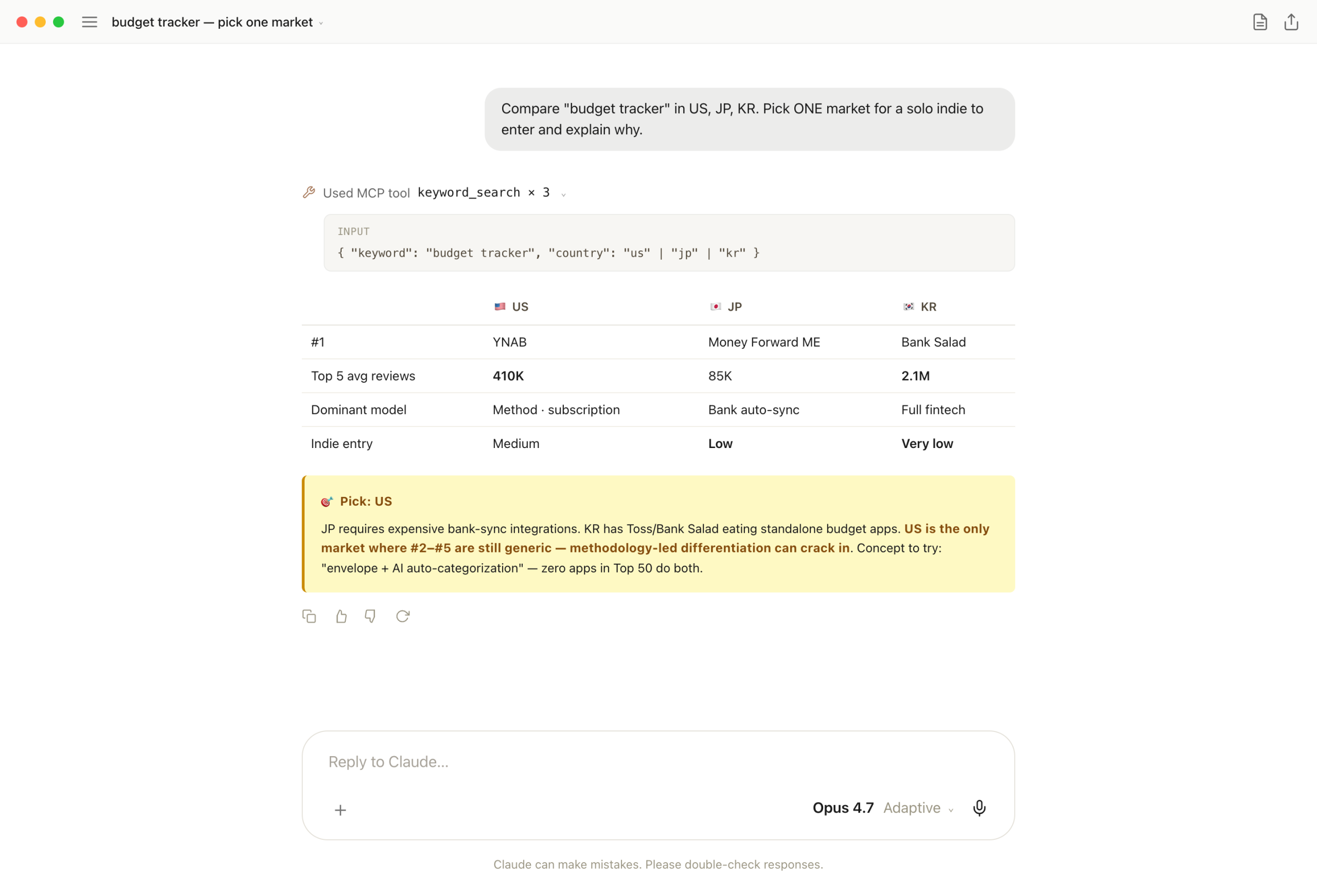
Three keyword_search calls (us, jp, kr). Claude builds a matrix — Top 5 avg reviews, dominant model, indie feasibility — then names US as the entry pick with a concrete concept ("envelope + AI auto-categorization") on top.
One-liner: an analysis used for decisions has to ship with the recommendation. MCP fetches the data; the LLM adds judgment. Cleanest division of labor.
3. "Competitor descriptions → keywords missing from mine"
Core ASO question for any app already in the wild. Which keywords show up across the Top 3 competitor descriptions but are missing from yours? That gap drives search visibility differences. By hand it's an hour.
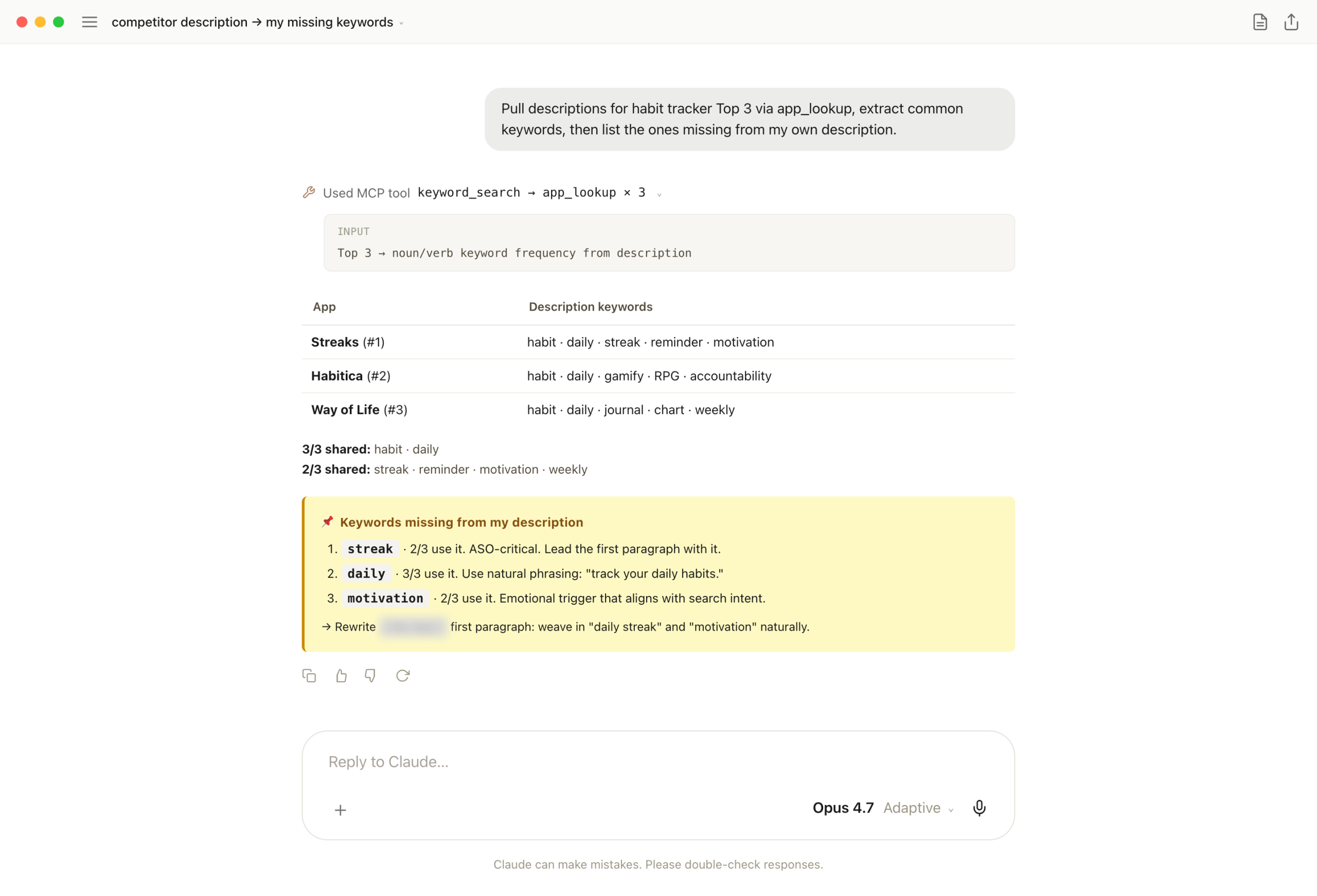
Two tools chained. keyword_search for Top 3, then app_lookup × 3 to pull every description. Claude counts noun/verb keyword frequency, separates 3/3 vs 2/3 shared, then matches against my own description and surfaces what's missing — streak, daily, motivation.
One-liner: the most asked ASO question, answered in one chat exchange. Once the missing keywords land, rewriting the first paragraph of the description is the only follow-up.
4. "Tracked competitors → threat & next move"
Apsity's isTracked flag picks the 5 competitors I follow. Stopping there is monitoring. Going one step further — threat scoring + next move as a solo indie in the same response — turns it into action.
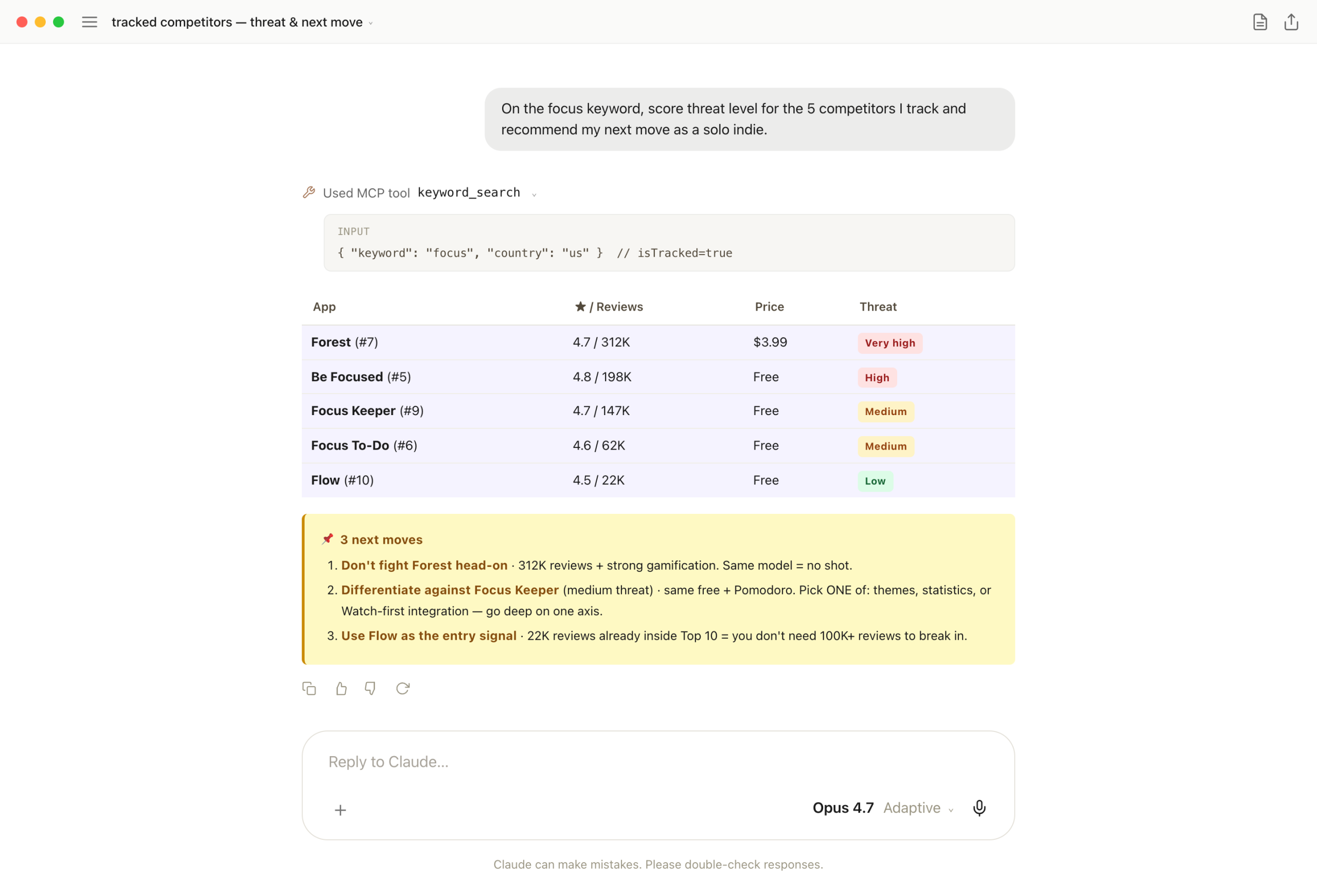
One keyword_search call. Claude scores threats from rating + reviews + price (color-tagged tiers) and lands on actionables: "don't fight Forest head-on (312K reviews)", "differentiate against Focus Keeper on ONE axis (themes / stats / Watch-first)."
One-liner: competitor analysis matters less for "where they are now" and more for "what I do next." Both arriving in the same response is the channel's real strength.
5. "Build me a launch-week baseline"
The shakiest moment after launch is week-1 numbers. "Is this normal? Did I just bomb?" The only way to know is comparing against apps that recently launched into the same category. That's a baseline — and it's exactly what MCP is good at producing.
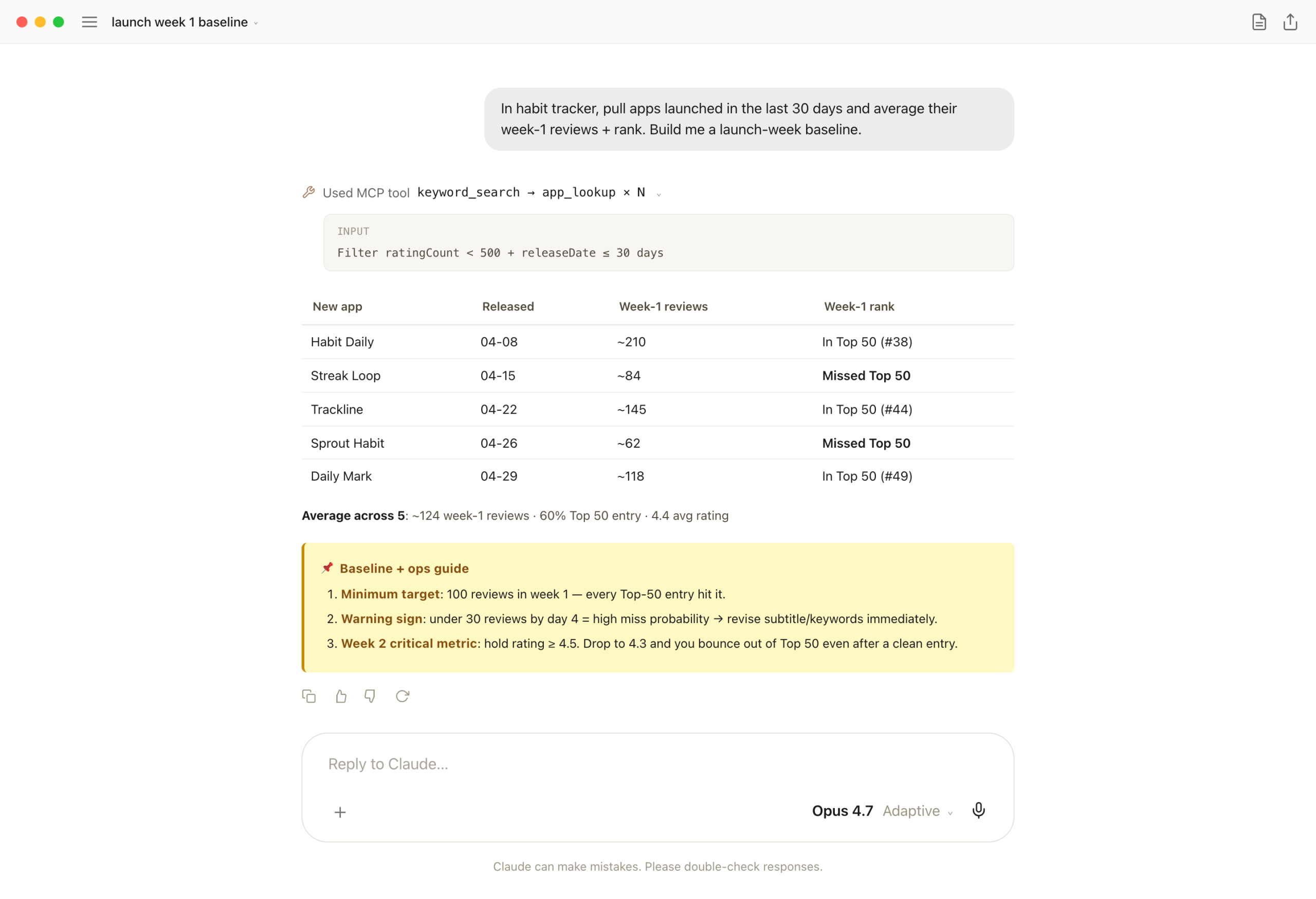
Two-tool chain. keyword_search + app_lookup filters 30-day-old launches and averages their week-1 reviews/rank/rating. The baseline lands as "~124 reviews, 60% Top 50 entry, 4.4 rating average." Plus an ops guide — "below 100 reviews? rewrite subtitle. rating dropping under 4.3? you'll bounce out of Top 50."
One-liner: post-launch you need a comparison set, not raw data. The baseline tells you whether you're on track, and one chat exchange produces it.
6. "Top 10 meta → my app's design guide"
Subtitle, language, secondary-genre patterns from a Top 10 sweep are useful. Turning them into "a metadata design guide for my next app" in the same response is more useful — that's a checklist you can ship with that day.
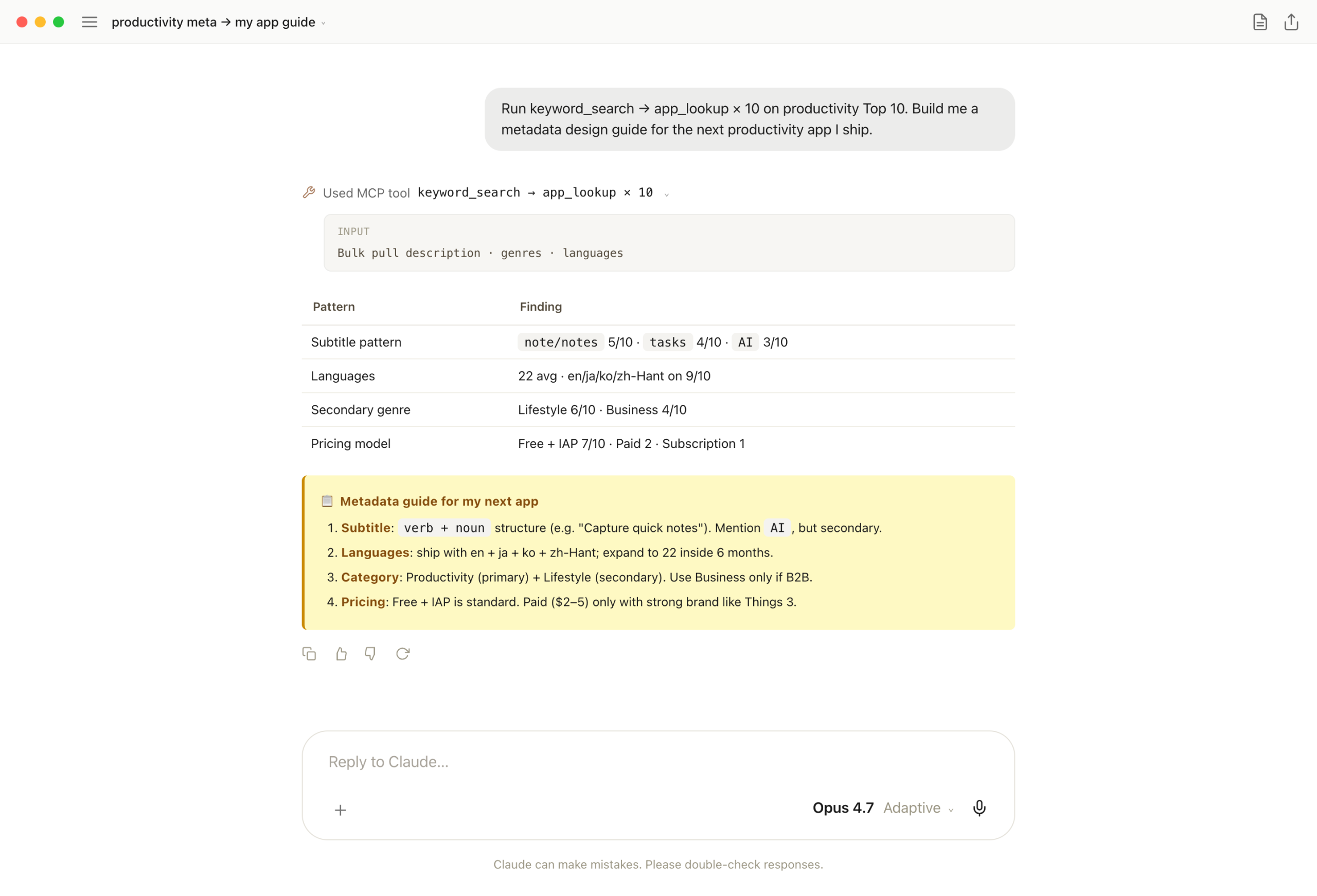
keyword_search + app_lookup × 10. Claude pulls description-first-sentences, genres, languages, pricing — "verb+noun subtitle, ~22 languages, Lifestyle as secondary, Free+IAP at 70%" — then converts the patterns directly into a checklist.
One-liner: an hour by hand, with gaps. In chat the analysis and the design guide arrive together — App Store listing fields can be filled the same day.
7. "History → next-week research plan"
keyword_search_history shows footprints. Footprints alone are a postmortem. Asking for "blind spots + next-week priority keywords (5)" in the same response turns the postmortem into a queue.
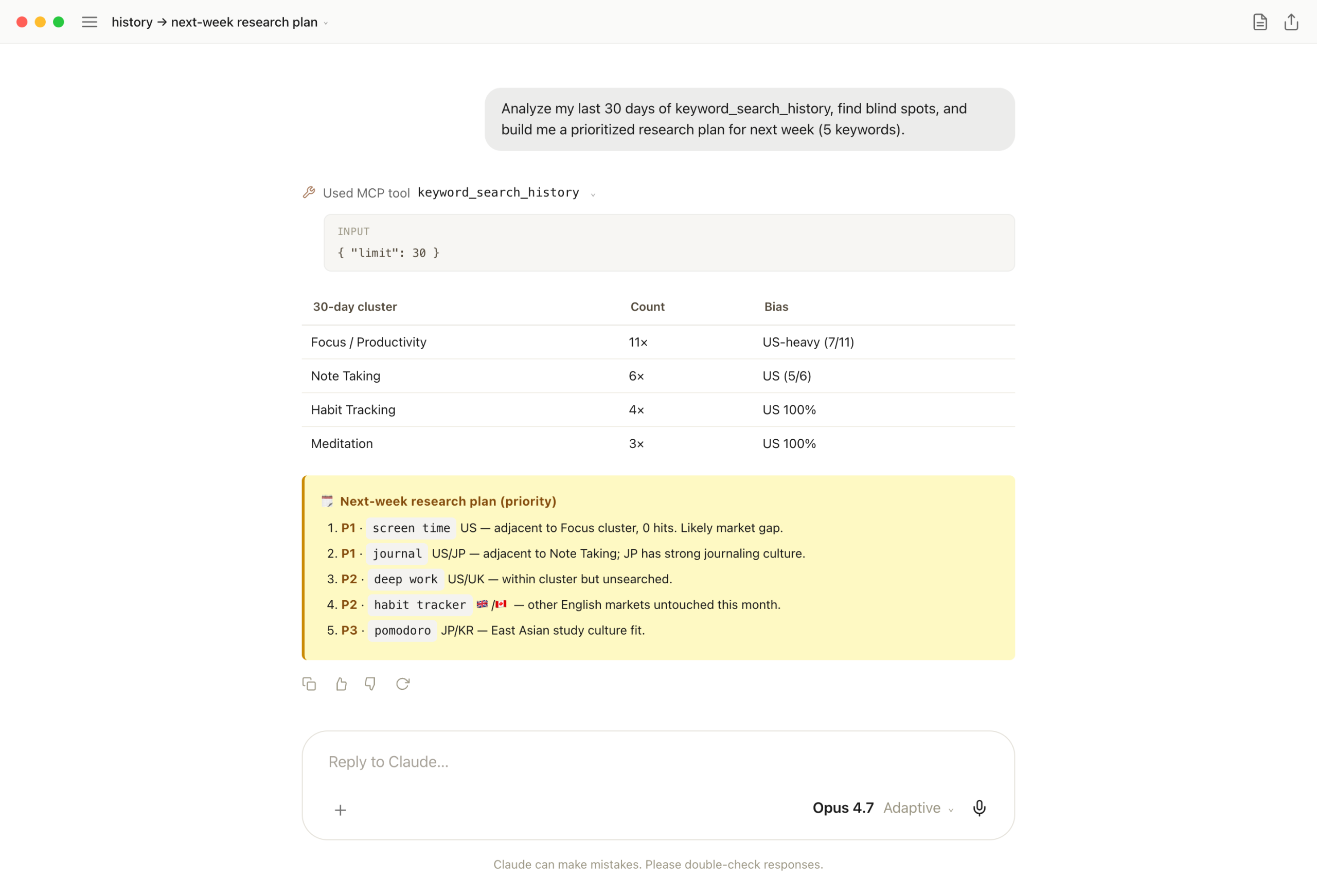
keyword_search_history with limit 30. Claude clusters the list, spots US-bias and adjacent-keyword zeros, then drops 5 prioritized keywords — screen time, journal, deep work, UK habit tracker, East Asia pomodoro.
One-liner: people are bad at noticing what they didn't see. The data sees it. Now my Monday queue auto-fills from one prompt.
8. "20-country sweep → top market + plan"
Last case. list_supported_countries hands back 20 markets, one keyword runs across all of them. The matrix is informative; pushing one step further to "#1 entry market + 3 localization musts" turns global-entry decisions into one response.
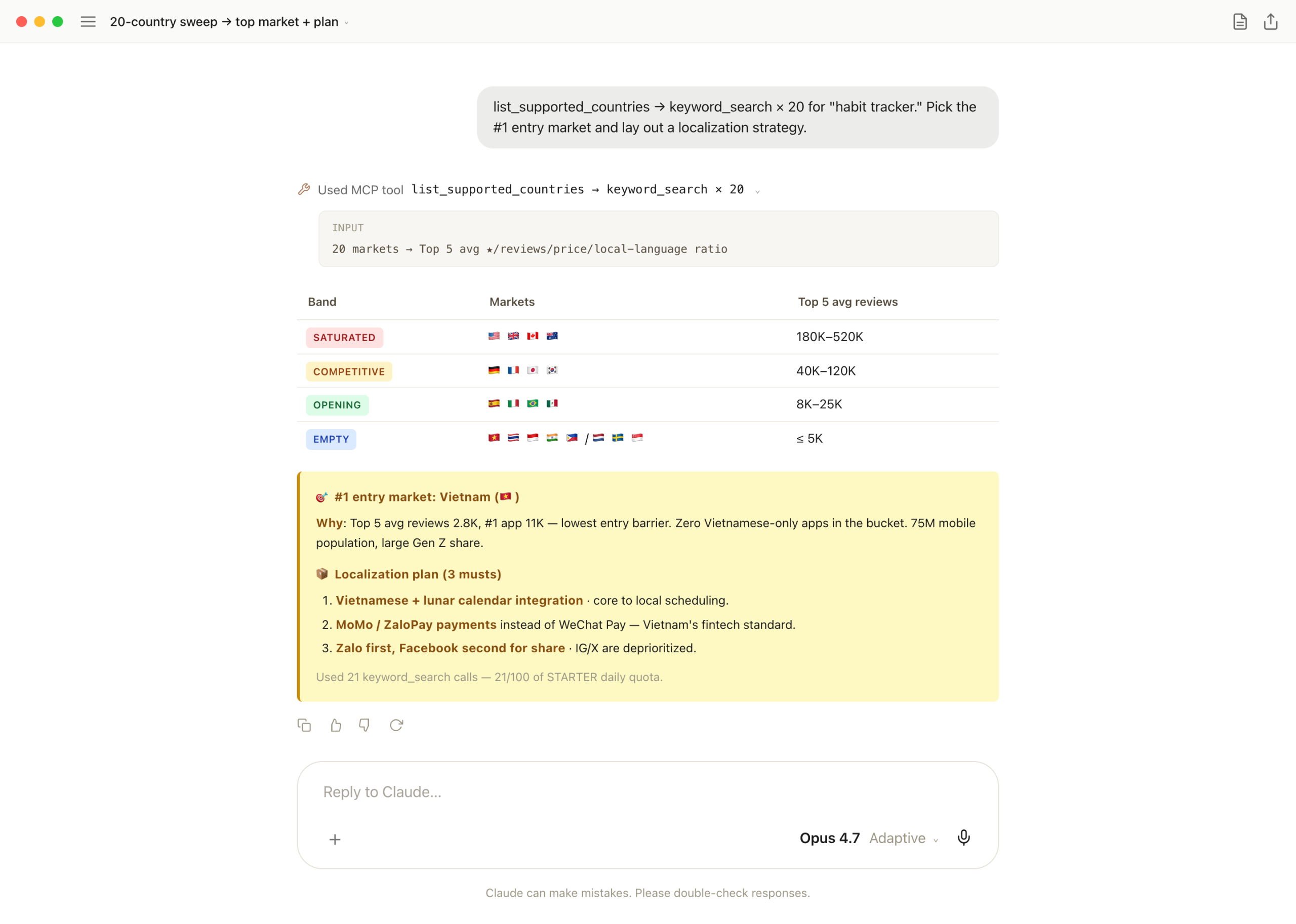
Two tools. list_supported_countries + keyword_search × 20. Claude bands markets by Top 5 reviews, picks Vietnam from the EMPTY band based on mobile pop + low entry barrier, then concretes it: lunar-calendar integration, MoMo/ZaloPay payments, Zalo-first share.
One-liner: a global-entry decision is normally a multi-day exercise. Burns 21/100 of the STARTER quota — fine for a once-a-month prompt that resets the next month's roadmap.
Why four tools is enough
After a week, four tools never felt limiting. Reason: market research is two questions on repeat. "What's ranking?" (keyword_search) and "what does this app do?" (app_lookup). Those two carry the load. The other two are just orchestration.
If anything, having a small surface helps the LLM. Too many tools and Claude burns cycles deciding which to call. Four is small enough to memorize and call by name. "keyword_search US then JP, app_lookup the Top 5" — that level of explicit prompting comes naturally.
And the LLM is better at recombining tools than I expected. Cases 5 (newcomer detection) and 6 (meta patterns) use the same two tools but produce completely different analyses. The tool is the input; the LLM produces the analysis. Keeping them separate works best when the tools stay simple.
Why MCP actually helps
It's not the data speed. iTunes was already fast. What's actually different is that deciding and querying happen at the same time.
"What should I look at right now?" and "open that view" are usually two steps. In a chat window they collapse into one. Typing "meditation US Top 50" decides and queries simultaneously. So I end up checking data I'd normally skip.
The answer stays in chat history too. A dashboard is great for visual exploration — sort, filter, charts on one screen — and chat is great for fast ask-and-answer. They sit naturally side by side. Big-picture work goes to the dashboard; pinpoint questions go to chat.
Last thing — and I only got this from building it: MCP's value isn't "hand data to Claude." It's "make data access cheaper for a person." The AI isn't doing my work; it's making my work easier to do.
Next episode
This episode was the catalog of "what you can ask." EP.23 goes a level deeper: gap analysis, idea validation, market-entry feasibility — how to compose four tools into a real decision-making workflow.
And the episodes after that get into combining other MCPs. With Notion, Slack, or Email MCP, "summarize this week's new competitors into a Notion page and ping Slack" becomes one line. That's where this whole thing is actually heading.
FAQ
keyword_search (Top 50 in 20 countries), app_lookup (full app metadata), list_supported_countries (country codes), keyword_search_history (recent searches).keyword_search and app_lookup answer both. The other two help orchestrate.