Apsity Ships Three New Features at Once — Keyword Search, MCP Server, Monthly Magazine
Apsity added three features in the last week of April: keyword search across 18 countries, an MCP server for Claude Desktop, and an auto-generated monthly magazine. Here's how each works and how they compose into one ASO workflow.
On this page (9)
April 2026 · Apsity
Apsity shipped three new features in the last week of April: Keyword Search, an MCP server, and a monthly magazine. With all three landing together, the missing ends of the ASO workflow are now filled in. Discovery → use → look-back runs inside a single tool.
Apsity has been a strong tool for showing data on apps you've registered — revenue, downloads, keyword ranks, reviews, competitor changes — all on one screen. But discovering new keywords, using the data in other tools, and looking back at a full month were jobs you had to do elsewhere. This release fills those three gaps.
This post explains how each feature works, how they compose, and what you get on each plan. It's less of a manual and more of a "here's the actual flow you'd use."
– Three new features: Keyword Search, MCP server, monthly magazine
– Keyword Search: iTunes Top 50 across 18 countries + AI summary + watchlist
– MCP server: ask Apsity data in natural language from Claude Desktop
– Monthly magazine: auto-sent every 1st at 5am KST, in Korean or English
– Core features on STARTER+. FREE covers data collection and basic keyword search
Why these three together
They're not three separate items — they're one workflow. ASO eventually comes down to three loops. Pick which keywords to chase (discovery). Look at the data and decide (use). Look back over time at what happened (look-back). Apsity was strong on the middle one but light on the two ends.
Keyword Search fills discovery. Looking only at your registered keyword ranks is a fishbowl. To find new keywords, you need to see how other apps surface for them. Pull iTunes Top 50 across 18 countries, let AI summarize, and save promising ones to a watchlist.
The MCP server extends use. Until now you opened Apsity to look at data. Now you can ask in natural language from Claude Desktop. Throw "how was my expense tracker's revenue yesterday?" at Claude and Apsity answers. The flow of using data alongside other tools becomes possible.
The monthly magazine is the look-back. Daily alerts already exist, but daily is noisy. You want a monthly summary. On the 1st of each month, you get an email with the picture of the past month. Revenue swings, download trends, memorable reviews, suggestions for next month. Four cards.
Keyword Search — discovery across 18 countries
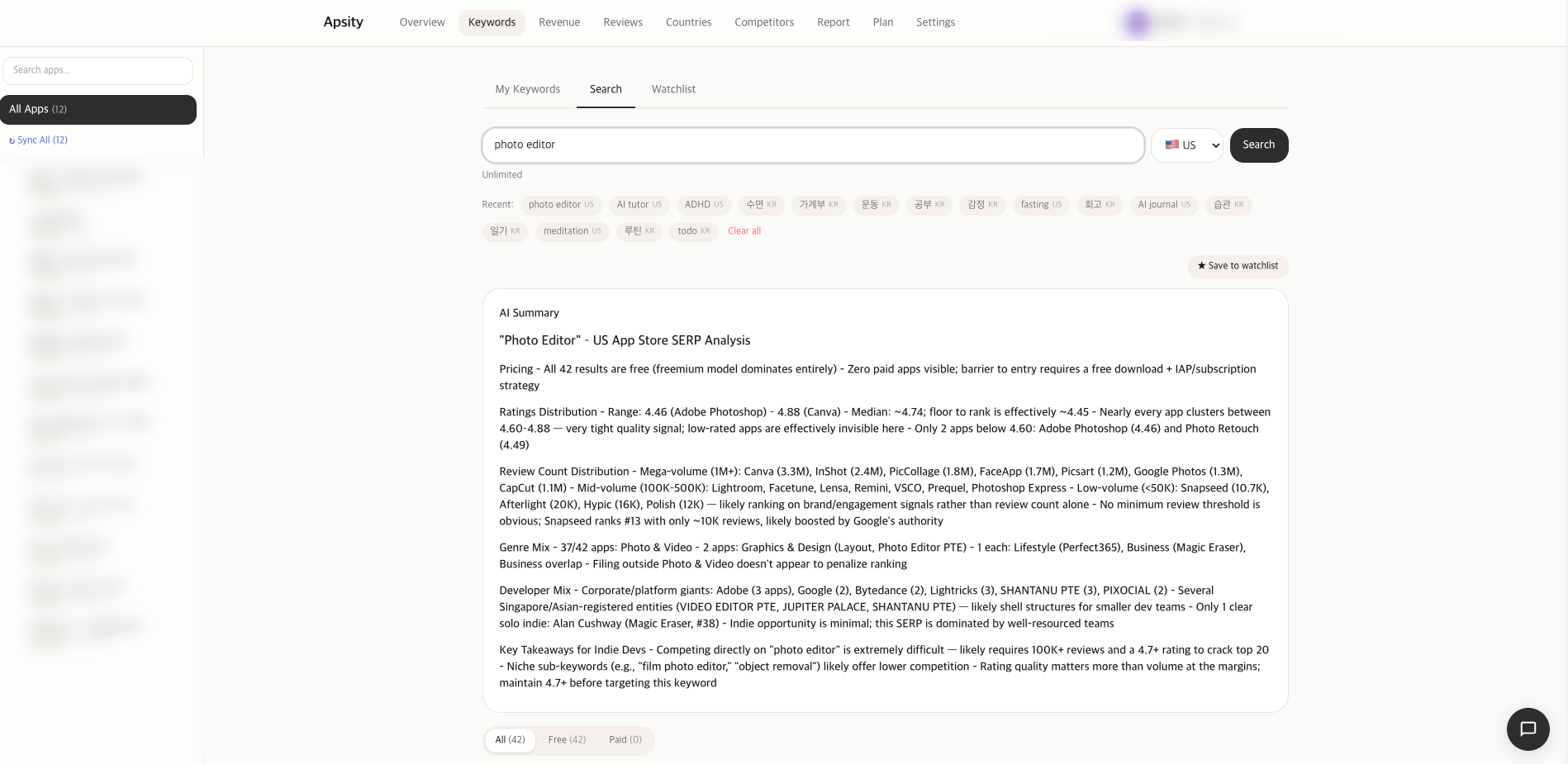
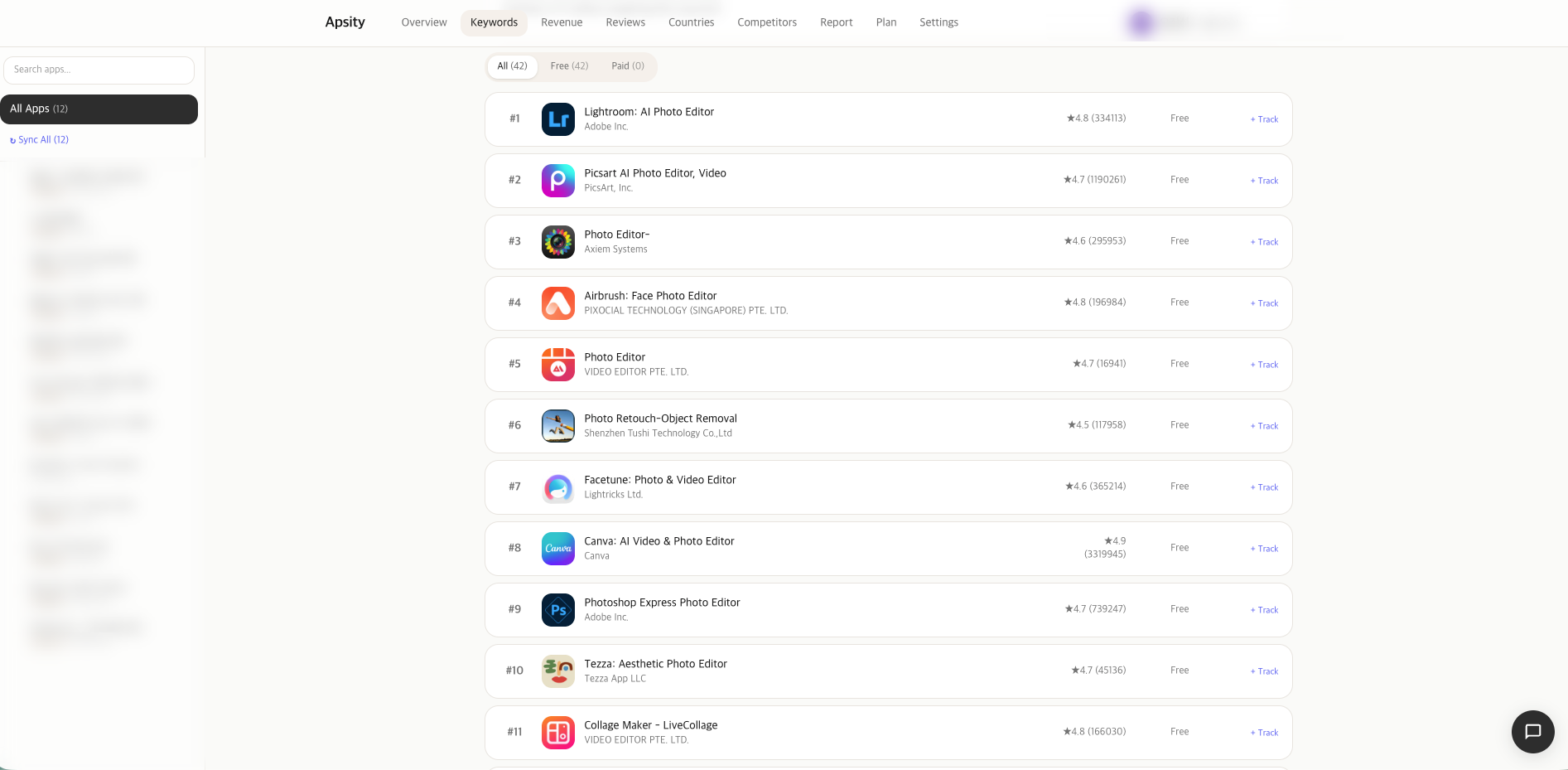
Keyword Search is a new tab in the dashboard (/dashboard/keywords). Type a keyword, pick a country, and the top 50 apps surfacing for that keyword on iTunes appear. Supported countries: US, KR, JP, GB, DE, FR, CN, TW, BR, MX, IN, ID, RU, CA, AU, ES, IT, NL — 18 in total.
Click a row in results to open a side panel. App detail — icon, name, subtitle, rating, category, price, download trend. The app doesn't need to be registered in Apsity. It's a fast entry point into competitor analysis.
Search: 18 countries × Top 50 = up to 900 app data points
Filter: free/paid/all
AI summary: common patterns auto-extracted from 50 apps
History: recent searches saved + delete
Watchlist: save keyword + daily Top 50 snapshots (PRO)
The AI summary isn't a flat dump of facts. Claude reads names, subtitles, and categories from 50 apps and produces a short paragraph on what the keyword market looks like. Which categories dominate, free vs. paid ratio, indie share. A quick decision aid when you're choosing keywords.
Watchlist is PRO-gated. Save a keyword and the Top 50 for that keyword gets snapshotted every morning. Over time you can track which apps rise and which drop. It's a tool for watching the ASO market move.
Daily search limits are part of plan-limits. FREE has a small daily quota; STARTER and above have generous quotas. Side panel detail is STARTER+. Watchlist plus daily snapshots are PRO-only.
MCP server — call Apsity from Claude
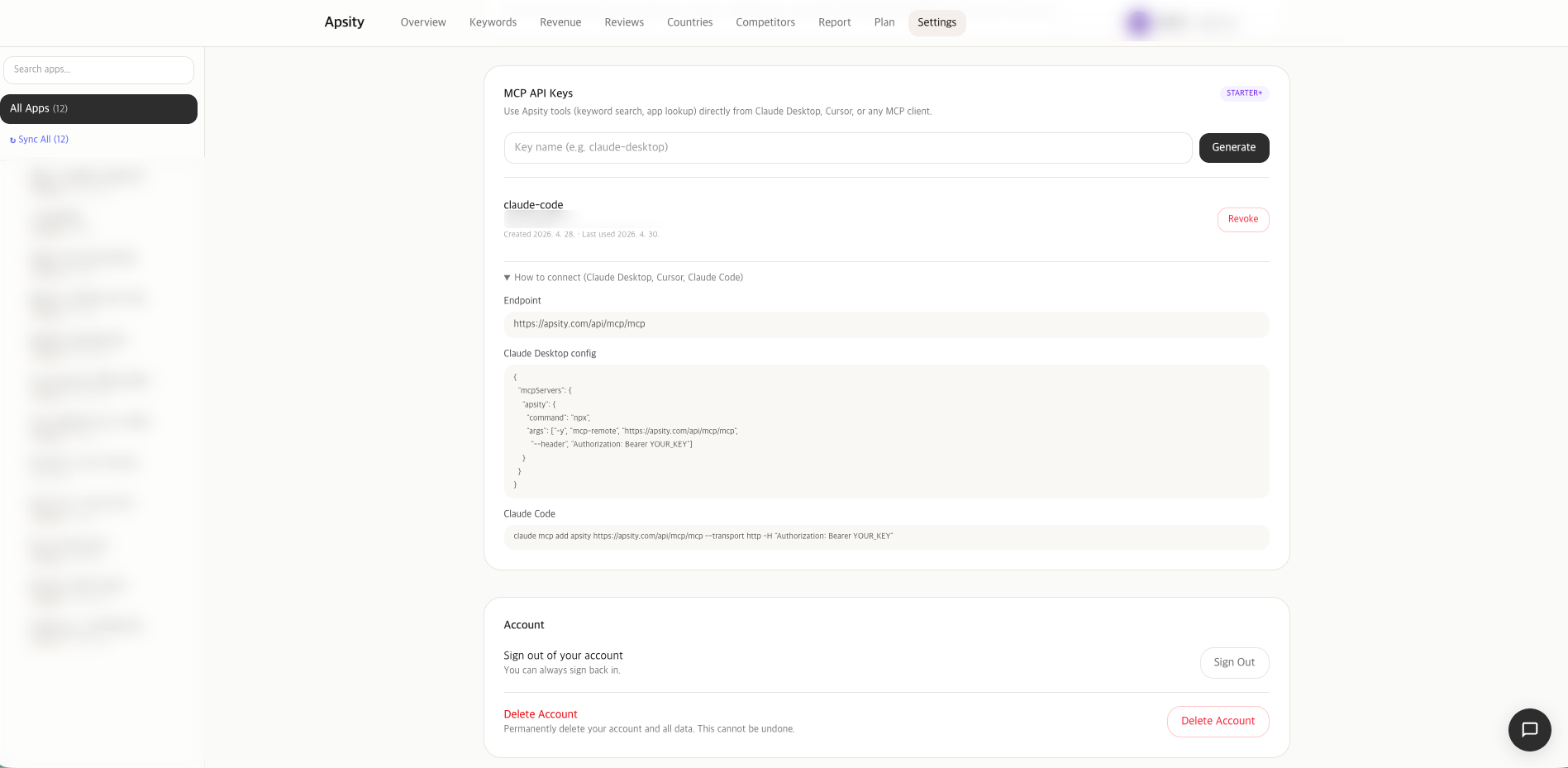
MCP stands for Model Context Protocol — the standard for AI agents to access external tool data. Apsity now ships its own MCP server, so any MCP-compatible client (including Claude Desktop) can ask Apsity data in natural language.
Setup is two steps. First, issue an API key from Settings > MCP. Second, register it in Claude Desktop's mcp config JSON. After that, you can ask Apsity inside any Claude conversation.
{
"mcpServers": {
"apsity": {
"command": "npx",
"args": ["-y", "@apsity/mcp"],
"env": { "APSITY_API_KEY": "apk_xxxxx" }
}
}
}
// Claude conversation
User: How was revenue across my apps yesterday?
Claude: (calls Apsity) $147.32 across 12 apps, +12% vs prior day
Key security has 4 layers. The issue button is disabled in the UI on FREE. If you bypass UI and hit the API directly, the server checks plan and blocks. After issuance, if you downgrade your plan, calls get blocked at call time. Some tools are PRO-only and split out separately. It's defense-in-depth — designed to prevent cost leaks.
The full key is shown only once at issuance. After that, only the last 4 chars are visible. Same pattern as a GitHub Personal Access Token. Lose it, revoke and reissue.
Monthly magazine — sent on the 1st automatically
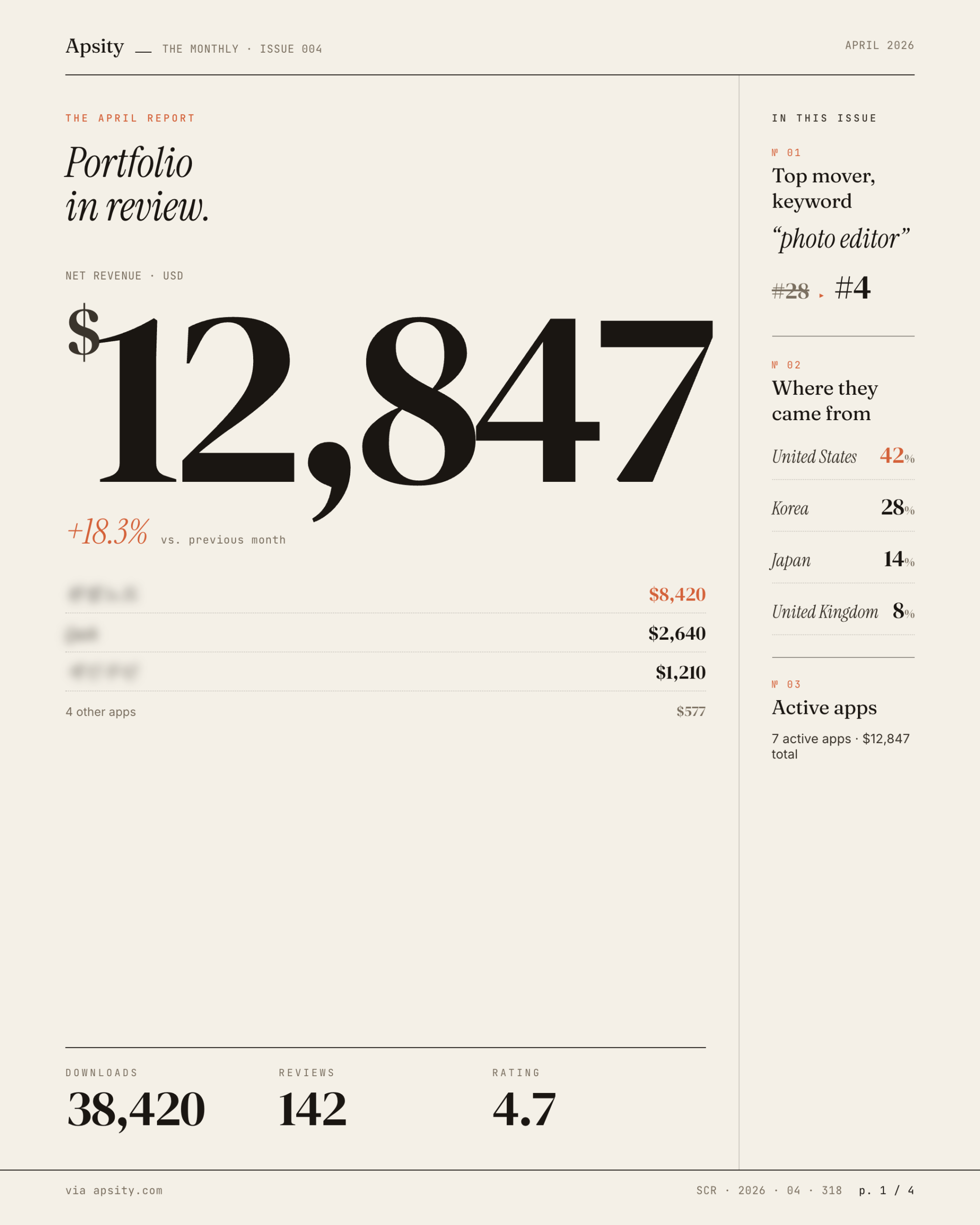
The magazine arrives on the 1st of every month at 5am KST. Email arrives in your chosen language (Korean or English). The past month is summarized into 4 cards.
1. Key metrics — revenue, downloads, new reviews + month-over-month change
2. Trend chart — daily revenue/download trends visualized
3. Review highlights — memorable reviews (positive/negative balance)
4. Next-month suggestions — AI-generated actions based on the data
Display currency is configurable in Settings. Korean users picking KRW get USD revenue auto-converted and combined. Exchange rate is cached at the 1st-of-month value. Subscription revenue is deduplicated, so a payment recorded twice still counts once.
The magazine isn't email-only. It's stored permanently inside Apsity for re-reading anytime. Run for a year and you have 12 magazines stacked — a time-series look-back archive built automatically.
Configure under Settings > Magazine. Toggle on/off, pick language, pick currency. STARTER+ plans.
How they compose
The flow becomes obvious in a real scenario. Imagine an indie running an expense-tracker app.
Monday morning. Search "expense tracker" in Keyword Search for the US market. The AI summary says "budget" and "expense tracker" dominate. Save "budget tracker" to the watchlist. Daily snapshots start.
Tuesday-Thursday. Claude Desktop is open in the background. Ask everyday questions: "How are my expense tracker's downloads trending this week?", "Did any competitor's metadata change?". You don't open Apsity directly, and you still get answers. Decision speed goes up.
Next month's 1st, 9am. Magazine email is in your inbox. Key metrics show downloads +18% but revenue +5%. The trend chart reveals new users surged late in the month. Review highlights mention "too many ads" three times. The next-month suggestion: "tune ad frequency + raise premium plan visibility." Five minutes and you have the picture.
Discover with Keyword Search → track via watchlist → ask daily questions through MCP → look back with the monthly magazine. Each feature stands alone, but together they let you run ASO inside one tool.
Plan-by-plan availability
The new features are gated differently per plan. The goal is letting free users feel the core value while keeping costs in check.
| Feature | FREE | STARTER | PRO |
|---|---|---|---|
| Keyword Search (18 countries Top 50) | Daily limit ✓ | ✓ extended | ✓ near-unlimited |
| App detail side panel | — | ✓ | ✓ |
| AI summary | — | ✓ | ✓ |
| Watchlist + daily snapshots | — | — | ✓ |
| MCP server (API key issuance) | — | ✓ | ✓ + PRO-only tools |
| Monthly magazine | — | ✓ | ✓ |
FREE lets you try the basic search flow. Search and see the results. To go deeper or run things on automation, upgrade to STARTER. For watchlist time-series tracking, that's PRO.
FAQ
Q. What does keyword search show?
It pulls iTunes Top 50 across 18 countries. Type a keyword and you get the 50 apps surfaced for that keyword, per country. Free/paid filter, AI summary, search history, and watchlist save are included. You can search any app worldwide, not only ones registered in Apsity.
Q. What do I need to use the MCP server?
Claude Desktop or another MCP-compatible client, plus an Apsity paid plan. Issue an API key from Settings > MCP, register it in your Claude Desktop mcp config, and you're done. Key issuance is blocked on FREE — that's a cost-protection gate.
Q. When does the monthly magazine arrive?
Every 1st of the month at 5am KST. Email arrives in your chosen language (Korean or English). Revenue, downloads, review highlights, and next-month suggestions are organized into 4 cards. The magazine is also stored in Apsity for permanent access.
Q. How do you use all three together?
Discover new keywords with search, save them to a watchlist. Ask everyday questions to Apsity through Claude via MCP. On the 1st of each month, the magazine arrives summarizing what happened. Discovery → use → look-back, all inside one tool.
Q. What can I do on the FREE plan?
Keyword search works with a daily limit. App detail side panel, AI summary, watchlist, MCP server, and the monthly magazine all require STARTER or above. FREE supports data collection and basic keyword search.
Wrap-up
Apsity added three features at once in the last week of April. Keyword Search filled the missing discovery slot for ASO. The MCP server opened Apsity data to other tools. The monthly magazine generates a monthly look-back automatically. Together, discovery → use → look-back happens inside a single tool.
You can try the basic Keyword Search on FREE. Once data accumulates, move to STARTER for automation. Add PRO when time-series tracking matters. Apsity's direction is reducing the time indies spend on ASO.
– Apsity: apsity.com
– MCP guide: apsity.com/docs/mcp
– Pricing: apsity.com/pricing
Official: apsity.com