Feedback Alone Wasn’t Enough, So I Built Surveys Too
April 2026 · Lazy Developer EP.09
April 2026 · Lazy Developer EP.09
As feedback started piling up in FeedMission, two things fell short. First, feedback is user-initiated, so I couldn’t ask what I wanted to ask. There was no way to throw structured questions like “how satisfied are you right now?” Second, once feedback crossed 50 items, I lost track. I couldn’t tell what I’d reviewed, what I hadn’t, and the same request coming in three times was scattered across separate entries.
Built a survey feature and beefed up feedback management. Status tracking, merging, CSV export, Slack notifications. 6,352 lines across 60 files in one day. This is the log of that process.
– Survey feature: Text, multiple-choice, rating question combinations → public survey page → response aggregation + AI summary
– Survey builder: 4 templates (satisfaction / feature priority / user opinion / custom) + expiration settings
– Feedback status: OPEN → IN_PROGRESS → CLOSED workflow
– Feedback merging: Combine duplicate requests and sum vote counts
– CSV export: Survey responses + Formula Injection defense
– Slack notifications: Auto-sent via Incoming Webhook on new feedback
– Surveys are PRO-plan only — AI summary included
Feedback and surveys are different things
Feedback is user-initiated. “Add dark mode,” “Login isn’t working.” User-driven. Developers just receive.
Surveys are developer-initiated. “Rate your app satisfaction 1-5,” “What feature would you want next?” Structured questions. Developer-driven. Feedback tells you what users complain about. Surveys tell you how things feel overall. You need both.
Canny doesn’t have surveys. Using Typeform or Google Forms separately fragments your data. When feedback and surveys live in one place, you can see connections like “requests from this survey are also showing up in feedback.”
Designed the survey model
Threw the requirements at Claude. “A survey that combines text, multiple-choice, and rating question types. Shareable via public URL. Response aggregation and AI summary.”
4 DB models came out.
Survey — the survey itself (title, status, expiration, AI summary)
SurveyQuestion — question (TEXT / CHOICE / RATING + order)
SurveyResponse — 1 respondent = 1 Response
SurveyAnswer — 1 answer per question
// Survey status
DRAFT → ACTIVE → CLOSED
// Question types
TEXT — free text (max 5,000 chars)
CHOICE — multiple choice (options array)
RATING — 1-5 stars
Create a survey as DRAFT, switch to ACTIVE when ready, and the public URL opens. Set an expiration and it auto-closes when the period passes. Surveys with responses lock question editing. Data consistency.
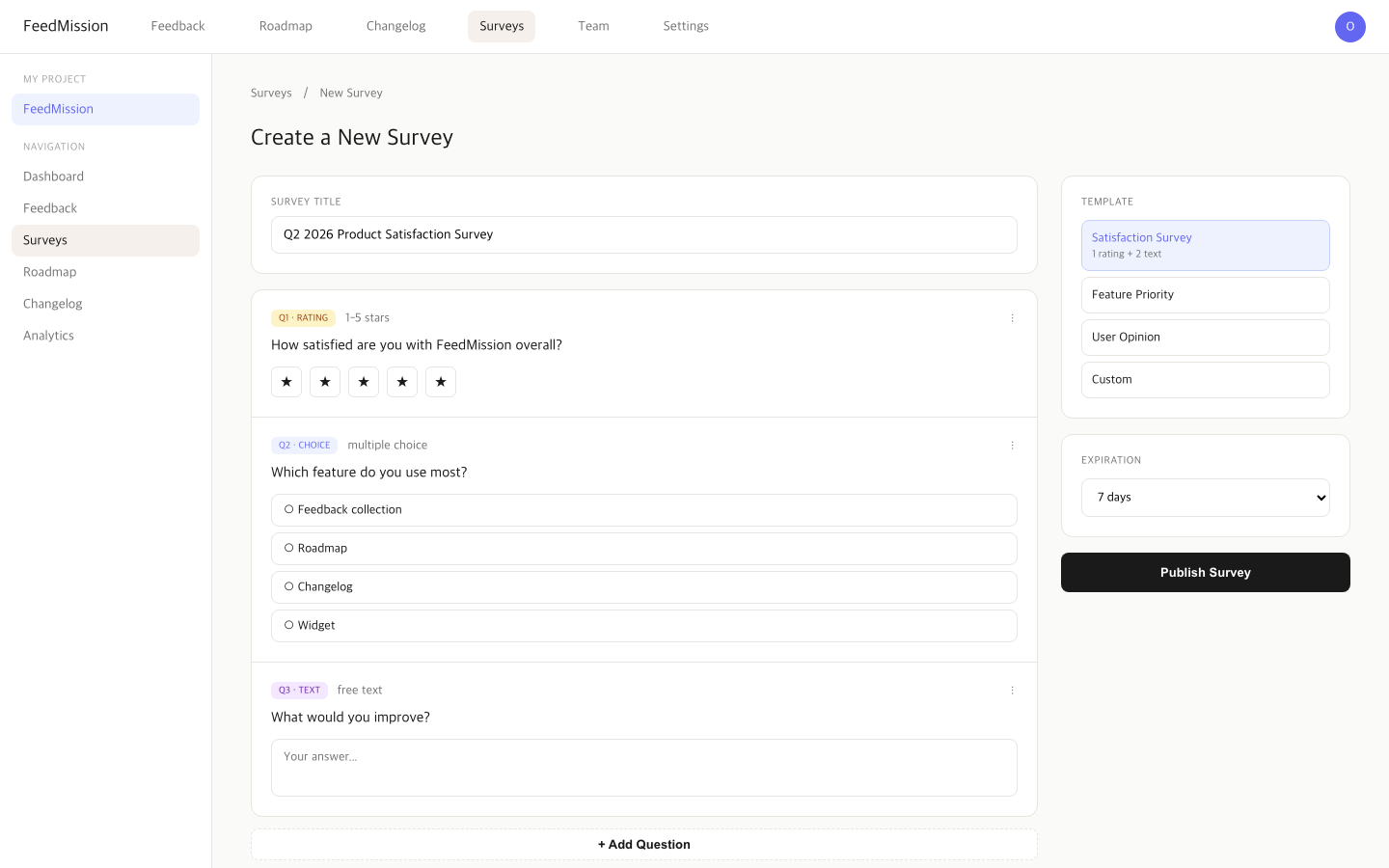
Survey builder — pick the purpose first
Starting from a blank canvas makes it hard to know what to ask. So I put purpose selection first. 4 templates.
Pick a template and questions pre-fill. Edit or add from there. Expiration is configurable: unlimited, 1 day, 3 days, 7 days, 14 days, 30 days, custom.
Response validation — don’t trust user input
Public surveys mean anyone can send responses. Validation is mandatory.
RATING: integers 1-5 only
TEXT: max 5,000 chars
CHOICE: only defined options
// Rate Limit: 10/min per IP
// Expired surveys: auto-CLOSED
// Required questions: 400 if empty
Added rate limiting. 10 requests per minute per IP. Blocks bots from flooding responses. When expired surveys receive responses, they auto-close and return “survey has ended.”
Aggregation + AI summary
When responses accumulate, I aggregate. Each question type handled differently.
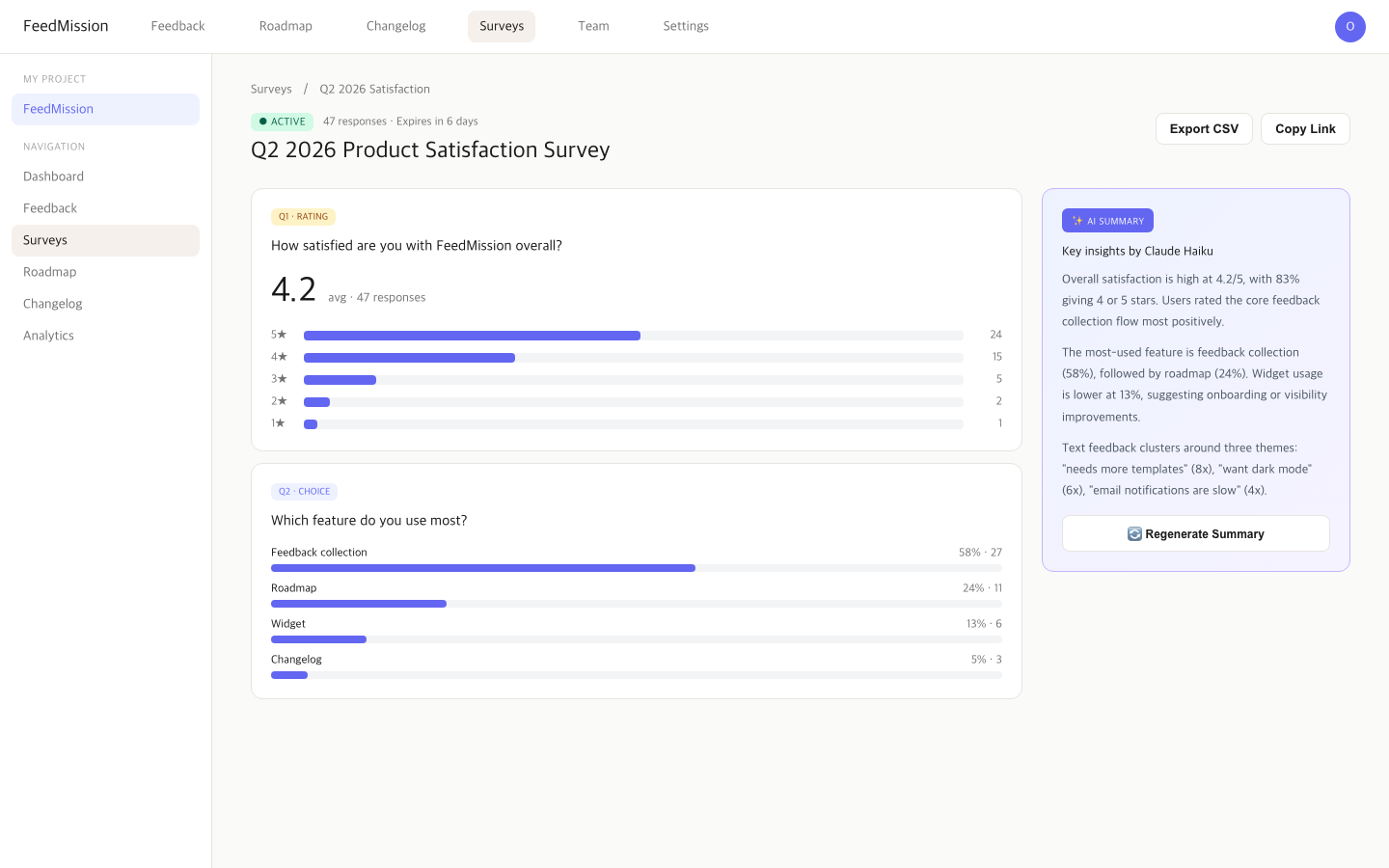
CHOICE: count per option + percentage (bar chart)
TEXT: first 50 answers listed
Connected Claude Haiku. Press “summarize this survey” and it organizes per-question response data and sends to Claude. Rating averages, choice distributions, text patterns — all summarized. The summary saves to survey.aiSummary. Re-generation supported.
CSV export too. Download via ?format=csv parameter. One thing I was careful about: CSV Formula Injection defense. Cell values starting with =, +, -, or @ get interpreted as formulas by Excel. Malicious responses could execute on the CSV opener’s machine. Prefixed these with ' to force text treatment.
Feedback status — now I know what I’ve reviewed
Once feedback crosses 50, you start losing track of what you’ve seen. Added status.
// Filter + search
GET /api/feedback?status=OPEN&search=dark+mode
// Change status
PUT /api/feedback { id, status: “IN_PROGRESS” }
Feedback list supports status filtering and title/body search. Status changes get validated server-side. Simple feature, but having it vs not having it is a big difference.
Feedback merging — combine duplicate requests
EP.05 used AI clustering to group similar feedback. But “completely identical requests” should be merged, not just grouped. If “add dark mode” comes in three times, don’t keep all three — merge into one and combine the vote counts.
model Feedback {
mergedIntoId String? // merged target
mergedInto Feedback? // target feedback
mergedFrom Feedback[] // merged-in items
}
Merged feedback doesn’t show in the list. Only queries where mergedIntoId: null. The target feedback shows a count like “3 feedback items merged.”
Slack notifications — know immediately when feedback arrives
Built email notifications in EP.06. But email takes time to check. Teams using Slack benefit from feedback landing in a channel the moment it arrives.
export async function sendSlackNotification(webhookUrl, payload)
// SSRF defense: only hooks.slack.com allowed
const url = new URL(webhookUrl)
if (!url.hostname.endsWith(‘hooks.slack.com’)) return false
Add a Slack Incoming Webhook URL to project settings, and every new feedback triggers a message. Title, type (Feature/Bug/Other), author, dashboard link included. Runs in the same after() block as email sending from EP.06.
Since users input the webhook URL, added SSRF (Server-Side Request Forgery) defense. Requests don’t send if the hostname isn’t hooks.slack.com. Prevents requests from reaching internal networks.
How to show surveys to users
Built the surveys — how do I show them to users? Could email links. Could embed in the widget. But most natural was putting them on the public board users already visit.
Public board (/p/[slug]) already has Feedback, Roadmap, and Changelog tabs. Added a Survey tab. But it shouldn’t always show. Only appears when an active survey exists. No survey or all closed? Tab disappears. Users know “there’s something to participate in” just from the tab’s presence.
Put a small green dot next to the tab. Visual indicator of active surveys. Gives a “something new” feeling without being pushy. Popups or banners yelling “please take our survey!” are annoying.
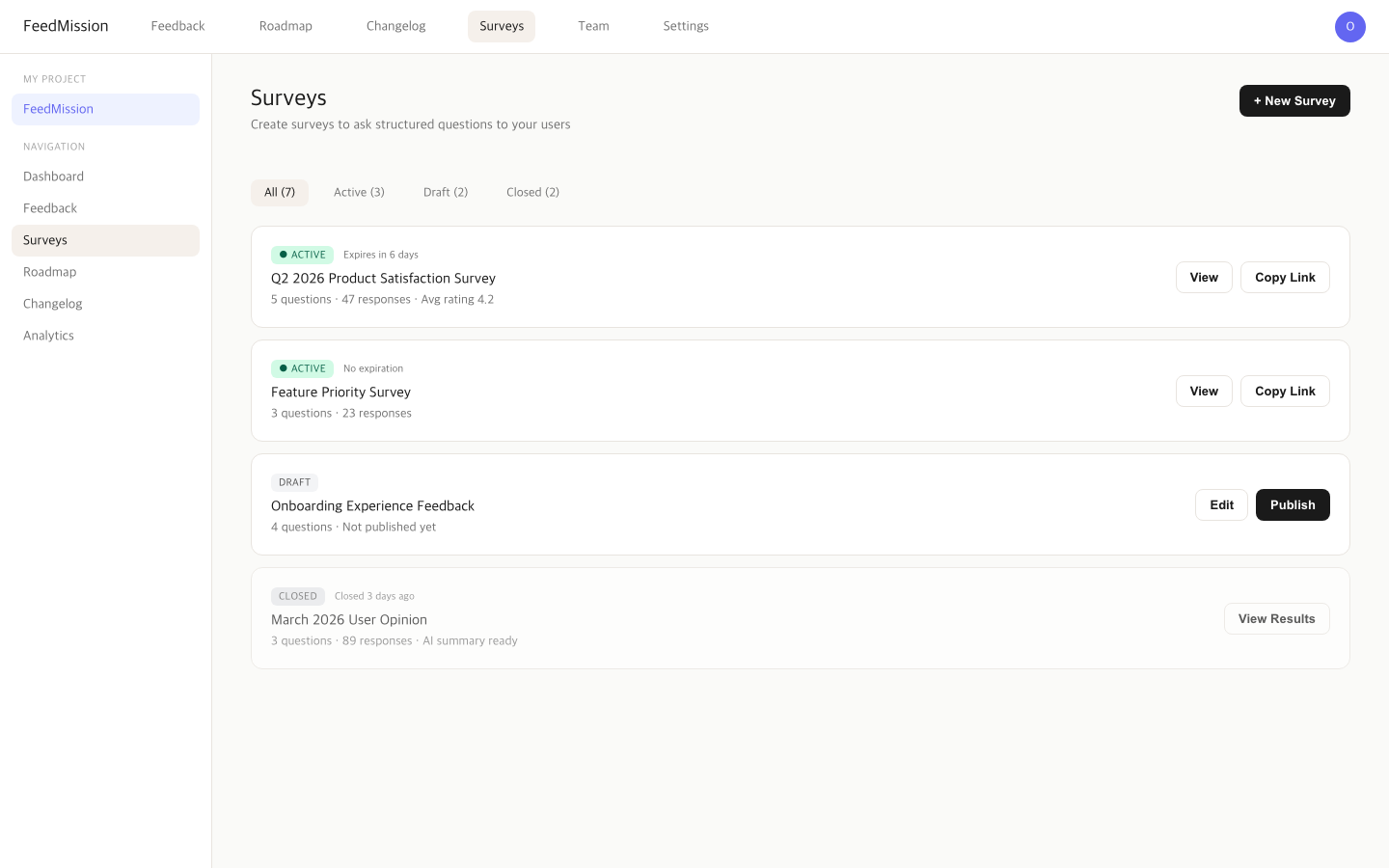
Can share survey URLs directly too. Click copy link in dashboard, /p/[slug]/survey/[surveyId] goes to clipboard. Share via email or social. Subdomain routing too, so myapp.feedmission.com format works.
Surveys through the widget too
Showing surveys through the public board tab is fine. But it requires users to visit the public board. The widget from EP.08 is already embedded inside the user’s app. If the widget can surface “there’s an active survey” when opened, users respond immediately without needing another page.
Plan: small banner at the top of the widget panel when an active survey exists. “Take our survey” one-liner, tap to open the survey form inside the widget. Feedback form and survey form swap inside the same widget. Users get “one widget for feedback and surveys.”
This feature is in progress. Need to add survey state checks and form rendering to widget.js, and replicate the same UX in iOS/Android SDKs. Once done, one widget handles feedback collection, survey responses, and public board links.
Surveys are PRO-only
EP.07 set up the plan matrix. Surveys live in PRO only. FREE and STARTER can’t use them.
Reason is cost. Survey result AI summaries call Claude API. More survey responses = more API calls. Leaving this open on free plans breaks cost control. Extension of EP.07’s “80% free, core paid features drive conversion” logic. Feedback collection and management work on all plans. Surveys work on PRO.
6,352 lines in a day
Today’s code additions summarized.
Survey feature was biggest at 2,143 lines. Feedback enhancements 482, team members 387, votes/subscribers 362. Most code added in a day since EP.04’s 52-minute MVP.
Ran code review three times. 93/100. Security fixes and quality improvements landed in the last two commits. Applied the same patterns caught in EP.06 (frontend exposure prevention, auth hardening).
FeedMission is evolving from “feedback collection tool” to “feedback + surveys + team collaboration platform.” Not sure what’ll annoy me next. When it does, I’ll build for it again.