I Got Tired of Sorting User Feedback, So I Let AI Classify It
I Got Tired of Sorting User Feedback, So I Let AI Classify It
목차 (13)
- Group similar feedback — but how?
- My first embedding with Voyage AI
- pgvector — storing 1024 numbers in the DB
- Find things similar to this — similarity search
- 0.85 was the answer — how I chose the threshold
- Cluster assignment — join or create
- How Claude names the groups
- Priority — what to look at first
- The after() pattern — users dont wait
- Problems I ran into while building this
- Automated feedback classification in 188 lines
- FAQ
- Related posts
April 2026 · Lazy Developer EP.05
In EP.04, I built FeedMission in 7 days. I attached the widget, opened the public board, and feedback started coming in. At first, it was great. Feedback means someone’s actually using it.
But once it starts piling up, a different problem emerges. “Please add dark mode.” “It hurts my eyes at night.” “Add a background color option.” Three people said three different things, but the request is the same. Manually grouping these is fine when there are 10. Past 50, just reading them eats up your time.
In EP.02, I automated revenue tracking. In EP.03, I automated analysis. This time, it was feedback classification’s turn. I asked Claude: “Can you automatically group similar feedback?” The answer was “embeddings.”
– Convert feedback text into a 1024-number array with Voyage AI (embeddings)
– Simultaneously analyze sentiment scores (-1.0 to 1.0) with Claude Haiku
– Enable the pgvector extension on PostgreSQL for vector storage + similarity search
– Cosine similarity >= 0.85 means same group; below that creates a new group
– When a group grows, Claude automatically re-generates the name and summary
– The entire pipeline runs in the background via the after() pattern
– It all fits in 188 lines of clustering.ts
“Group similar feedback” — but how?
“Please add dark mode” and “It hurts my eyes at night” share zero words. But they’re the same request. How do you tell a computer that? You convert the sentence into 1024 numbers. Similar meanings produce similar numbers. Think of it like a food delivery app — searching “late night cravings” finds both fried chicken and pork feet at the same time. It searches by meaning, not by matching words.
When I asked Claude “Can you automatically group similar feedback?”, it told me these number arrays are called “embeddings.” Each sentence gets a coordinate made of 1024 numbers, and if the coordinates are close, they’re considered similar requests.
The explanation made sense, but I couldn’t quite picture it. So I tried it myself.
My first embedding with Voyage AI
I used a service called Voyage AI. Send a sentence to the API and you get back 1024 numbers. The code is short.
const response = await fetch(‘https://api.voyageai.com/v1/embeddings’, {
body: JSON.stringify({
model: ‘voyage-3-lite’,
input: [“Please add dark mode”],
}),
})
// → [0.0234, -0.0891, 0.0412, …] (1024 numbers)
One API call and that’s it. The returned number array is like a “meaning coordinate” for that sentence. “It hurts my eyes at night” produces a similar coordinate. Measure the distance between the two and you get a number telling you “how similar these two sentences are.”
I ran sentiment analysis at the same time. I told Claude Haiku: “Give me a single number between -1 and 1 for whether this sentence is positive or negative.” “Please add dark mode” came back as 0.1 (neutral), “Why isn’t this available yet?” came back as -0.4 (negative). Same request, different temperature. Knowing this lets you prioritize features that users are starting to get frustrated about.
I ran both tasks simultaneously with Promise.all. Sequential takes 500ms; parallel takes 300ms.
“Why not just send two pieces of feedback to Claude and ask if they’re similar?” Of course that works. Accuracy would probably be higher too. But with 100 feedback items, that’s 4,950 comparison pairs. Calling the Claude API for each one is unmanageable in both time and cost. With embeddings, you create them once and the DB handles comparisons with math. Measuring distances between numbers finishes in milliseconds without any API calls. Even at 1,000 feedback items, search speed stays roughly the same.
Embeddings aren’t a silver bullet, though. They’re weak with numbers. “I need 3 buttons” and “I need 30 buttons” have completely different meanings, but their embedding coordinates come out nearly identical. Negation is the same problem. “Dark mode is great” and “Dark mode is terrible” land on similar coordinates. If the sentence structure is similar, even opposite meanings end up close together. I’m aware of this. But given the nature of FeedMission’s feedback, these cases weren’t common. If you try to catch every edge case from the start, you’ll never ship the core feature. Build a structure that covers 80% quickly, and fix the remaining 20% when actual problems arise. Once thousands of feedback items pile up and misclassifications become visible, I’ll refine it then. Shipping and iterating is faster than building perfectly before launch.
pgvector — storing 1024 numbers in the DB
I had the embeddings. The question was where to store them. There are dedicated vector DBs like Pinecone. But I was already using Supabase PostgreSQL. I didn’t want to manage yet another database.
There was a PostgreSQL extension called pgvector. Enable it and you can store and compare vectors in your existing DB. One line in the Prisma schema.
model Feedback {
embedding Unsupported(“vector(1024)”)? // ← this
sentiment Float?
}
But there was a catch. Prisma doesn’t officially support pgvector. Declaring it as Unsupported creates the schema, but you can’t read or write this column through the normal Prisma API. You have to write raw SQL.
const vectorStr = `[${embedding.join(‘,’)}]`
await prisma.$executeRawUnsafe(
`UPDATE “Feedback”
SET embedding = $1::vector, sentiment = $2
WHERE id = $3`,
vectorStr, sentiment, feedbackId
)
Convert the 1024 numbers into a string and cast it with ::vector. Use regular Prisma for everything else, raw SQL only for vector operations. A hybrid approach. Not elegant, but it works.
“Find things similar to this” — similarity search
With vectors stored, I could compare them. When new feedback comes in, it gets scored against existing feedback for similarity. pgvector has the <=> operator. It calculates cosine distance.
SELECT id, title,
1 – (embedding <=> $1::vector) as similarity
FROM “Feedback”
WHERE “projectId” = $2
AND id != $3 — exclude self (important!)
ORDER BY embedding <=> $1::vector
LIMIT 5
Converting with 1 - distance gives you similarity. 1 means identical, 0 means unrelated. And AND id != $3. Forgetting this one cost me quite a while.
The item matched itself with similarity 1.0. Obviously. It’s the most similar to itself. Every new piece of feedback joined an existing cluster, and new clusters never got created. I stared at “Why is everything going into one group?” for a long time before I figured it out. Fixed with one line, but took a while to find.
If you don’t exclude the item itself from results, you always get similarity 1.0. Every piece of feedback gets classified as “identical to something that already exists,” and new groups never get created. A single line —
AND id != $3 — determines the correctness of the entire logic.
0.85 was the answer — how I chose the threshold
I had similarity scores. But I needed to decide “how similar is similar enough to be the same request?” This wasn’t something I could determine theoretically. I created 20 pieces of test feedback and experimented directly.
At 0.85, “the same request worded differently” grouped well. In the code, it’s managed as a single constant.
Cluster assignment — join or create
The similarity search result leads to one of two outcomes. If there’s feedback with similarity 0.85 or above, it joins that feedback’s group. If not, a new group gets created.
const bestMatch = similar.find(
s => s.similarity >= 0.85 && s.clusterId
)
if (bestMatch) {
// join existing group
} else {
// ask Claude for a name and create new group
}
Every time feedback joins a group, the feedback count gets updated. And every time the group grows, the name gets regenerated.
if (count % 3 === 0 || count === 2) {
await refreshClusterSummary(clusterId)
}
Why multiples of 3? A name given when there’s 1 feedback item reflects just that one item’s content. At 2, common patterns start to emerge. At 3, 6, 9, the character might shift. Calling Claude every time would inflate API costs, so it only refreshes at multiples of 3.
How Claude names the groups
I collected all feedback in a group and sent it to Claude Haiku. “Give me a title under 30 characters and a summary under 80 characters for the common theme of these items. In JSON.”
“Return ONLY valid JSON:
{\”title\”: \”…\”, \”summary\”: \”…\”}”
// Claude response example
{ “title”: “Dark Mode / Theme Custom”,
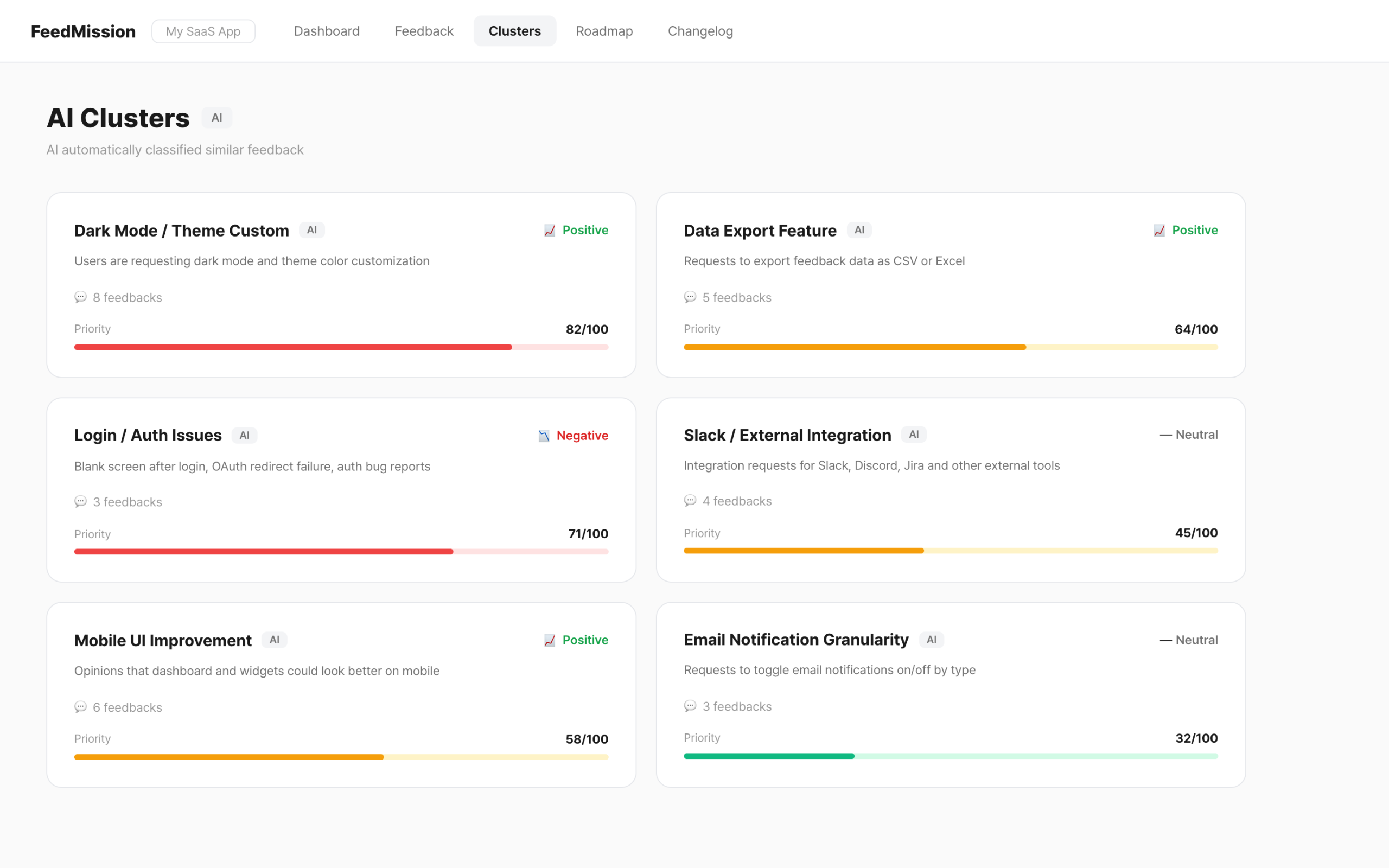
“summary”: “Users are requesting dark mode and theme color options” }
Worked well. But occasionally Claude wrapped the JSON in a code block. In the ```json ... ``` format. Running JSON.parse on that obviously throws an error. I added a defensive regex to strip the code block markers.
if (text.startsWith(‘“`’)) {
text = text.replace(/^“`(?:json)?\s*\n?/, ”)
.replace(/\n?“`\s*$/, ”)
}
AI responses are never 100% predictable. You always need a fallback. If parsing fails, the entire text becomes the title.
Priority — what to look at first
Once you have more than 10 groups, you need an order. I made it so “things many people have recently and frequently requested” rise to the top.
votes 50% + feedback count 30% + recency 20%
// 50 votes = max score, 10 feedbacks = max score
// recency hits 0 after 50 days since last feedback
Votes carry the most weight at 50%. Feedback count is 30%. Recency is 20%. This formula produces a score between 0 and 100. 70 or above shows in red, 40 or above in yellow, below that in green.
The after() pattern — users don’t wait
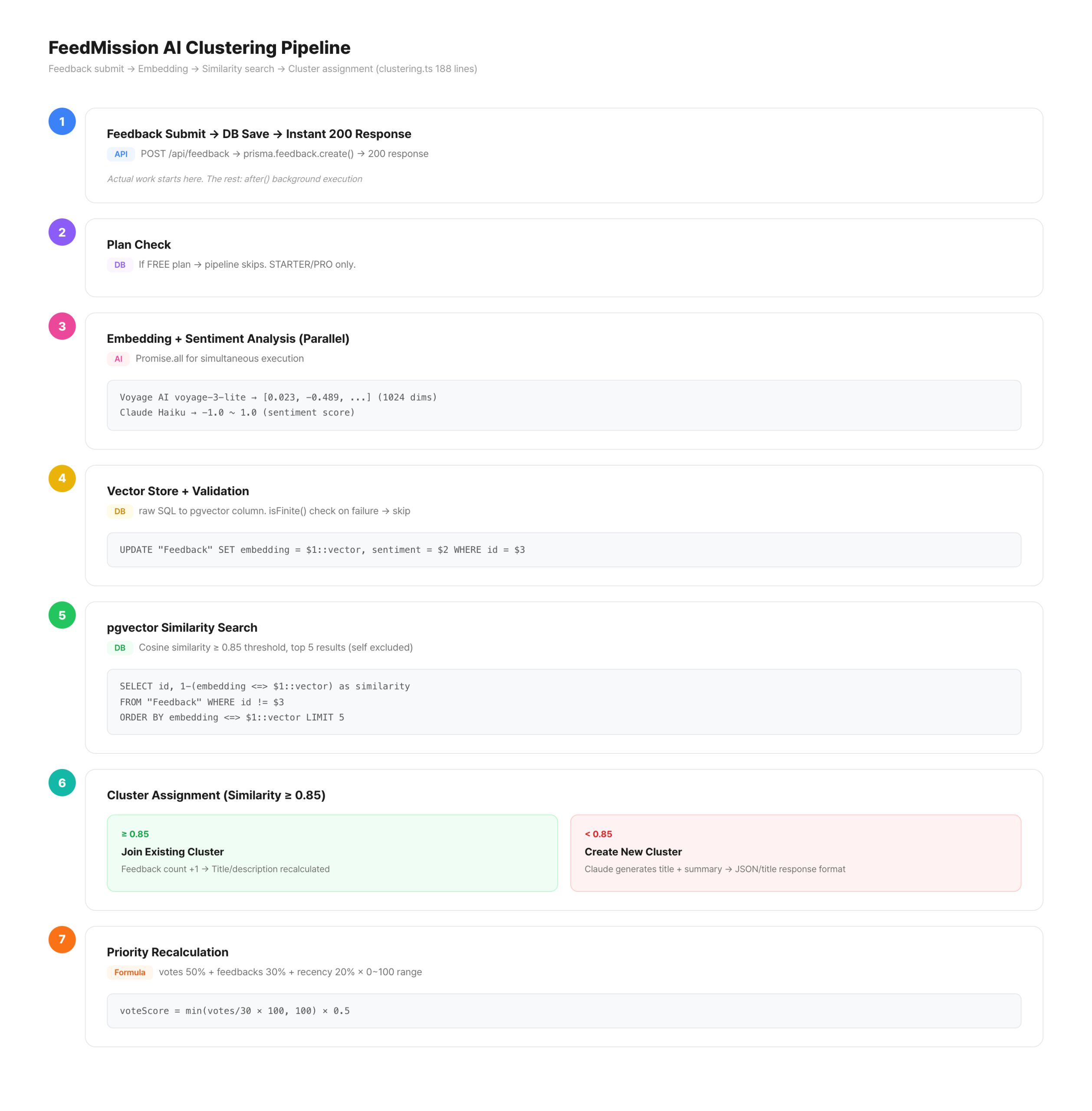
This entire pipeline runs inside the feedback submission API. Embeddings + sentiment analysis + similarity search + cluster assignment + priority calculation. All together, it takes 1-2 seconds. Making the user wait 2 seconds after pressing “Submit Feedback” is bad UX.
I used the same pattern from EP.02, where I dodged the Vercel Cron timeout. after(). Like paying at a convenience store — the transaction finishes immediately, and the receipt prints afterward.
const feedback = await prisma.feedback.create({ … })
const response = NextResponse.json(feedback, { status: 201 })
// ↑ immediately return “received”
after(async () => {
await processFeedbackAsync(feedback.id)
// ↑ embedding + clustering runs in background
})
return response
The user sees “Feedback received” right away. Behind the scenes, AI quietly finishes the classification. Refresh the dashboard and the new feedback is in the right group.
Problems I ran into while building this
Here’s a collection of problems I hit along the way. Hopefully others can avoid the same mistakes.
isFinite() validation, the DB gets corrupted.recalculatePriority() when joining an existing group and forgot to call it when creating new ones. New groups always had priority 0, making the sort meaningless.```json```. Regex stripping + try-catch + fallback are essential.Automated feedback classification in 188 lines
clustering.ts — the entire pipeline fits in 188 lines. 2 external APIs (Voyage + Claude), 5-7 DB queries, 1 branch. All in one file, so the flow is easy to follow.
Now when feedback comes in, there’s no need to manually read and group them. AI classifies, names, and prioritizes everything. Open the dashboard and “what users want most right now” is displayed in order of score.
In EP.02, I automated revenue data. In EP.03, analysis and judgment. In EP.04, an entire SaaS. This time, feedback classification. Next up, I’ll write about security vulnerabilities and email debugging.