Cursor vs Windsurf vs OpenAI Codex — March 2026 AI Coding Tool Comparison
We compared Cursor, Windsurf, and OpenAI Codex. In March 2026, when OpenAI announced its super app and Astral acquisition, we honestly reviewed the performance, pricing, and features of all three tools. Find out which AI coding tool to use right now.
목차 (8)
March 25, 2026 · Comparison
Letting AI handle your coding has become the norm. The problem is there are too many tools. Cursor, Windsurf, and OpenAI’s Codex — all three are claiming to be the best.
On March 20, OpenAI made an interesting announcement. They plan to merge ChatGPT, Codex, and the Atlas browser into a single desktop super app. On top of that, they acquired Astral, the Python dev tool startup. uv, Ruff, ty — every developer knows these tools.
This is news that could shake the entire AI coding market. It’s a declaration that OpenAI is jumping directly into the space Cursor and Windsurf have been holding. I tried all three tools hands-on and compared them.
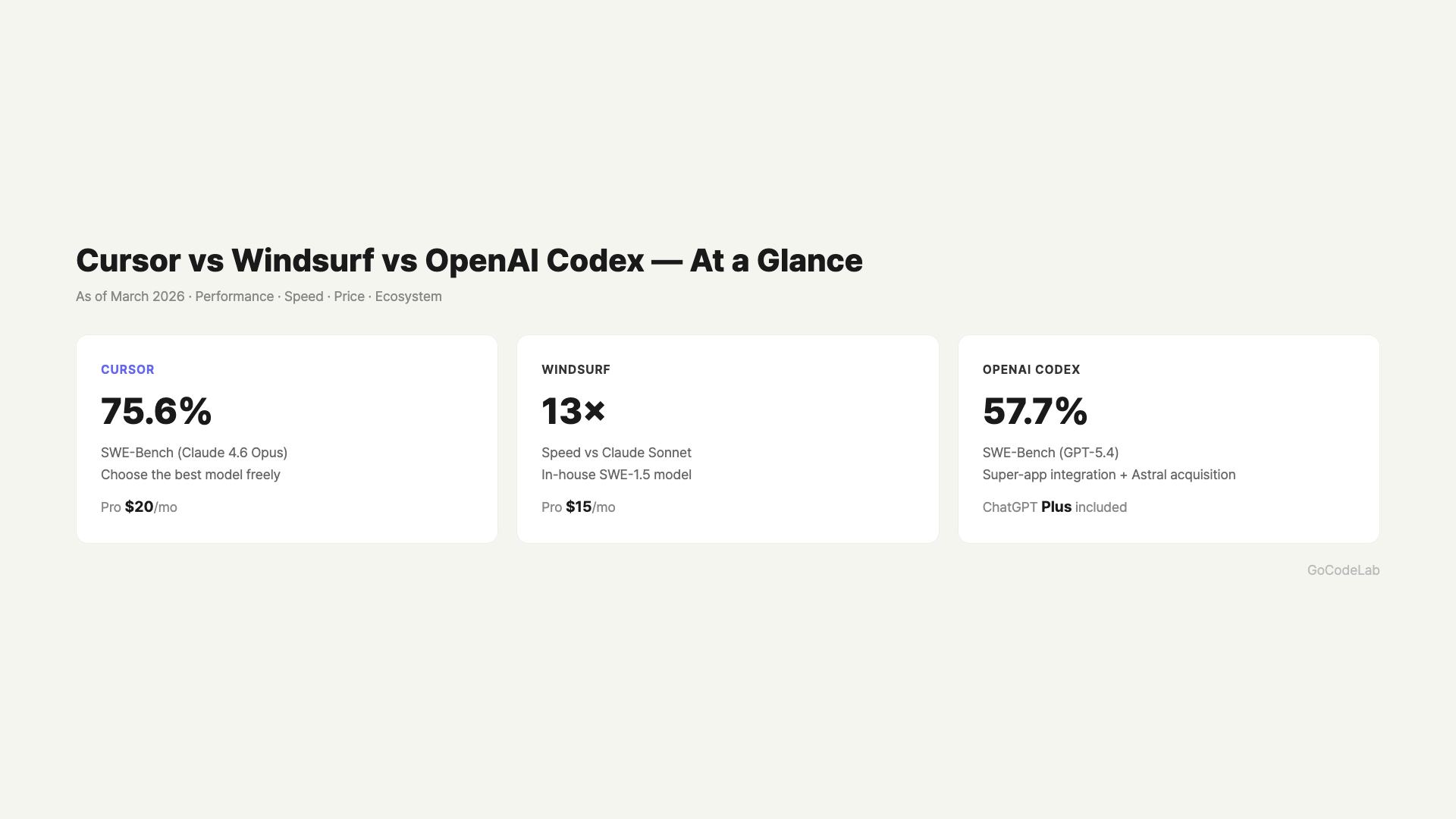
– Cursor: Best model combo (Claude 4.6 Opus, GPT-5.4) — go here if performance is your priority
– Windsurf: Fast with its own SWE-1.5 model, cheaper than Cursor at $15/month
– OpenAI Codex: Super app integration + Astral acquisition makes it especially promising for Python devs
– Best tool right now: Cursor for performance, Windsurf for value + speed
Why OpenAI Is Building a Codex Super App
This was reported by The Wall Street Journal on March 20 and confirmed by OpenAI. They’re bundling ChatGPT, Codex, and the Atlas browser into a single desktop app. It means these three things, currently separate, will be accessible from one interface.
The Astral acquisition was also officially announced the same day. Astral is the company behind tools Python developers love. Package manager uv, code linter Ruff, type checker ty — all three are Astral products. OpenAI said they’ll integrate these tools directly into Codex.
The current Codex is a web-based coding agent available to ChatGPT Pro subscribers. It creates and tests code in an isolated sandbox environment. When the super app is complete, the Atlas browser and ChatGPT’s conversational capabilities will be merged in.
This is concerning news for Cursor and Windsurf. OpenAI is jumping directly into the coding tool competition. However, the super app launch timeline hasn’t been disclosed yet. They said the mobile ChatGPT app will remain as-is.
The Astral acquisition isn’t just a tool purchase. uv is a package installer that spread quickly among developers for being 10-100x faster than pip. Ruff is regarded as the fastest Python linter available. If OpenAI integrates both into Codex, AI can write code while simultaneously handling package management and code quality checks.
Looking at the competitive landscape, OpenAI has been in the position of supplying models to Cursor and Windsurf. They’ve provided GPT via API, and both tools paid fees for using OpenAI models. Once the super app launches, OpenAI becomes both supplier and competitor. From Cursor and Windsurf’s perspective, their biggest partner is now entering the market directly.
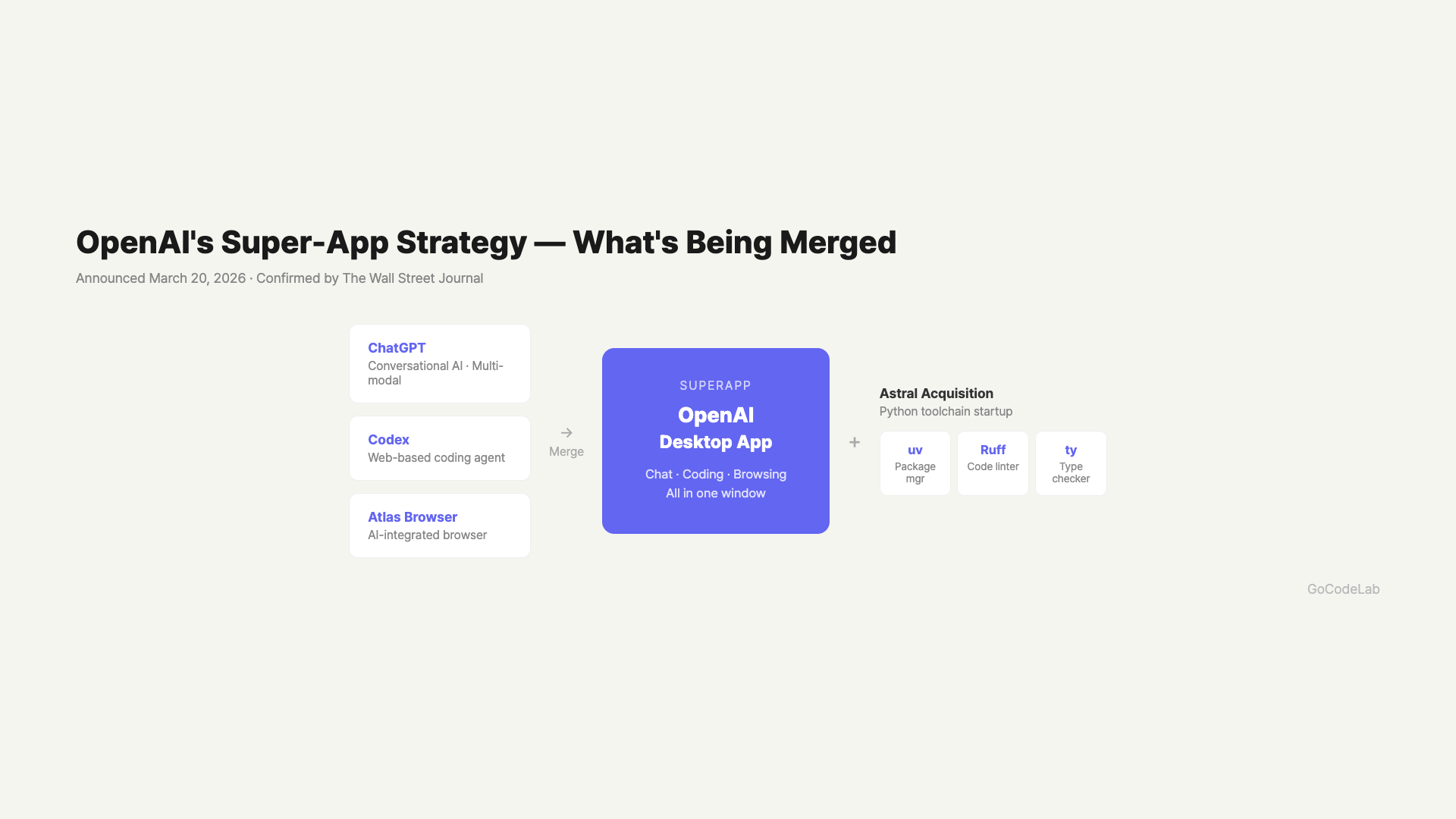
ChatGPT + Codex + Atlas + Astral Integration Plan / GoCodeLab
Cursor — Strong Models, Same Price
Cursor was the first to establish itself in the AI coding editor market. It’s based on VS Code, so it feels familiar and works with existing VS Code plugins. The interface looks similar, so even first-time users get up to speed quickly.
Its strength is model flexibility. You can switch between top-tier models like Claude 4.6 Opus, GPT-5.4, and Gemini 3.1 Pro on the fly. On SWE-Bench, the coding performance benchmark, Claude 4.6 Opus scored 75.6%. Using this model in Cursor delivers impressive coding performance.
The Pro plan is $20/month. Teams is $40/month. However, high-performance models have separate usage limits. Many users report hitting limits quickly with heavy use. If you have high daily workloads, check this in advance.
Beyond coding tasks, there’s an agent mode that can automatically create and modify files. It’s great for delegating step-by-step work on complex projects.
Agent mode’s practicality is notable. Rather than just completing a single line of code, it automatically continues a flow of creating new files per feature, modifying existing files, and catching errors. One prompt can handle work across multiple files, which feels like a step above simple autocomplete.
The downsides are clear too. There are limits on high-performance model usage. Top models like Claude 4.6 Opus hit their daily cap quickly. Once you exceed the limit, it either auto-switches to a slower model or incurs additional charges. If you’re in a high-volume daily environment, this is something you must check first.
Windsurf — Winning on Speed with Its Own Model
Windsurf is the challenger that gained attention starting late 2025. Its standout feature is the proprietary SWE-1.5 model. According to official announcements, it’s 13x faster than Claude Sonnet 4.5. The speed difference is definitely noticeable.
The Wave 13 update added two features. First is parallel agent sessions. You can work on multiple parts of the same codebase simultaneously. Useful when working on frontend and backend at the same time. Second is Cascade Hooks. It automatically runs linters, tests, and custom scripts before and after code writing.
Pricing is cheaper than Cursor. Pro is $15/month, Teams is $30/month. There’s also a free plan, and a new Max plan recently launched for power users. It’s a good fit for people who think there’s no reason to pay more for the same features.
Another advantage of Windsurf is that the free plan is more generous than you’d expect. You can use SWE-1.5-based features to some extent on the free plan, making it easy for beginners to try without any barrier. Being able to test before committing to Pro is a real strength.
The disappointing part is that SWE-1.5’s SWE-Bench score hasn’t been disclosed. Windsurf describes it as “near-frontier quality,” but there’s no independent verification yet. Real-world user experiences are mostly positive, but the lack of official numbers limits objective comparison. This is honestly a bit frustrating.
Three-Way Comparison: Performance, Features, Price
The differences become clearer when you compare the numbers.
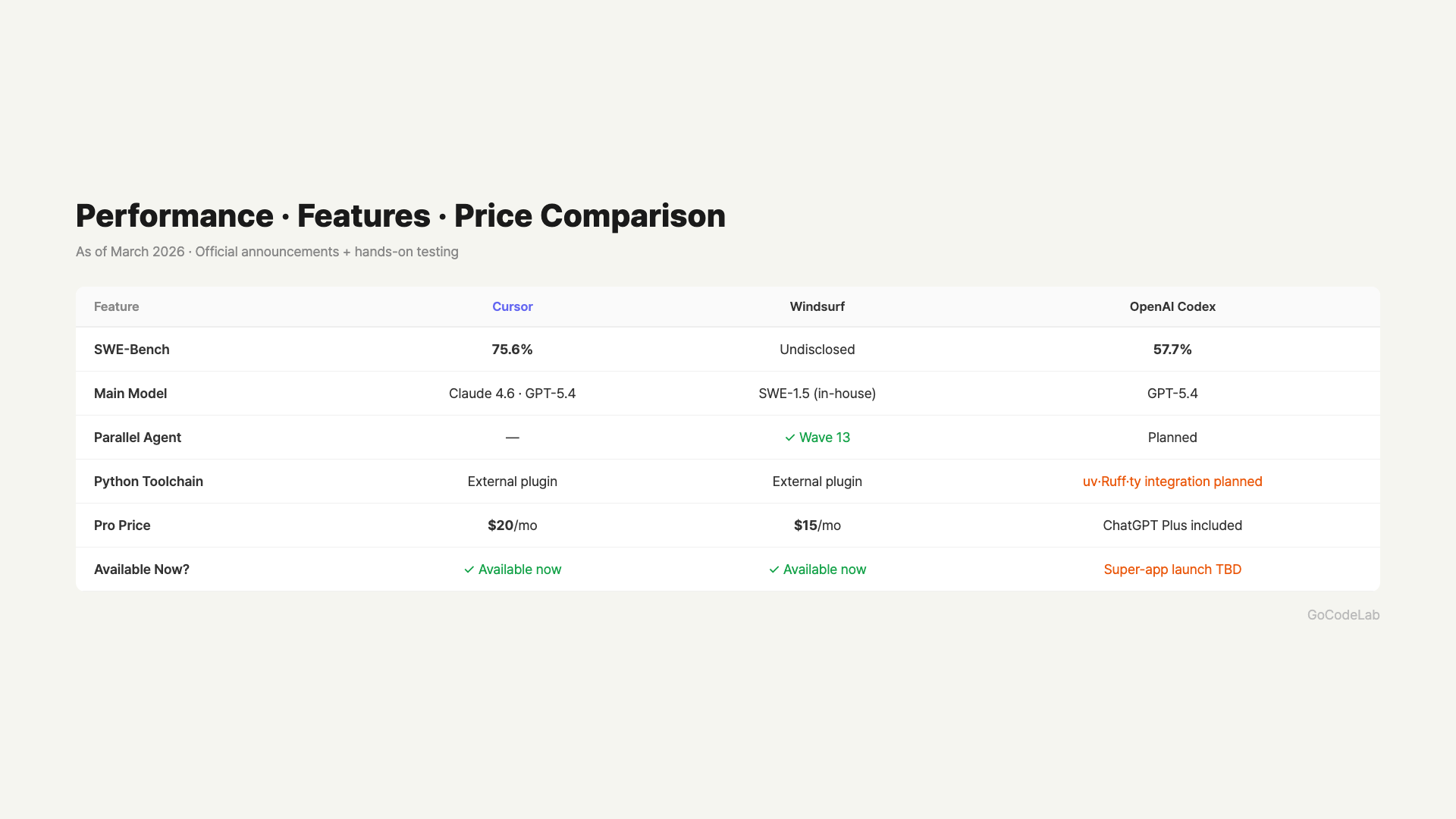
| Category | Cursor | Windsurf | OpenAI Codex |
|---|---|---|---|
| Base Editor | VS Code | VS Code Fork | Web-based (Super app planned) |
| Primary Model | Claude 4.6, GPT-5.4, etc. | SWE-1.5 (Proprietary) | GPT-5.4 |
| Best SWE-Bench Score | 75.6% (Claude 4.6) | Proprietary model (undisclosed) | 57.7% (GPT-5.4) |
| Parallel Agents | – | Supported (Wave 13) | Planned with super app |
| Pro Price | $20/mo | $15/mo | Included with ChatGPT Plus |
| Teams Price | $40/mo | $30/mo | – |
| Python Toolchain | External plugins | External plugins | uv, Ruff, ty integration planned |
SWE-Bench measures how well AI solves real open-source coding tasks. A score of 75.6% means AI can independently fix about 76 out of 100 real bugs.
Which Tool Should You Pick?
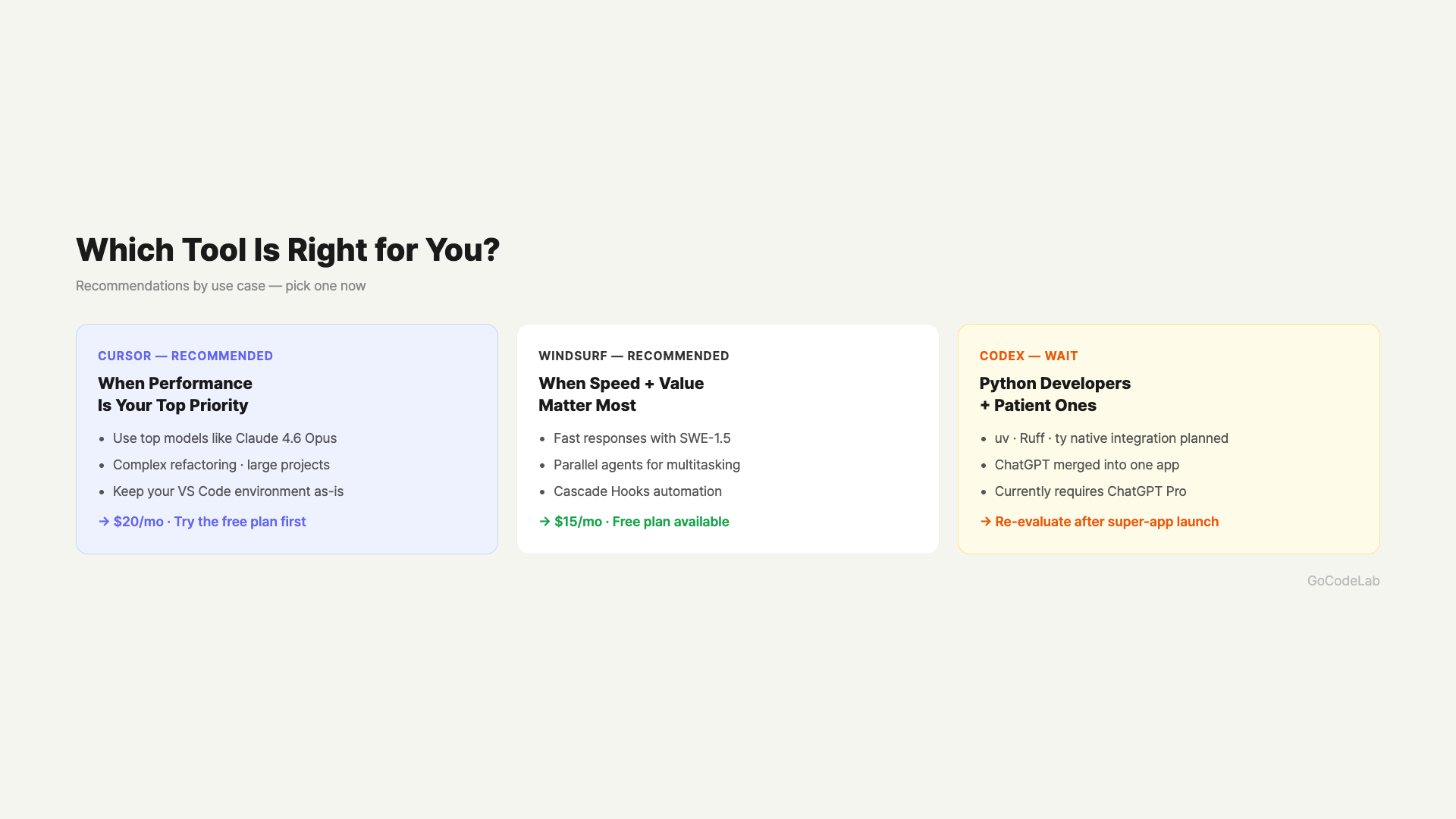
The recommendation changes depending on your situation. It’s hard to say one tool is universally best.
When Cursor is the right choice: If performance is your top priority, go with Cursor. You can pick from top-performing models like Claude 4.6 Opus and GPT-5.4, delivering better results on complex coding tasks. It’s also a popular choice for team use. However, $20/month may feel steep, and heavy usage incurs additional costs.
When Windsurf is the right choice: This is a bit different. If you need fast response times or want to save on monthly subscription costs, Windsurf is great. The parallel agent feature lets you run multiple tasks simultaneously, which noticeably boosts productivity. In terms of value for money, it’s the best among the three right now.
When it’s worth waiting for Codex: If you primarily work with Python, Codex after the Astral integration could be quite appealing. With uv and Ruff built in, AI handles package installation and code cleanup together. However, the super app launch date is still TBD. If you need something right now, choosing between Cursor and Windsurf is the realistic move.
If you’re just starting to code or only use these tools occasionally, I’d recommend trying the free plans of Windsurf or Cursor first. Both tools let you start for free.
For teams, collaboration features are worth evaluating. Cursor Teams ($40/mo) and Windsurf Teams ($30/mo) offer shared context and admin features. The price difference grows with team size, so calculate based on your team. A 5-person team pays $150/month on Windsurf vs. $200 on Cursor.
How Is the Developer Community Actually Reacting?
Sometimes real developer feedback is more honest than benchmark numbers. Here’s a summary of reactions from Reddit, Dev.to, and LinkedIn.
Sentiment toward Windsurf is shifting. In 2025, “just use Cursor” was the overwhelming opinion. But since early 2026, reviews saying “switched to Windsurf and it’s actually better” are growing. In LogRocket’s AI development tool power rankings (February 2026), Windsurf overtook Cursor for the #1 spot. It’s particularly popular among beginner developers. Many note that the Cascade flow works more predictably than Cursor’s agent.
Cursor’s actual cost issue comes up frequently. “They said Pro was $20/month but I actually paid $40-50” is a common complaint. High-performance model requests burn through credits quickly, and Cloud Agent usage is billed separately. Cursor does disclose this structure, but first-time users may find it hard to understand how charges add up.
Claude Code is the new wildcard. Unlike Cursor or Windsurf which are editors, Claude Code is a terminal-based agent gaining prominence. Instead of adding plugins to an existing IDE, AI directly creates files and runs commands from the terminal. Among experienced developers, “VS Code + Claude Code terminal combo is the best” is a growing sentiment. The real AI coding tool competition is effectively a three-way race between Anthropic, OpenAI, and Windsurf (Codeium).
Cursor Pro’s official price is $20/month, but if you use high-performance models (Claude 4.6 Opus, GPT-5.4) intensively every day, actual spending can climb to $40-50. For heavy users, Windsurf Pro ($15) + connecting your own API when needed is worth considering.
What do developers prefer? If code autocomplete accuracy and access to top-tier LLMs matter most, Cursor still leads. If fast response times and cost savings are priorities, Windsurf is the popular choice. One thing common across all three tools: results are more stable when you write prompts in English rather than other languages.
FAQ
Q. What is SWE-Bench? Does a higher score always mean better?
SWE-Bench measures how well AI fixes real GitHub issues and bugs. A higher score means stronger real-world coding task resolution. However, this benchmark doesn’t reflect every situation. Sometimes it’s more important to check how well it matches the type of tasks you frequently do.
Q. Can I try both Cursor and Windsurf for free?
Yes, both have free plans. Cursor provides a monthly allotment of free AI usage, and Windsurf lets you use basic features on the free plan. It’s best to try both for free before going Pro to find the right fit.
Q. When the OpenAI super app launches, will Cursor or Windsurf disappear?
That’s unlikely. Cursor and Windsurf already have solid developer communities and unique features. Even when the OpenAI super app arrives, it means more intense competition, not the end of existing tools. Competition often makes each tool improve faster.
Q. How does the Astral acquisition affect regular users?
You won’t feel much impact right away. Astral tools (uv, Ruff, ty) are primarily used by Python developers, so the effect on non-coding users is minimal. However, once integrated into Codex, asking AI to write Python code will likely produce more accurate and cleaner results.
Q. Are all three tools available globally?
Yes, all three tools are accessible worldwide. Cursor and Windsurf are used by installing the editor, and Codex is accessed through the ChatGPT interface. They support various language inputs. However, writing prompts in English tends to produce more stable results.
Q. Can Claude Code replace Cursor or Windsurf?
Claude Code is a terminal-based agent, not an editor. If you’re comfortable with editors like VS Code, Cursor or Windsurf will feel more natural. But for developers comfortable with the terminal and experienced in coding, the VS Code + Claude Code terminal combo can actually be more powerful. The three tools overlap somewhat but serve slightly different purposes. If you don’t want to change your editor environment right now, starting with Cursor or Windsurf is the realistic choice.
Q. Windsurf ranked #1 on LogRocket — is it actually the best?
Rankings are composite scores based on multiple criteria. Windsurf scored high in usability, value for money, and beginner-friendliness to reach #1. But “best” depends on the situation. If you want free access to the latest top-performing models or do lots of complex multi-file work, Cursor still has advantages. Rather than trusting rankings, trying the free plans yourself is the most accurate approach.
Wrap-Up
OpenAI’s super app announcement shows the AI coding market is still in its early days. No clear winner has been established, and things keep changing. Cursor leads in model selection, Windsurf competes on speed and price. Codex can be re-evaluated once the super app actually ships.
If you need an AI coding tool right now, go with Cursor if you prioritize performance, or Windsurf if you prioritize cost and speed. Both have free plans, so try them out before deciding.
We’ll update this when super app launch news drops.
Curious about AI coding tool updates? Subscribe to GoCodeLab — we try tools hands-on and share honest reviews.
This article was written on March 25, 2026. Tool pricing and features may change with updates. Check each official website for the latest information.
At GoCodeLab, we try AI tools hands-on and share honest reviews. Subscribe to the blog for more AI news.
Related: GPT-5.4 Is Out — What Changed? · What Is Agentic AI? · Claude Dispatch vs OpenClaw Comparison