The Claude Code Skill & Plugin Set I Actually Use — Mapped by Dev Task
Four plugins (superpowers, vercel, frontend-design, bkit) cover seven dev tasks — UI, backend, data, deploy, planning, review, docs. Includes exact Skills per task, feature flow, and a mapping onto the EP.19 5-agent team.
목차 (15)
- Skill vs Plugin — the difference
- The 4 plugins I run
- Task-to-Skill map (7 tasks × set)
- UI / Frontend — draft to review
- Backend · API — Next.js fullstack
- Data · DB — storage, cache, queries
- Deploy · Infra — on top of Vercel
- Planning · Research — before the code
- Review · Debug — the last gate
- Process · Docs — when docs become necessary
- Mapped onto the EP.19 5-agent team
- Skills I tried and dropped (honestly)
- When to build your own Skill
- FAQ
- Closing
April 2026 · Lazy Developer EP.20
A type error detonated five minutes before deploy. Claude had just declared "completed." I trusted the line and hit vercel --prod. Preview was green; the Production build failed. Four hotfix commits later, the evening was gone.
Without that incident, I wouldn't have bothered organizing my Skills. The next day I pinned /verification-before-completion as an always-on gate — Claude no longer declares "done" on its own. Task by task I added similar guardrails. I ended up with seven Skills in active use.
This post is the Claude Code Skill and plugin set I actually run. Grouped by dev task — UI / Backend · API / Data · DB / Deploy · Infra / Planning · Research / Review · Debug / Process · Docs. For each task I document which Skills I call, which plugin they come from, and which Skills I tried and dropped. It's the set that slots directly onto the 5-agent team from EP.19.
- Four plugins cover most of my work — superpowers · vercel · frontend-design · bkit
- superpowers is methodology (brainstorming, TDD, debugging, verification)
- vercel is infra and framework (Next.js, Functions, deploy, env, storage)
- frontend-design handles UI drafts + React best practices
- bkit runs PDCA cycles · design-vs-implementation gap · code quality analysis
- Seven dev tasks mapped — each gets 2–3 Skills
- The whole set drops directly onto the EP.19 5-agent team
- Skill vs Plugin — the difference
- The 4 plugins I run
- Task-to-Skill map (7 tasks × set)
- UI / Frontend — draft to review
- Backend · API — Next.js fullstack
- Data · DB — storage, cache, queries
- Deploy · Infra — on top of Vercel
- Planning · Research — before the code
- Review · Debug — the last gate
- Process · Docs — when docs become necessary
- Mapped onto the EP.19 5-agent team
- Skills I tried and dropped (honestly)
- When to build your own Skill
- FAQ
Skill vs Plugin — the difference
Terminology first. A Skill is a single markdown file — an SOP that says "this task runs in this order." Claude reads it mid-session and follows. One file per Skill.
A plugin is a bundle of Skills. Related Skills packaged so they install in one shot. Anthropic launched the official marketplace in January 2026, and since then /plugin install <name> pulls in a whole set. Updates ride the same command.
With 3–4 Skills, manual copy is easier. Past that, plugins are the sensible path — especially if the Skill updates frequently. I run three plugins plus two or three custom Skills.
The 4 plugins I run
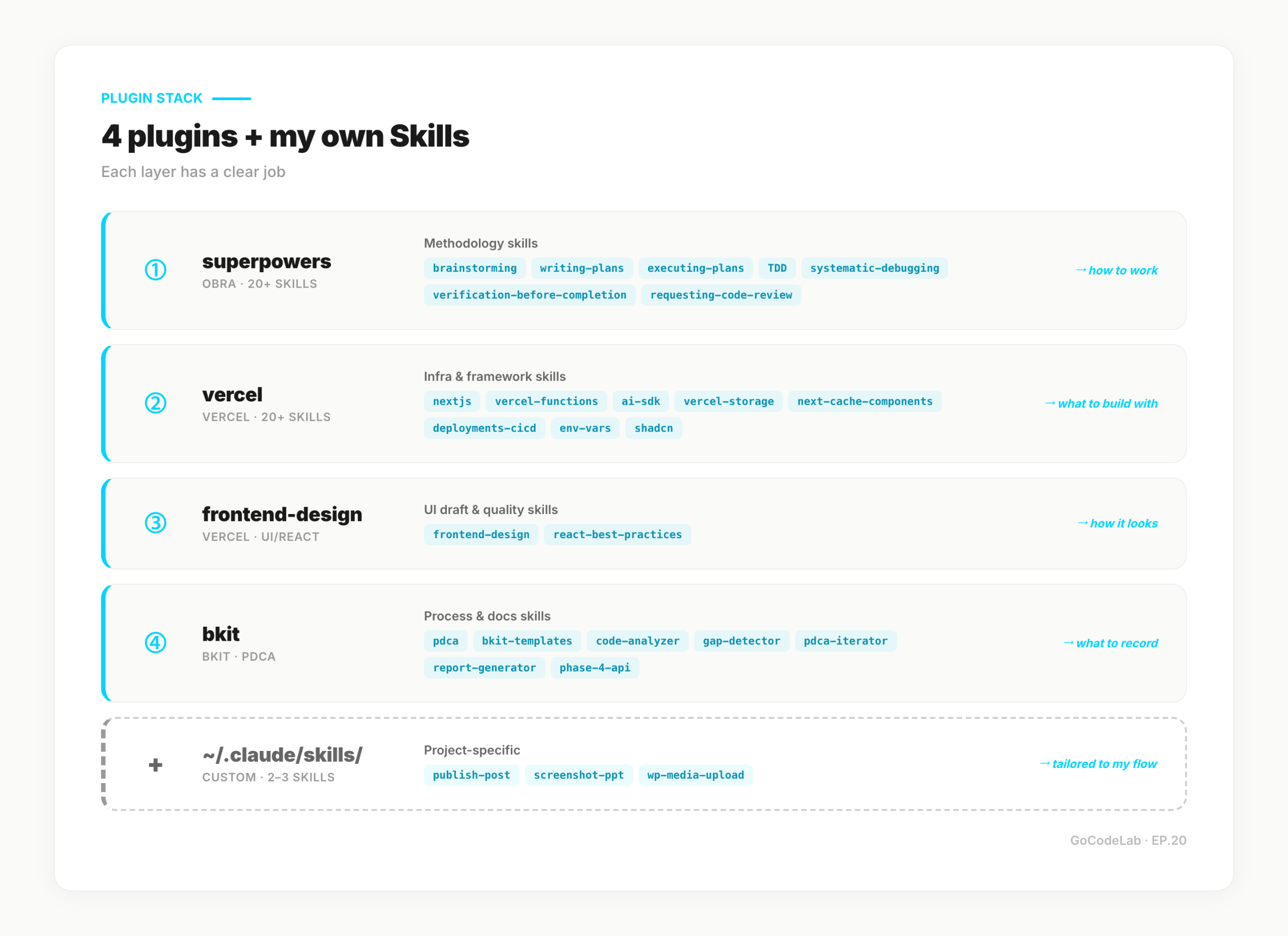
Most of my dev routine lives inside these four. The rest gets filled by two or three project-specific Skills I wrote myself.
/plugin install superpowers@claude-plugins-official
/plugin install vercel@claude-plugins-official
/plugin install frontend-design@claude-plugins-official
/plugin install bkit@claude-plugins-official
# Check
/plugin list
superpowers is a methodology Skill bundle. Jesse Vincent (obra) built it open-source, and Anthropic brought it onto the official marketplace in January 2026. brainstorming, TDD, systematic-debugging, verification-before-completion — 20+ "how to work" Skills drop in at once. 94k+ GitHub stars — the most battle-tested set available.
vercel covers infra and framework. Next.js App Router · Server Components · Cache Components, Vercel Functions · Edge, AI SDK, the deploy CLI — the coverage is wide. If you're running Next.js fullstack on Vercel, it's nearly required. The Skill keeps you on the latest syntax without memorizing release notes.
frontend-design handles UI drafts plus React code quality. It steers away from generic AI-looking UIs toward production-grade designs. After editing multiple TSX files, react-best-practices auto-kicks a quality checklist. It also produces cleaner drafts when using shadcn.
bkit is the PDCA-and-docs layer. If superpowers is "how to work," bkit is "what to record and in what stage." Overkill for solo work, but the moment client or team docs become necessary, this plugin pulls its weight. Skills line up behind each stage — Plan → Design → Do → Check → Act — so decision records accumulate automatically. design-vs-implementation gap detection (gap-detector), code quality analysis (code-analyzer), and an auto-improvement loop (pdca-iterator) all ship with it.
Task-to-Skill map (7 tasks × set)
Real-world dev splits into about 7 task types. Which Skills get called for each is the core of this post. The table gives a quick scan before the per-section deep-dives.
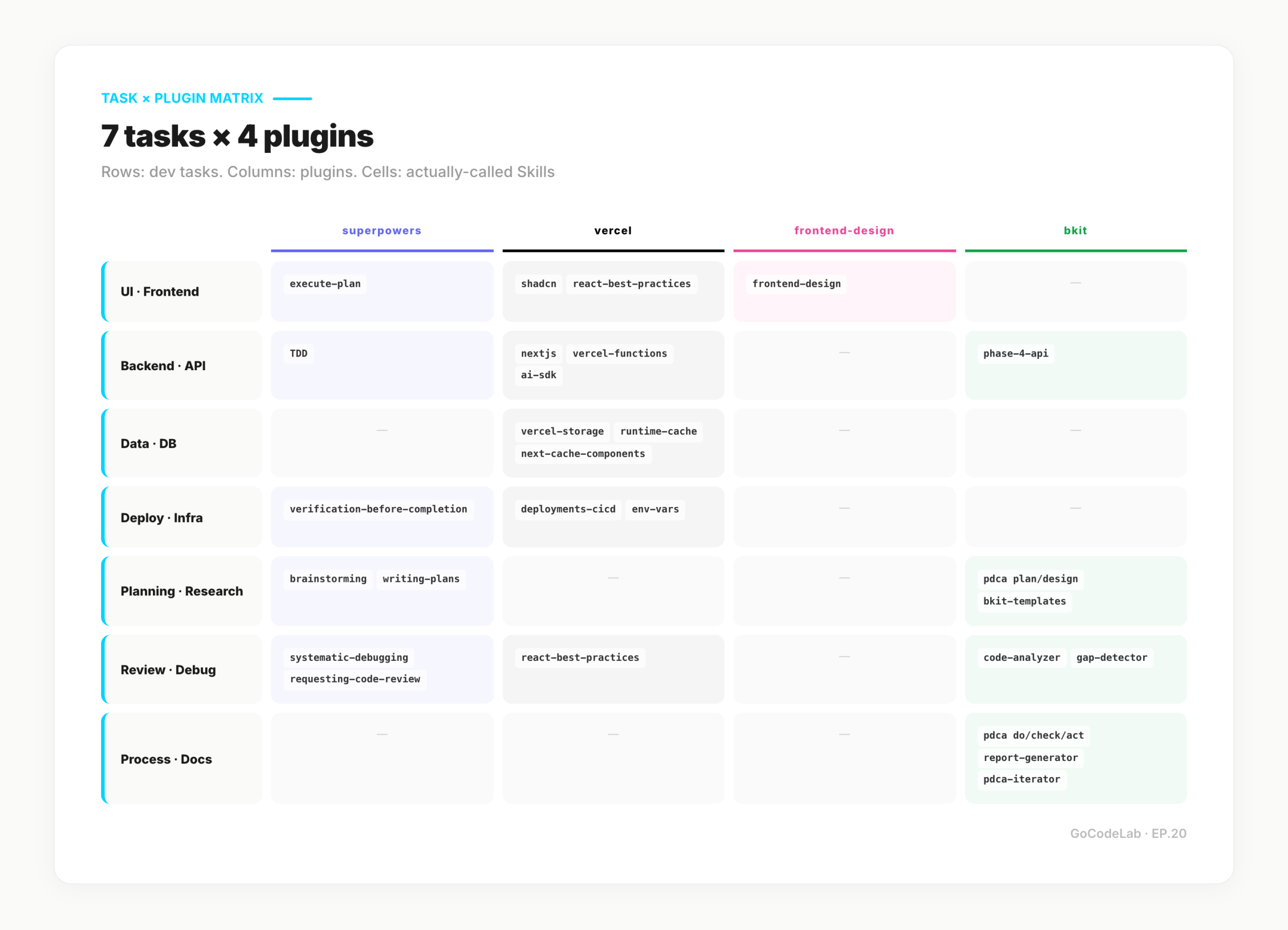
| Task | Primary Skills | Plugin |
|---|---|---|
| UI / Frontend | frontend-design · shadcn · react-best-practices | frontend-design · vercel |
| Backend · API | nextjs · vercel-functions · ai-sdk · phase-4-api | vercel · bkit |
| Data · DB | vercel-storage · runtime-cache · next-cache-components | vercel |
| Deploy · Infra | deployments-cicd · env-vars · verification | vercel · superpowers |
| Planning · Research | brainstorming · writing-plans · pdca (plan/design) · bkit-templates | superpowers · bkit |
| Review · Debug | systematic-debugging · verification-before-completion · requesting-code-review · code-analyzer · gap-detector | superpowers · bkit |
| Process · Docs | pdca (do/check/act) · report-generator · pdca-iterator | bkit |
Some Skills overlap. verification-before-completion runs across deploy, review, and test tasks. I keep it globally on and call the rest per task.
UI / Frontend — draft to review
UI work breaks into three stages: draft → implement → review. Each has a different Skill.
For the draft stage, call frontend-design. On broad prompts like "build a dashboard card section," it produces production-grade drafts without the generic AI-tailwind look. The Skill is my default shield against cookie-cutter templates.
If the project uses shadcn, vercel:shadcn attaches too. Component installs, theming, custom registry — the Skill auto-fires when those come up. Basically always-on in shadcn projects.
After implementation, vercel:react-best-practices detects multiple TSX edits and runs a review checklist — hooks usage, accessibility, performance, TypeScript patterns. It's one of the Skills that attaches without me asking.
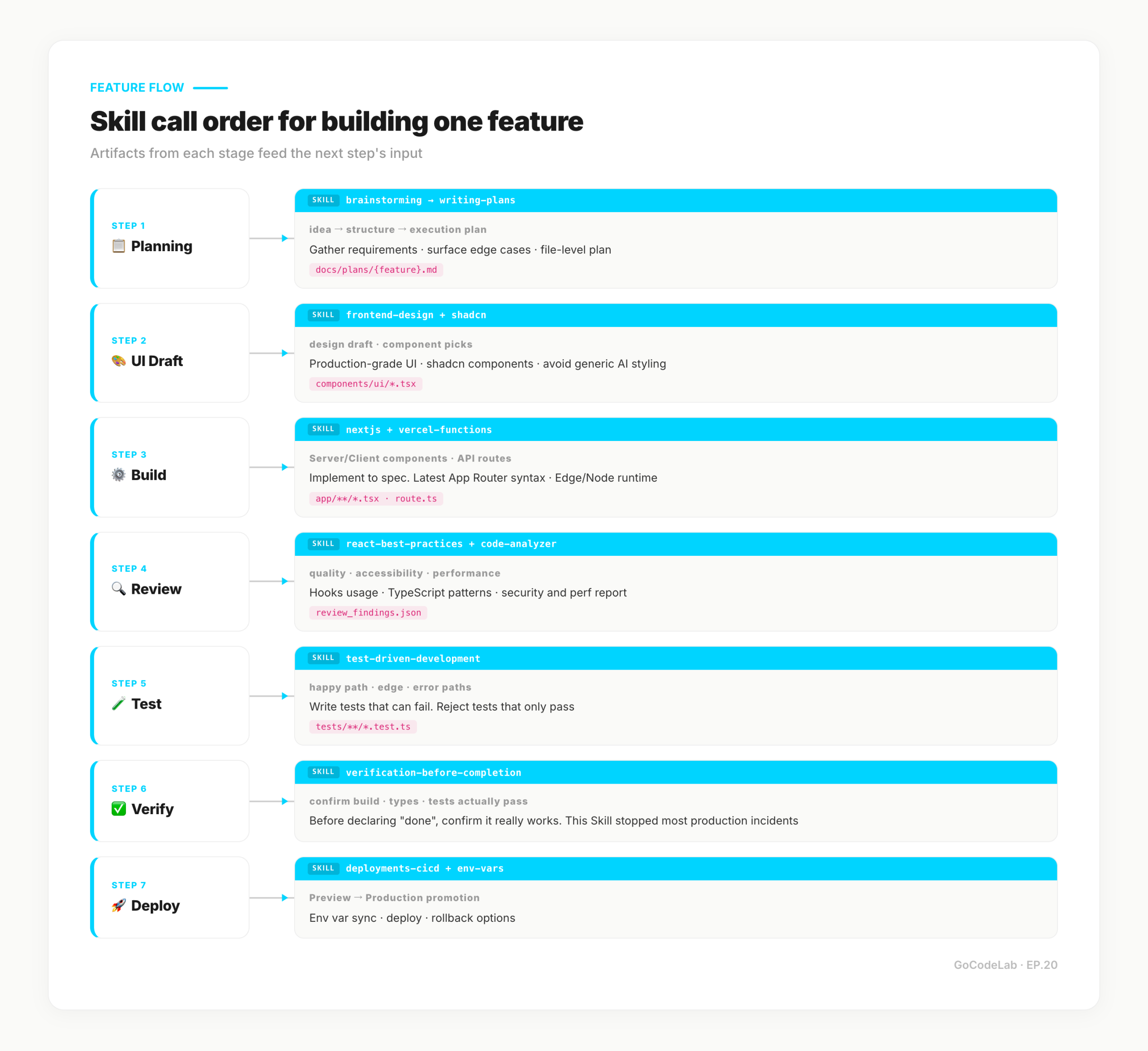
/brainstorming to gather requirements → /frontend-design draft → drop in shadcn components → react-best-practices auto-triggers on TSX save → /verification-before-completion runs build, type, and accessibility checks.
Backend · API — Next.js fullstack
Fullstack work runs on Next.js App Router. Server Components, Server Actions, Route Handlers coexist. vercel:nextjs lives here.
Server Component fetch patterns, Server Actions for forms, Middleware for request interception — the Skill holds the freshest patterns. Write Next.js 16 code and it won't silently regress to 15-era syntax.
When serverless functions enter, vercel:vercel-functions attaches. Edge vs Node runtime choice, Fluid Compute streaming, Cron Jobs setup — the Skill handles the config decisions so I don't memorize timeouts.
AI features bring in vercel:ai-sdk. Chat UI, structured output, tool calls, agents, MCP integration — AI SDK-side syntax is this Skill's domain. When working directly against the Anthropic SDK, claude-api takes priority instead.
At the early API-design stage, bkit:phase-4-api helps. Endpoint conventions, error payload shapes, Zero Script QA (validate via structured JSON logs, not test scripts) — the Skill pulls in the checklist. Skip it for solo work; for public APIs or team projects, the consistency it enforces pays off.
Data · DB — storage, cache, queries
On Vercel, the data layer typically runs on Marketplace storage (Neon, Upstash, etc.) plus Vercel Blob and Edge Config. vercel:vercel-storage helps pick the right one — sessions here, logs there, files elsewhere.
Caching splits in two. Framework-level goes to vercel:next-cache-components — the use cache directive, cacheLife, cacheTag. Shared cache across functions, middleware, and builds lives in vercel:runtime-cache.
ORM questions follow EP.19's Drizzle pattern, but the caching strategies come from these Skills. Query tuning beyond that belongs to indexes and EXPLAIN — the Skill doesn't replace SQL optimization.
Deploy · Infra — on top of Vercel
Deploy is where I'm most conservative. Two Skills are always attached.
vercel:deployments-cicd covers deploys, rollbacks, promotions, prebuilt builds. It even writes GitHub Actions workflow files for Vercel deploys. Before I hit vercel --prod, this Skill passes a check.
Env vars go through vercel:env-vars. Syncing .env files with Vercel env vars, OIDC tokens, per-env separation. Local sync is one vercel env pull, but deciding which key is shared where is where the Skill earns its keep.
The last gate is always superpowers:verification-before-completion. It confirms build, type, and tests actually pass before deploy. This one Skill prevented most of my production incidents — including the "5 minutes before deploy" incident from the intro, which is why it stays on by default.
Planning · Research — before the code
Planning precedes code. Putting Skills on that stage felt odd at first — then the output difference became obvious.
superpowers:brainstorming is for "build vs. skip" calls. Requirement structuring, edge-case discovery, decision trees. Running it once before coding cuts mid-course design flips.
superpowers:writing-plans goes a step further. Turns brainstorming results into an execution plan — split by file and by step. When the plan file is ready, /execute-plan picks it up. This is the Skill combo for the Planner role in EP.19.
When planning docs must live in the team repo, bkit:pdca's plan/design stages run alongside. Where brainstorming is a conversation to solidify ideas, bkit writes the outcome into docs/plans/{feature}.md in template form. bkit:bkit-templates brings planning-and-design doc templates so "what should this say?" is pre-decided. Off on solo work; on for client projects.
Review · Debug — the last gate
Implementation isn't the finish line. Three review/debug Skills hold the last gate.
superpowers:systematic-debugging kicks in on bugs and failing tests. It forces a sequence — reproduce → three hypotheses → eliminate two with evidence → minimal fix. Cuts the impulse to "just fix it." This is the base Skill for the Debugger role in EP.19.
superpowers:verification-before-completion runs before "done." It confirms type check, build, and test execution before allowing completion. Don't trust a "completed" without it.
superpowers:requesting-code-review is for handing off to another session for review. It organizes change rationale, edge cases, and test evidence into a format that produces sharper feedback.
Two more bkit Skills attach here. bkit:code-analyzer turns out pre-commit quality, security, and performance reports in a structured format. If systematic-debugging is "why isn't this working," code-analyzer is "this is fine, but these three things are worth touching." bkit:gap-detector catches gaps between design docs and actual implementation. Corresponds to PDCA's Check stage — and if Match Rate drops below 90%, pdca-iterator launches an auto-improvement loop. Only useful in projects where design docs exist.
Process · Docs — when docs become necessary
On solo work, process and docs Skills stay off. But situations shift. When a teammate joins, when progress reports go to a client, or when future-me needs to ask "why did I build it this way?" — bkit pays off.
bkit:pdca splits Plan → Design → Do → Check → Act into slash commands. /pdca plan {feature} writes the planning doc, /pdca design the design doc, /pdca analyze the post-implementation analysis — each into the right path. The Skill alone builds a running record under docs/.
bkit:report-generator fires after one PDCA cycle. It pulls Plan/Design/Do/Check docs and actual code into a single-page completion report — "what we shipped this sprint, what we learned." Ready to hand to stakeholders.
bkit:pdca-iterator is the Evaluator-Optimizer pattern. When gap-detector reports Match Rate under 90%, the loop auto-iterates — max 5 times, hands off to report-generator past 90%. Overkill for solo work; meaningful the moment collaborators appear.
Mapped onto the EP.19 5-agent team
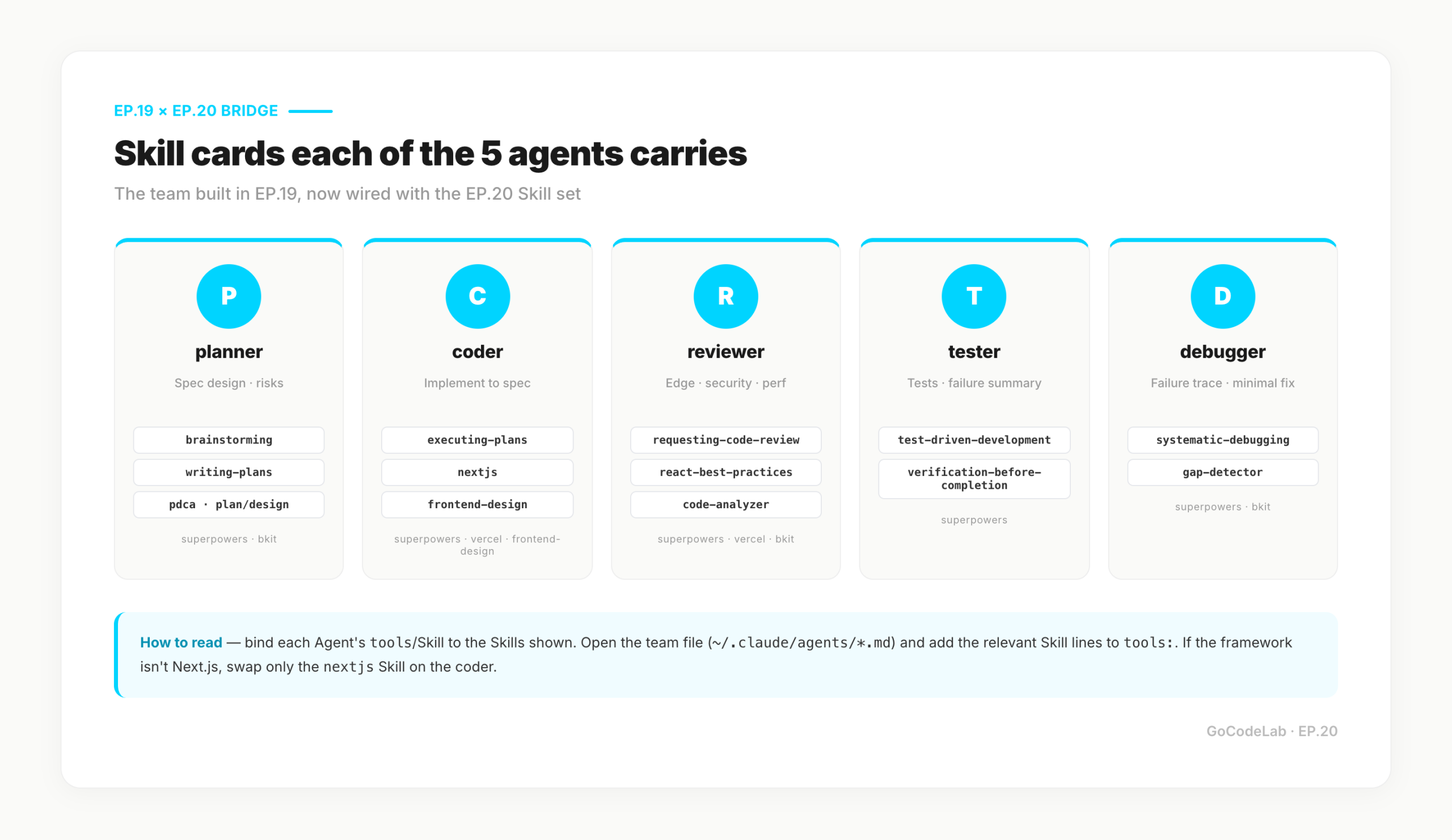
The Skill set maps cleanly onto the 5-agent team from EP.19 (Planner · Coder · Reviewer · Tester · Debugger). Wire each Agent's tools with the matching Skills and the team runs.
planner → brainstorming · writing-plans · pdca plan/design
coder → executing-plans · nextjs · frontend-design
reviewer → requesting-code-review · react-best-practices · code-analyzer
tester → test-driven-development · verification-before-completion
debugger → systematic-debugging · gap-detector
If the codebase isn't Next.js, swap nextjs for whatever framework Skill fits. Skills are bundled per plugin, so changing stack doesn't require redesigning the team.
Skills I tried and dropped (honestly)
Not every Skill is worth keeping. Here are the ones I dropped.
using-git-worktrees — useful in theory, didn't fit my workflow. I switch branches fast and don't have enough parallel work to justify multiple worktrees. I pull it out for big refactors then return to plain branches.
dispatching-parallel-agents — ran it early in the EP.19 build, then set it aside as I moved to running the 5-agent team directly. The external DB state-sharing structure is more stable. Still useful for one-off parallel tasks.
bkit:enterprise · bkit:infra-architect — same bkit plugin, but these two stay off. Built for microservices + k8s + Terraform combos, which doesn't match my stack (Vercel + Supabase). I pull them only when enterprise-grade infra design is actually required.
When to build your own Skill
Start with what plugins ship. Only build your own when "I keep typing the same thing" repeats three times.
My three custom Skills: publish-post (blog publish pipeline), screenshot-ppt (Puppeteer capture template), wp-media-upload (WordPress media API call). All blog-operations only — they don't attach to other projects.
When writing your own, superpowers:writing-skills helps. It holds the authoring conventions, examples, and metadata format. After writing a Skill, call the same Skill again to validate — formatting mistakes get caught.
FAQ
Q. Can I use Skills without a plugin?
Yes. Drop the markdown files into ~/.claude/skills/. The trade-off is no auto-updates. With 3 or fewer Skills, manual copy is fine. Past that, plugins are easier.
Q. Don't superpowers and bkit overlap?
There's overlap, but the positions differ. superpowers = "how to work" (methodology). bkit = "what to record and in what stage" (process and docs). I run superpowers as primary for solo work and pull bkit in on client/team projects for auto-accumulating docs.
Q. How many Skills is too many?
Past 7–8, Claude starts asking "which Skill should I use?". My practical ceiling is 6–7 active. Beyond that, split by task profile.
Q. Install command?
/plugin install superpowers@claude-plugins-official — on the official Anthropic marketplace since January 2026. Updates flow through the same command.
Q. Can I combine my own Skills with plugin Skills?
Yes. Custom Skills in ~/.claude/skills/ run at the same level as plugin Skills. No conflict as long as names don't collide.
Closing
Skills don't make Claude smarter. They show Claude how I work, repeatedly. Four plugins cover most of it; the remainder goes to two or three custom Skills. First setup is under 10 minutes.
80% first, fix the remaining 20% as real problems show up. Skills grow the same way. Start with the four base plugins. When "this repeats" happens three times, that's the moment to write a new Skill. Don't force it earlier.
The last gate is always a human. verification-before-completion passing doesn't guarantee the feature works — build, type, and tests get the automated pass; business logic still needs a human check. Hold that line, and a Skill set demonstrably speeds up development.
Based on an actively running dev routine plus official docs. Plugin listings and versions can change — check the official marketplace for the latest.
Originally published: April 2026 · GoCodeLab