I Built a Personal AI Assistant Before Third-Party Tools Got Cut Off
After watching OpenClaw get blocked, I built my own personal AI assistant with Claude MCP. 13 modules, 50 tools, built in 3 hours. App revenue, feedback, email, calendar, car status — all in one place.
April 2026 · Lazy Developer EP.10
This is how I ended up building my own MCP AI assistant. It started on April 4th, when OpenClaw blew up.
OpenClaw was an open-source AI agent that used Claude as its engine. Anthropic makes Claude, and most people use it through a monthly subscription (Pro at $20, Max at $200). OpenClaw worked by logging into your subscription account and borrowing Claude’s brain. Like logging into Netflix with your account to watch movies — you logged into OpenClaw with your Claude subscription, and it put Claude to work for you.
The problem was that it worked too well. 135,000 people were using it this way, and Anthropic’s servers could not handle the load. So Anthropic shut the door. Logging into third-party tools with a subscription account no longer works. If you want to keep using them, you have to switch to pay-as-you-go pricing. What used to cost $200 a month could now run up to $5,000.
I was not using OpenClaw. But watching the news, one thought came to mind: build on someone else’s platform, and this is what happens.
I run 12 apps, 2 SaaS products, and a blog. Every morning there is a mountain of things to check. Open dashboards, check email, look at the calendar, dig through revenue numbers. What I wanted was to ask an AI “how’s today looking?” and get a summary back. Anthropic had just released something called MCP — their own official feature, so it would not get cut off overnight. I started building right away.
– Built a personal AI assistant with Claude MCP (Model Context Protocol)
– 13 modules, 50 tools, finished in 3 hours
– Connected app revenue, feedback, blog, email, calendar (daily-life automation added later)
– “How’s business today?” — one sentence gets the full picture
– API cost: $0 (runs on Claude subscription tier)
What MCP Actually Is
MCP stands for Model Context Protocol. It is an official standard made by Anthropic. In plain terms, it gives AI hands and feet. (If you want to understand MCP in detail, read this first.)
Here is an analogy. When you install apps on your phone, you get access to the camera, maps, music. Apps tap into the phone’s capabilities. MCP works the same way. Connect tools to Claude via MCP, and Claude can pull numbers from your database, read your email, check the weather. Say “show me Apsity revenue” and Claude goes to the database and fetches the numbers. No copy-pasting needed.
The key is division of labor. MCP tools are errand runners. “Go get the revenue numbers.” That is all they do. Analyzing, summarizing, and making judgments — that is all on Claude. The tools themselves can be dead simple. The AI does the thinking.
The Design: One Assistant Instead of 50 Remote Controls
Here is the architecture.
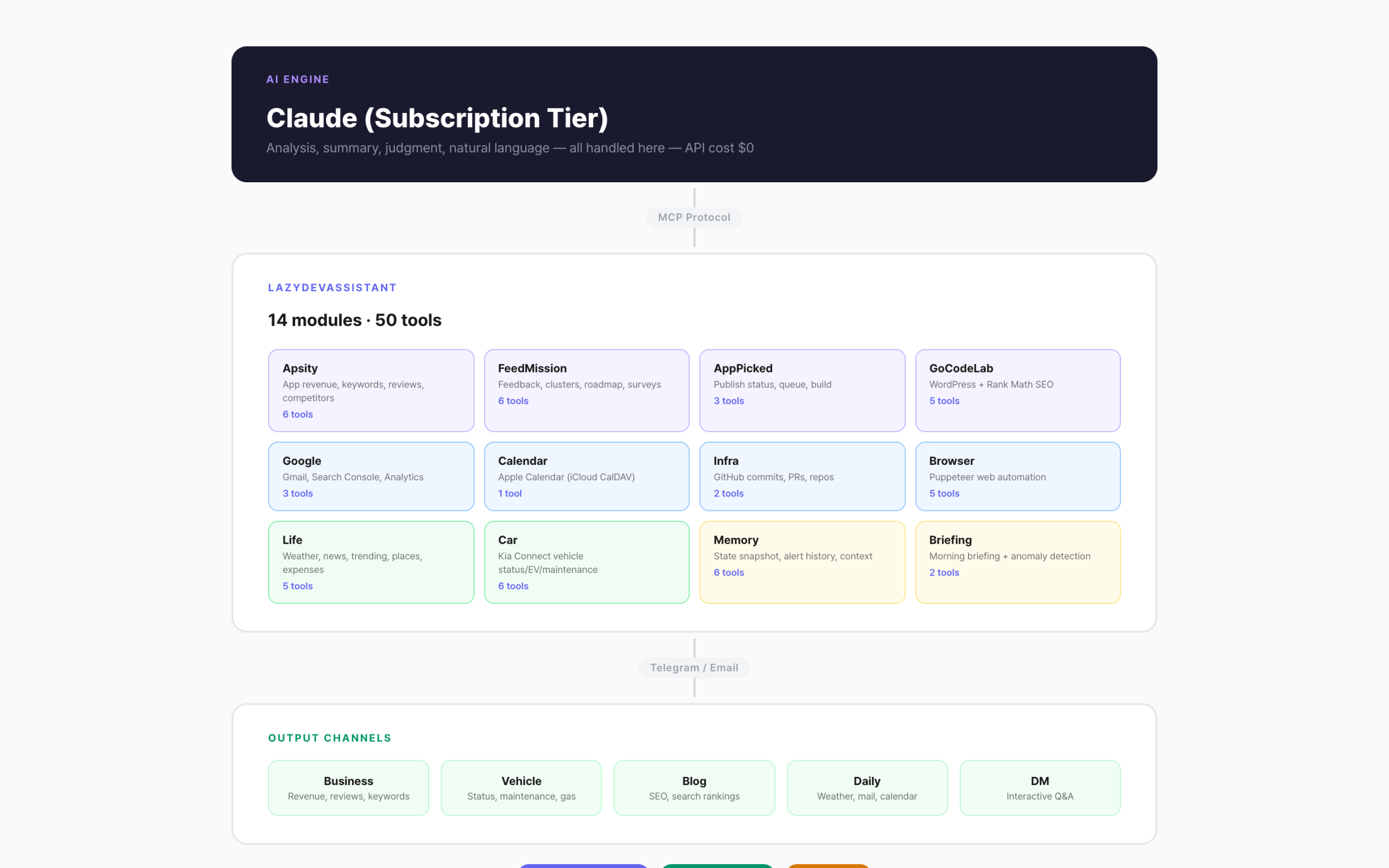
Claude sits at the top. It runs on a subscription, so the API cost is zero. In the middle is my MCP server, LazyDevAssistant. The core is the business modules — app revenue, feedback, blog SEO, GitHub, and other dev-related data all wired in. Productivity tools like email and calendar are attached too, and later I added daily-life automation like weather and car status. In total: 14 modules, 50 tools. At the bottom is the output layer — results get sent to Telegram channels.
This is different from typical automation tools. You do not write rules. No need to set up conditions like “send an alert if revenue drops 20%” the way you would with IFTTT. Just ask “anything unusual today?” and Claude figures it out.
50 Tools in 3 Hours
I started at 10 AM and finished at 12:40 PM. Two hours and forty minutes.
The speed came from the module pattern. Every module has the same structure. Name, description, parameters, handler. Fill in those four things and a tool pops out.
export const apsityTools: ModuleTools = {
apsity_revenue: {
description: ‘Query revenue by app’,
params: z.object({ period: z.enum([‘today’, ‘week’, ‘month’]) }),
handler: async (params) => { /* DB query */ },
},
}
One line — registerModule(apsityTools) in server.ts — and every tool inside gets registered with MCP. Want to add a new module? Create one file, one import, one register call. Done.
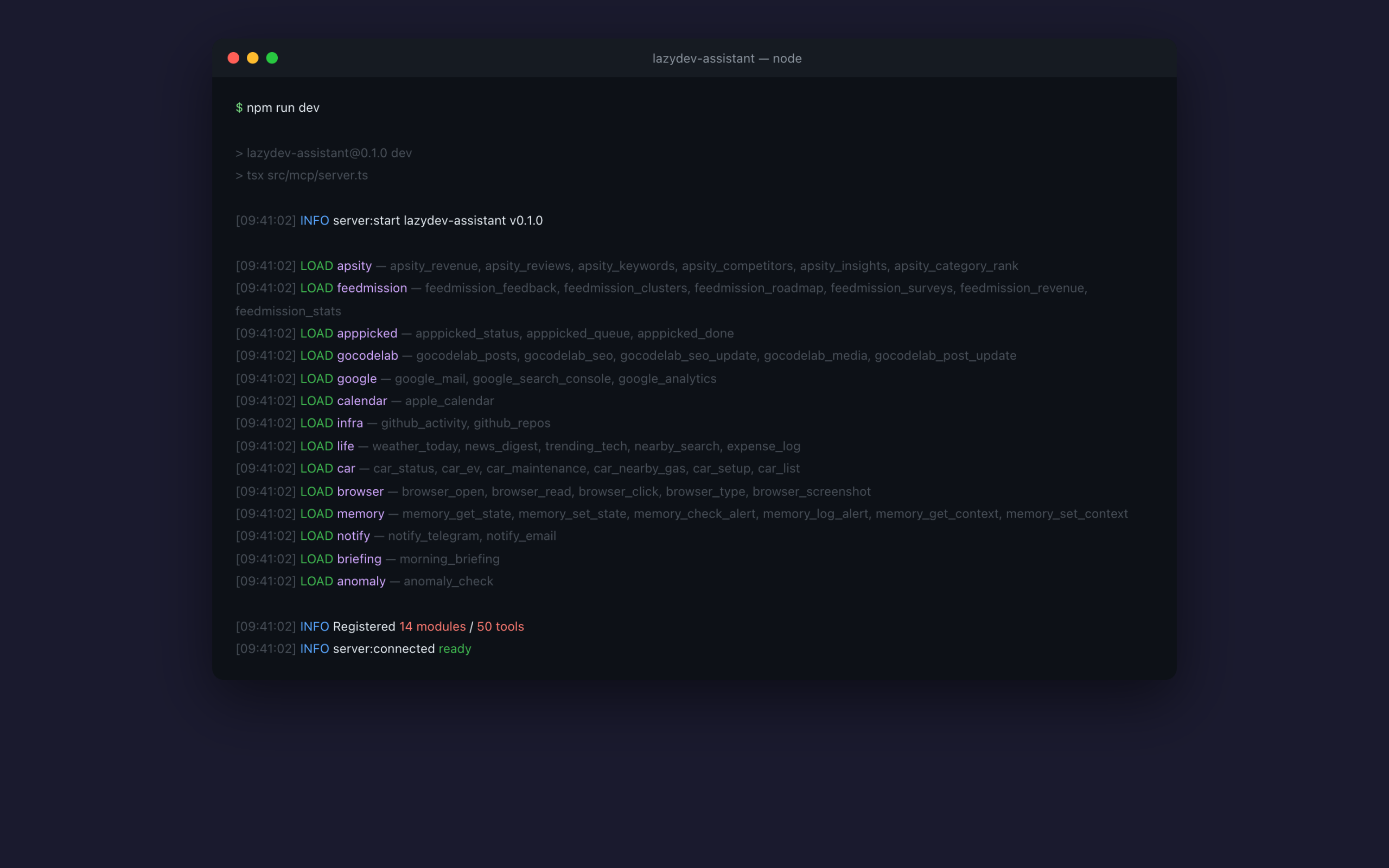
This pattern made things fast. Each module took 10 to 15 minutes on average. Apsity and FeedMission took the longest because they needed database connections. Modules that just hit an API — weather, GitHub — were done in 5 minutes.
What I Connected
Running 12 apps means a flood of things to check every day. I started by wiring all dev-related data into MCP.
– Apsity: App revenue, keyword rankings, reviews, competitor changes, AI insights
– FeedMission: Feedback, clusters, roadmap, surveys, subscription revenue
– GoCodeLab: Blog post management, SEO settings
– Google: Gmail, Search Console, Analytics
– Apple Calendar: iCloud CalDAV connection
– GitHub: Commit history, PR status
– Puppeteer: Web automation (open, read, click, type, capture)
– Weather, news, trending, nearby search, expense tracking
– Kia Connect: Car status, battery, maintenance schedule, nearby gas stations
– Memory: State snapshots, notification history, conversation context
I built the dev automation first, then layered convenience features on top.
What It Looks Like in Practice
You ask in natural language from the Claude Code terminal. Claude picks the right tools and calls them on its own.
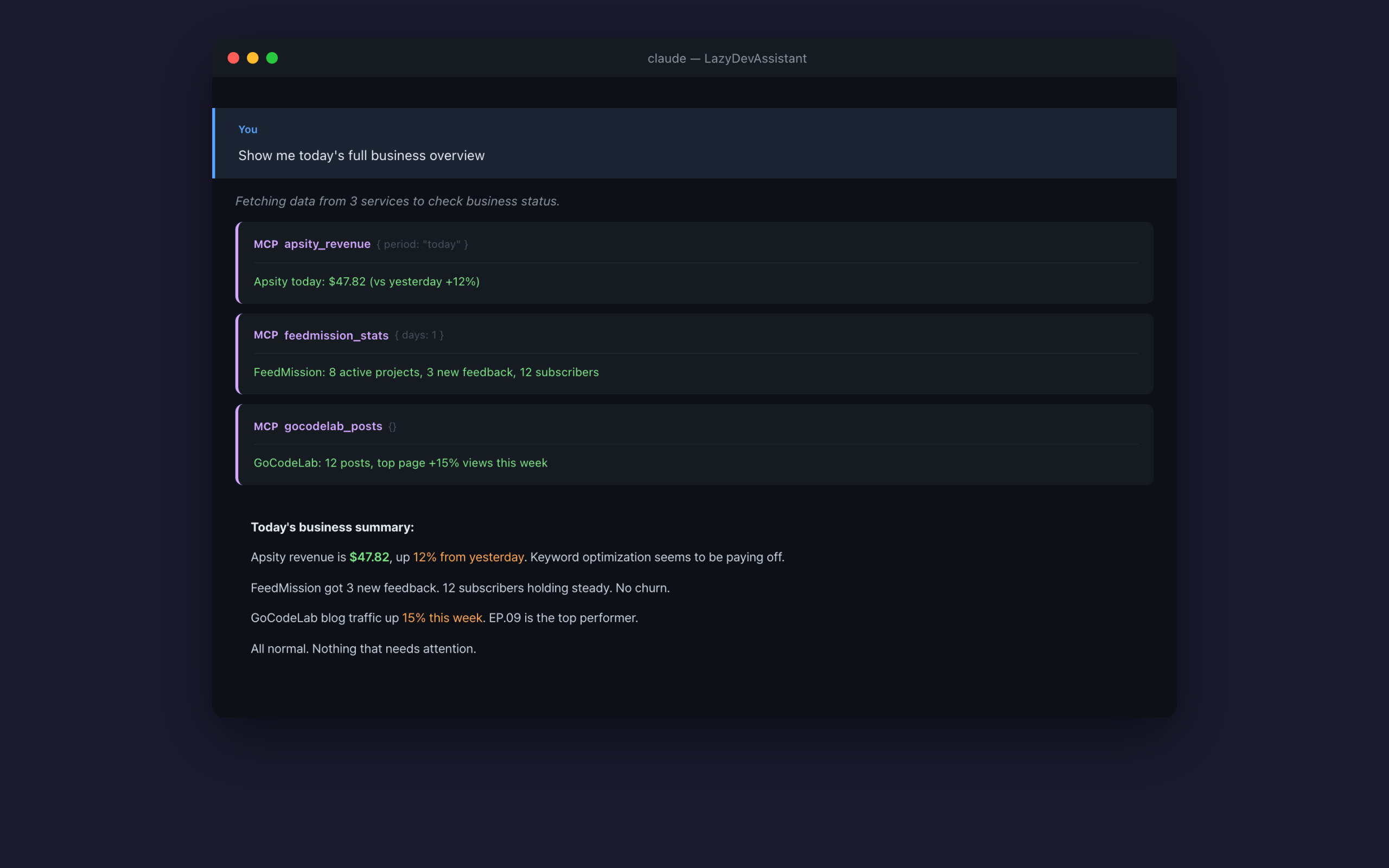
I typed “how’s business today?” Claude picked apsity_revenue, feedmission_stats, and apppicked_status on its own. Data came back from three services, and Claude summarized it in one paragraph. Whether revenue went up, how many feedback items came in, how many items are left in the queue. Before this, I would have had to open the Apsity dashboard, the FeedMission dashboard, and GitHub separately.
This works too: “How’s GoCodeLab SEO this week?” “What’s on my calendar tomorrow?” “How’s the car on fuel?” Claude picks the right tool and answers. You never need to memorize tool names.
What Broke at First
It did not all work on the first try. A few things tripped me up.
MCP config file location. To tell Claude Code about the MCP server, you need a config file. I first put it in settings.json, but it was not recognized. Turns out you need a separate .mcp.json file at the project root. The official docs were a bit vague on this, so I lost about 30 minutes.
DB date queries. Pulling “last 7 days” data from PostgreSQL threw an error. CURRENT_DATE – 7 had a type mismatch in TypeScript. Switching to make_interval(days => 7) fixed it. Nothing major, but this kind of thing eats time.
Why I Built This
The OpenClaw incident was the trigger, not the reason.
The real reason was that I was tired of the routine. Every morning: open Apsity, open FeedMission, open Gmail, open the calendar, check GitHub. Cycling through each one took 30 minutes. And all I did in those 30 minutes was “check.” Not a single decision made.
Now I ask “how’s today?” and everything is summarized in under a minute. I just look at the summary and make decisions. Let the AI handle the checking; I handle the judging. That is how I always wanted it to work.
This is just the beginning. In the next episode, I will talk about connecting my SaaS data directly to these tools. Down the road, I am planning to open MCP access for subscribers too, but that is further out. Continued in EP.11.
FAQ
Q. What is MCP?
A standard that gives AI hands and feet. It is an official protocol by Anthropic. Plug it in and Claude can read and write your data directly — databases, APIs, files, whatever.
Q. Is this related to the OpenClaw incident?
Not directly. OpenClaw was a third-party agent framework. MCP is Anthropic’s official protocol. What got blocked was using subscription accounts with third-party tools, not MCP itself. MCP and Claude Code are Anthropic products, so they are safe.
Q. Is the API cost really $0?
If you have a Claude subscription (Pro or Max), yes. MCP tools only fetch data. Analysis runs on subscription credits. External APIs like weather are used within free tiers.
Q. Can a non-developer build this?
Honestly, you need to be able to read TypeScript. But the structure itself is simple. One file is one module, and you just fill in the name, description, and handler. You can even ask Claude to “write an MCP module that connects to the weather API” and it will generate the code.