I Run My Business from Telegram Now
I connected a Telegram bot to Claude MCP. One DM to check revenue, feedback, and calendar. Debugging the 409 Conflict, running 24/7 with tmux, and auto-restart with a Stop hook.
April 2026 · Lazy Developer EP.12
In EP.10, I built an MCP server. In EP.11, I connected my SaaS data. Fifty tools, and Claude could fetch anything I asked for.
But there was a problem. I had to open a terminal. Launch Claude Code, type the question there. If I wondered “how’s revenue?” while eating lunch, I had to open my laptop. That was annoying.
I decided to move it to Telegram. Send a DM like a text message, and revenue, feedback, calendar — everything comes back. Works from my phone. That was the goal.
– Built a DM agent with Telegram bot + Claude MCP
– Wrote AGENT.md — maps natural language to tool calls
– Debugged 409 Conflict — bot polling collision
– 24/7 uptime with tmux + auto-restart via Stop hook
– “How’s revenue?” from my phone, and data comes back
Architecture: Bot Receives, AI Responds
Here is the setup.
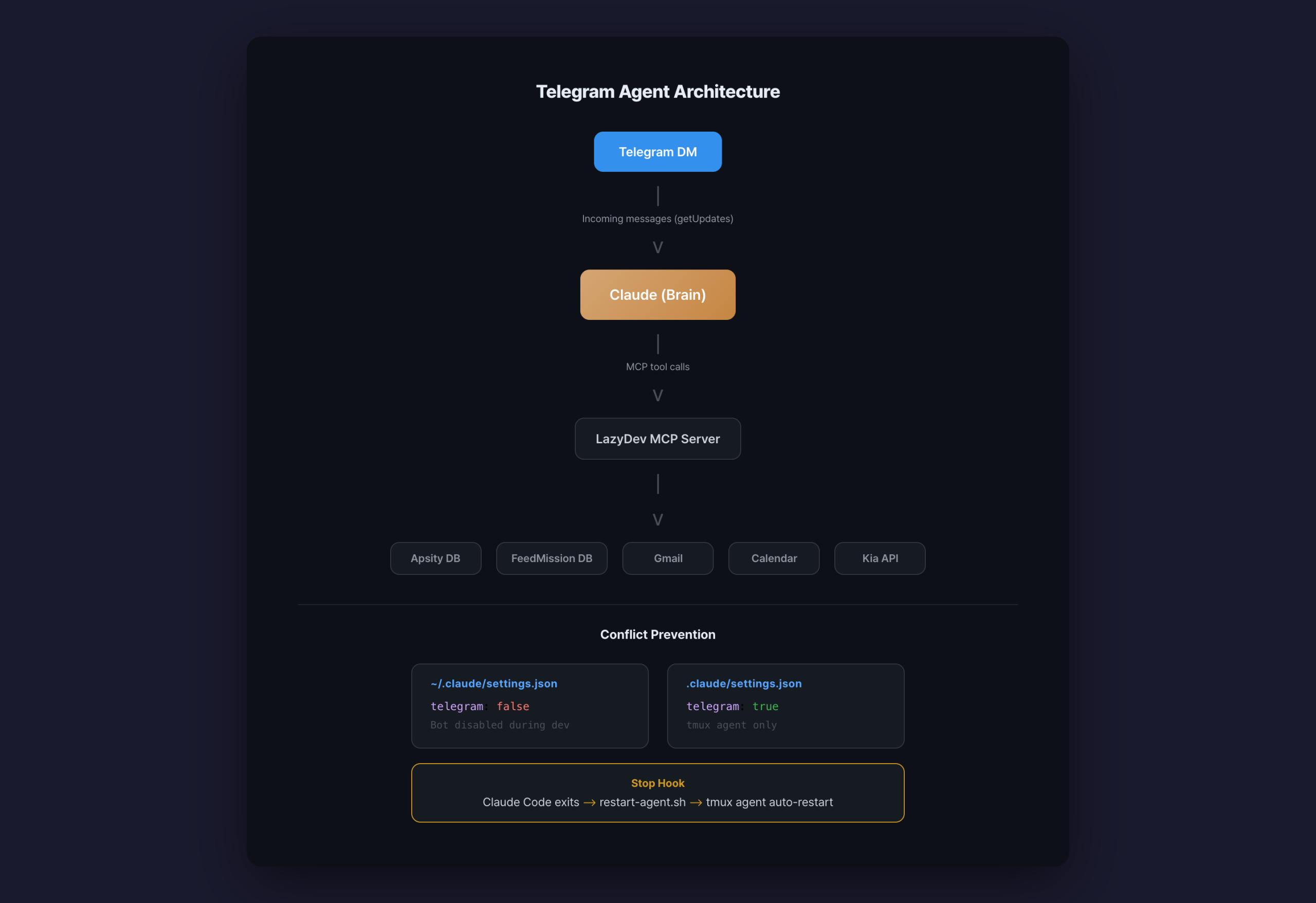
The Telegram bot receives a message. Claude reads it. It fetches whatever data is needed through MCP tools. It sends the answer back to Telegram. That is the whole thing.
The Telegram bot is like a telephone operator. It just relays messages. Claude does the thinking. MCP does the fetching. The bot itself can be dumb.
AGENT.md: The Agent’s Instructions
Claude needs to know its role. I wrote everything in one AGENT.md file.
Role: Telegram DM response + morning briefing
Language: Korean, keep it concise
## Natural language mapping
“show me revenue” → apsity_revenue
“feedback” → feedmission_feedback
“today’s schedule” → apple_calendar
“weather” → weather_today
“car status” → car_status
The key part is the natural language mapping. “Show me revenue” triggers apsity_revenue. “Feedback” triggers feedmission_feedback. Since Claude understands natural language, exact matches are not required. “How much money did I make this month?” still calls the revenue tool.
Hand this file to Claude and it becomes an agent. No additional code — one instruction file is all it takes.
What It Looks Like in Practice
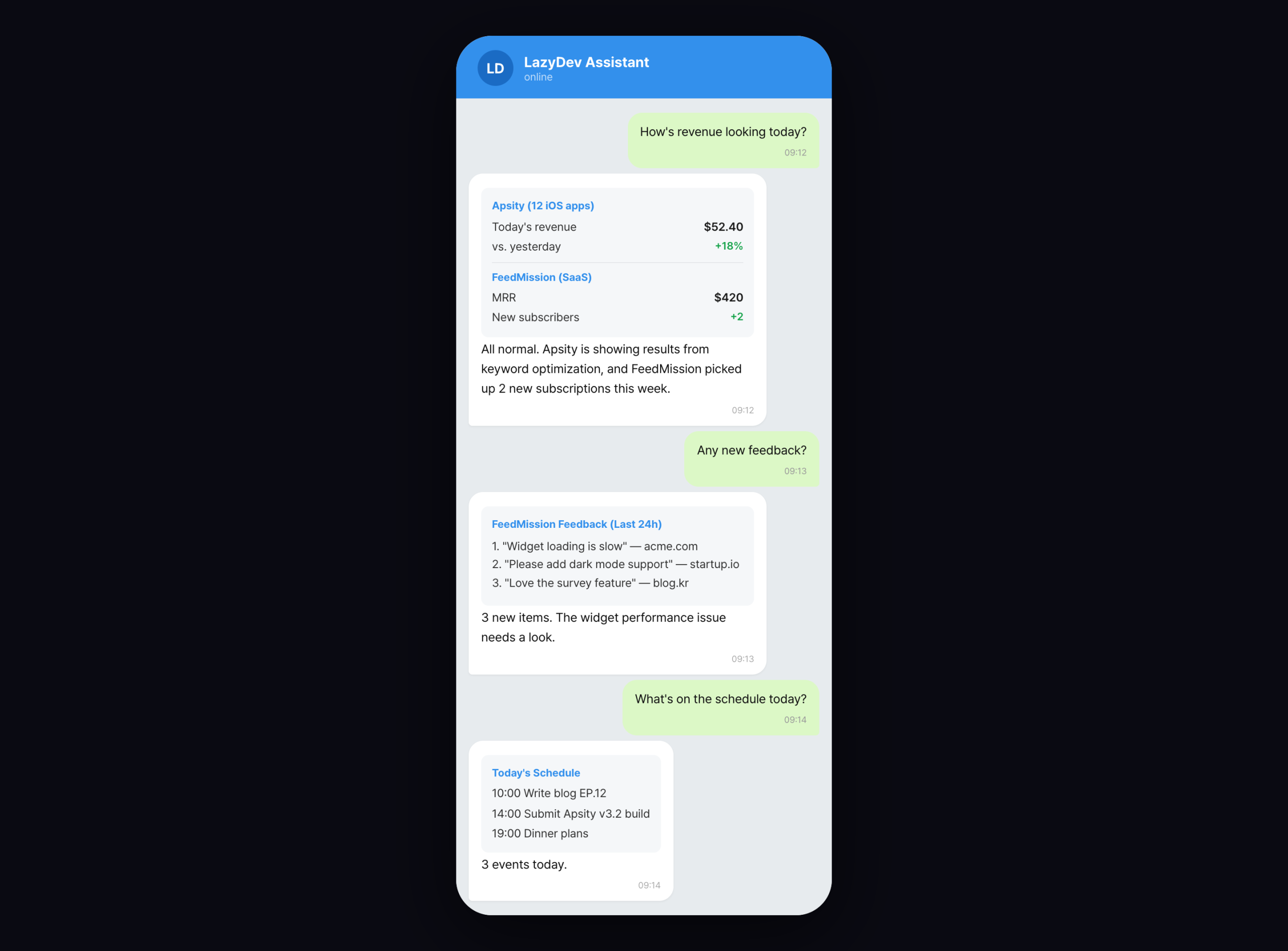
Send “how’s revenue?” on Telegram, same as texting a friend. Apsity app revenue and FeedMission subscription status come back in one message. “Any feedback?” returns the recent feedback list. “Today’s schedule” pulls from the calendar.
It works from my phone. It works on the subway. No laptop needed. That is the point.
The Bot Would Not Respond
This is where I got stuck. I sent a message on Telegram and nothing came back. The bot just sat there.
I checked the logs. Red text.
make sure that only one bot instance is running
409 Conflict. “Someone else is already receiving messages.”
It is how a Telegram bot checks for new messages. Like a phone on standby. The bot keeps asking the Telegram server “any messages for me?” That is called polling. The problem is that only one process can poll at a time. Two phones trying to receive calls on the same number means a collision. That collision is the 409 Conflict.
I found the cause. I was running the Telegram agent in tmux (a tool for keeping multiple terminal sessions alive). But my Claude Code development session was using the same bot token. Two processes polling at the same time.
Like having two phones registered to the same number. Obviously that does not work.
The Fix: Separate settings.json Files
The solution was simple. Do not start the bot when I am developing.
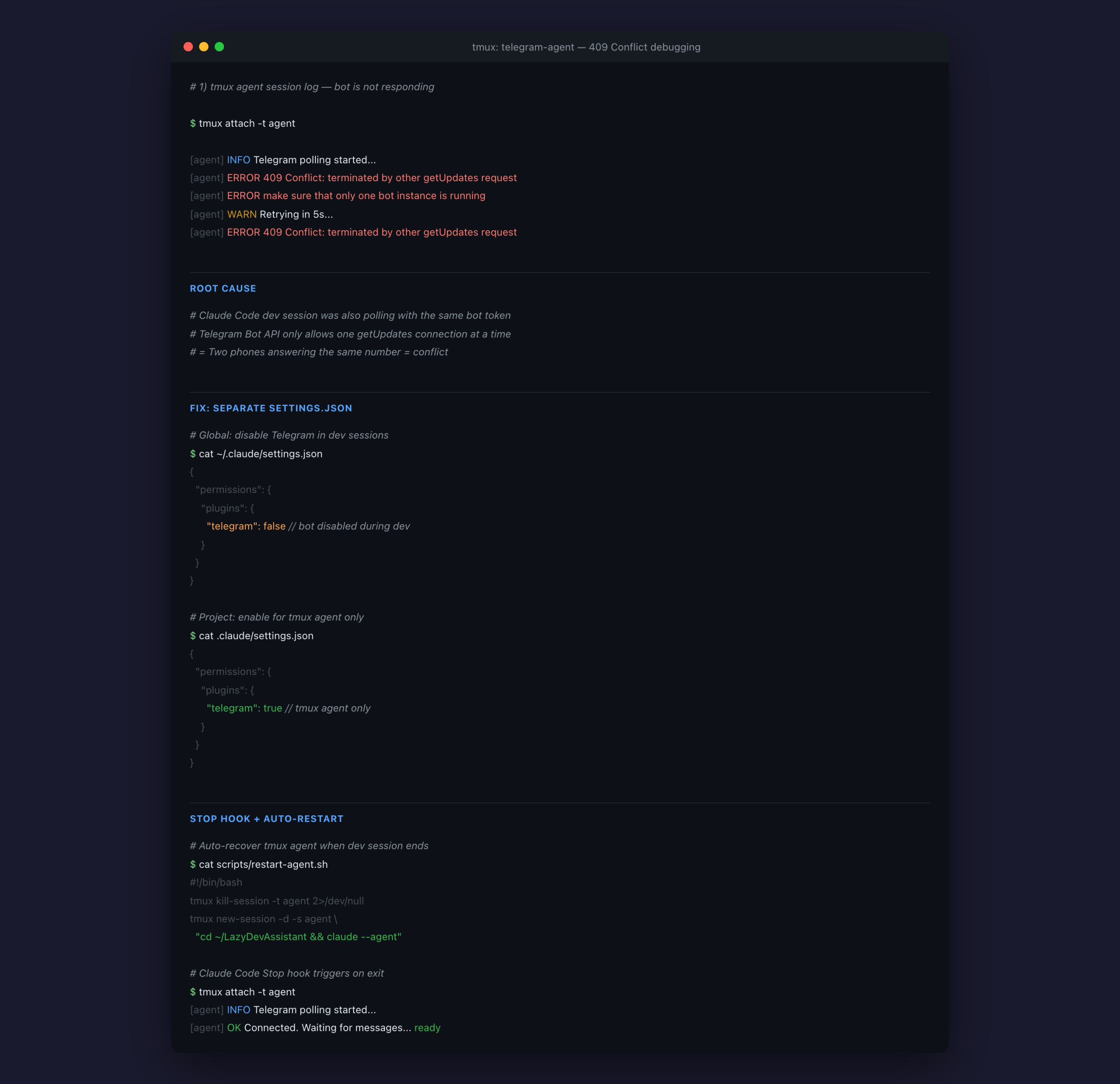
Claude Code has two levels of settings files. Global (applies everywhere) and project (applies per folder). Project settings override global.
// Applies to all projects
{ “telegram”: false }
// Project: .claude/settings.json
// Applies only in the LazyDevAssistant folder
{ “telegram”: true }
Telegram is turned off globally. So when I am developing, the bot does not start. It is only enabled in the project settings. The tmux agent session launches from the LazyDevAssistant folder, so it reads the project settings. The bot only runs there.
No more collisions. Development sessions run without the bot, and only the tmux agent receives messages.
tmux: Running the Bot 24/7
A tool for running multiple terminal sessions. The key feature: programs inside keep running even after you close the window. Close the laptop lid and the server stays alive. Perfect for a bot that needs to run around the clock.
I launched the agent in a tmux session on my Mac mini server. Even with the screen closed, the bot keeps receiving messages.
$ tmux new-session -d -s agent
# Start the agent
$ cd ~/LazyDevAssistant && claude –agent
# Check the session (keeps running after you leave)
$ tmux ls
agent: 1 windows (created Mon Apr 7 09:41:02 2026)
But there was another issue. When I opened Claude Code to develop, it interfered with the agent session. And when I closed Claude Code after finishing, I had to manually restart the agent. Doing that every time was annoying.
Stop Hook: Auto-Restart
A script that runs automatically when a specific event occurs. Like a smartphone alarm. “Ring at 7 AM” is the same idea as “run restart-agent.sh when Claude Code shuts down.”
I set up a Stop hook on Claude Code. When a development session ends, it automatically restarts the agent.
# scripts/restart-agent.sh
# Kill the existing agent session
tmux kill-session -t agent 2>/dev/null
# Start a new one
tmux new-session -d -s agent \
“cd ~/LazyDevAssistant && claude –agent”
Here is the flow.
2. I open Claude Code to develop
3. Global settings have telegram: false, so no bot collision
4. I finish developing and close Claude Code
5. The Stop hook runs restart-agent.sh
6. The tmux agent comes back up
7. The Telegram bot starts receiving messages again
Set it up once and you never think about it. Finish developing, and the bot recovers on its own.
Why Telegram, Not Something Else
Most messaging apps do not let you create personal bots. Business channels only. The message-receiving API is not open to individuals.
Telegram is different. Talk to BotFather and you get a bot instantly. One API token and you are set. Personal DMs work. For developers, Telegram is the obvious choice.
Honestly, I never used Telegram before this. But I installed it for the bot, and now it is the app I open most.
What Changed
Before, mornings looked like this. Open the laptop, open the Apsity dashboard, open the FeedMission dashboard, open Gmail, open the calendar. Check each one individually. Thirty minutes minimum.
Now it looks like this. Open Telegram, type “how’s revenue?” Done. “Any feedback?” Done. “Today’s schedule?” Done. One minute on my phone.
The AI does the checking. I do the deciding. That distinction matters. Gathering data is not a human job.
What Comes Next
Right now, I have to ask first for the answer to come. In the next episode, I flip that. The AI speaks first. Every morning, Telegram sends a briefing. Revenue, calendar, weather, anomalies. Summarized and delivered before I even ask. Continued in EP.13.
FAQ
Q. Why a Telegram bot?
Most messaging apps do not support personal bots. Telegram gives you a bot from BotFather with an instant API token. Personal DMs work, and sending and receiving messages is completely free.
Q. What is a 409 Conflict?
A Telegram bot can only receive messages through one connection at a time. If two processes try to receive simultaneously, you get this error. Like two phones on the same number. Turn one off and it is fixed.
Q. Can I skip tmux?
Yes. You can use screen, systemd, or similar tools. The point is “the process survives after the terminal closes.” You need some tool like this to keep a bot running on a server.
Q. Can a non-developer follow along?
Creating the bot itself is easy. Make one in BotFather and you are done. But connecting the MCP server requires reading TypeScript. You can ask Claude to “build me a Telegram bot” and it will write the code, though.