Ditched Cypress for Playwright — Speed, Cost, and CI Were All Different
Moving a Cypress suite to Playwright in 2026. 290ms vs 420ms per action, 45.1% vs 14.4% QA share, 91% vs 72% satisfaction, free --shard parallelization. Install to CI walkthrough.
목차 (9)
April 2026 · AI Trends
A Cypress suite of 180 tests was eating nine minutes per pull request. Parallel execution needed the paid Cypress Cloud plan, starting at $67 a month. For a small team, that kept hurting.
Switching to Playwright trimmed the PR pipeline noticeably. Parallelization on GitHub Actions matrix was free. Safari testing was built in. Bottom line: for a new project, just go Playwright.
This post walks through installation, the page object pattern, network interception, and CI parallel runs — with direct numbers against Cypress. If you're evaluating E2E tooling or considering a migration, it's worth the read.
· Market share: Playwright 45.1% / Cypress 14.4% (State of JS 2025, published Jan 2026)
· Satisfaction: Playwright 91% / Cypress 72% — the widest gap on record
· Execution speed: Playwright averages 290ms/action · Cypress 420ms (~1.45x faster)
· RAM for 10 parallel tests: Playwright 2.1GB / Cypress 3.2GB — 40~60% lower CI cost
· Parallel: Playwright --shard is free / Cypress Cloud starts at $67/month
· Browsers: Playwright bundles Chromium · Firefox · WebKit · Edge binaries / Cypress is Chromium-only
· GitHub stars: Playwright 78,000+ · weekly npm downloads 33M+ (early 2026)
At a glance — Playwright vs Cypress
Here's the core matrix. Execution speed, parallel cost, browser coverage, network interception, and market share all lean Playwright. State of JS 2025 put satisfaction at 91% vs 72% — the widest gap ever between these two. Cypress still has the best time-travel debugger and the friendlier first-run UI.
Numbers look decisive, but a working Cypress suite is a different story. Compare migration cost to the gains directly — don't decide from a table alone.
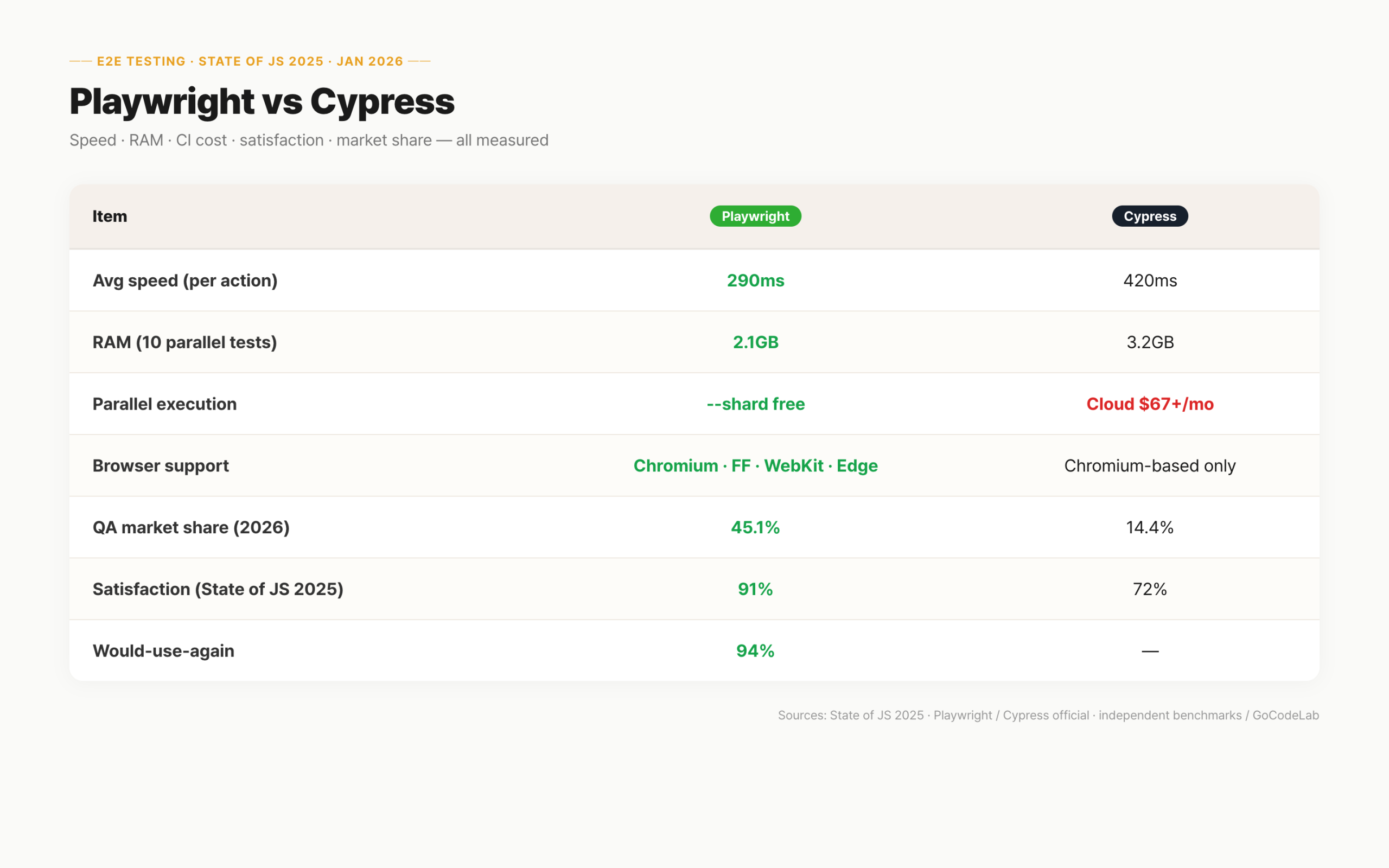
| Item | Playwright | Cypress |
|---|---|---|
| Avg speed (per action) | 290ms | 420ms |
| Parallel execution | Free (--shard) | Cypress Cloud $67+/mo |
| Browser support | Chromium · FF · WebKit · Edge | Chromium-based only |
| Network intercept | Built-in | Plugin required |
| RAM (10 parallel) | 2.1 GB | 3.2 GB |
| Satisfaction (State of JS 2025) | 91% | 72% |
| QA market share (2026) | 45.1% | 14.4% |
Installation and basic configuration
Node.js 18 or higher is all that's needed. One command generates the config file automatically. Browser binaries are installed alongside it.
npm init playwright@latest
# Install browser binaries (auto on first run)
npx playwright install
After running the command, playwright.config.ts is generated. baseURL, timeout, and the browser list are managed here. Chromium, Firefox, and WebKit are configured by default.
import { defineConfig } from '@playwright/test';
export default defineConfig({
baseURL: 'http://localhost:3000',
timeout: 30_000,
retries: process.env.CI ? 2 : 0,
projects: [
{ name: 'chromium' },
{ name: 'firefox' },
{ name: 'webkit' },
],
});
Setting retries to 2 in CI is standard practice — it muffles false failures from flaky networks. Locally it stays at 0 so failures surface immediately.
Writing the first test
Files matching *.spec.ts are auto-detected. One test() is one scenario. expect() handles assertions.
import { test, expect } from '@playwright/test';
test('redirects to dashboard on successful login', async ({ page }) => {
await page.goto('/login');
await page.getByLabel('Email').fill('test@example.com');
await page.getByLabel('Password').fill('password123');
await page.getByRole('button', { name: 'Sign in' }).click();
await expect(page).toHaveURL('/dashboard');
});
Locators are DOM selectors. getByRole(), getByLabel(), and getByText() cover most cases. Semantic selectors outlive CSS-class ones when DOM structure shifts.
getByLabel('Email') resolves the input paired with the matching label. As long as the label text stays put, selector stability survives HTML rewrites. That's the real advantage over CSS-class selectors.
Structuring with the page object pattern
A page object is a class that groups all selectors for a UI surface. When a button id changes, you touch one file instead of twenty tests.
import { type Page } from '@playwright/test';
export class LoginPage {
constructor(private readonly page: Page) {}
emailInput = () => this.page.getByLabel('Email');
passwordInput = () => this.page.getByLabel('Password');
submitButton = () => this.page.getByRole('button', { name: 'Sign in' });
async login(email: string, password: string) {
await this.emailInput().fill(email);
await this.passwordInput().fill(password);
await this.submitButton().click();
}
}
Put page classes under pages/ and have your tests import them. Selectors change? Edit one class file. Twenty tests get updated at once.
Mocking APIs via network interception
Use it when third-party APIs are flaky or when you need to reproduce error paths. route.fulfill() injects a synthetic response — a programmable fake server for payment failures, server errors, timeouts.
await page.route('**/api/payments', async (route) => {
await route.fulfill({
status: 500,
contentType: 'application/json',
body: JSON.stringify({ error: 'Payment failed' }),
});
});
Cypress needs cy.intercept() plus plugins for comparable behavior — more surface area and more failure modes. Playwright ships it built-in.
GitHub Actions parallel execution
The key argument is --shard. Actions matrix hands you parallel VMs by default — free. Cypress Cloud charges for the equivalent.
jobs:
test:
strategy:
matrix:
shard: [1, 2, 3, 4]
steps:
- run: npx playwright test --shard=${{ matrix.shard }}/4
HTML reports are auto-generated. Upload them as artifacts and Slack integrations will surface failure traces on each PR.
Playwright vs Cypress head-to-head
Both are valid picks. Team circumstances decide, not absolute rankings. Cypress keeps its UI clarity and friendly error output — approachable for non-dev contributors too. If a working Cypress suite is already there, migration is usually not worth the churn.
| Item | Playwright | Cypress |
|---|---|---|
| Base usage | Free (open source) | Free (open source) |
| Parallel execution | Free (--shard) | Cloud plan required |
| CI dashboard | Free (HTML report) | $67+/month |
| Team size limits | None | Varies by plan |
Which tool for which case
For new projects, lock in Playwright as the default. $0 cost, multi-browser out of the box, and the ecosystem is moving faster in 2026.
| Scenario | Pick | Why |
|---|---|---|
| Starting a new project | Playwright | Free sharding, multi-browser default |
| Existing Cypress team | Stay on Cypress | Migration cost > switching gain |
| Frequent Safari bugs | Playwright | WebKit-based Safari testing |
| Non-dev writing tests | Cypress | Approachable UI, friendlier errors |
| Cost-conscious CI | Playwright | No additional parallel fees |
| Gradual migration | Run both | New tests in Playwright, keep Cypress |
If Cypress is current, write new tests in Playwright first. Run both in parallel and let the old suite age out. Forced migration rarely pays off.
- Node.js 18+ installed
- baseURL set in playwright.config.ts
- retries: 2 in CI recommended
- Page objects under pages/ once you cross ~20 tests
- trace: 'on-first-retry' for failure replay
- GitHub Actions matrix with --shard
FAQ
Q. Should I choose Playwright or Cypress?
Small team and CI cost matters? Playwright. Free parallelization and multi-browser are standard. Already have a working Cypress suite? No urgency to swap.
Q. Does Playwright support Safari?
Yes. A WebKit-based binary simulates Safari behavior. Cypress only supports Chromium-based browsers. Projects with frequent iOS WebView issues particularly benefit.
Q. Is parallel execution free in CI?
Yes. --shard runs free inside GitHub Actions. Cypress Cloud is paid. Only runner time counts against your GitHub quota.
Q. Is the page object pattern mandatory?
It pays off at scale. One selector file instead of twenty test edits. If you have fewer than 20 tests, decide later based on how the suite grows.
Q. Can I keep Jest alongside Playwright?
Yes. Jest for unit/integration, Playwright for E2E. Split scripts: test:unit and test:e2e in package.json is the common shape.
Playwright is the default E2E choice in 2026. Easy install, free parallelization, multi-browser by default. New project? Start here.
For Cypress users, migration is justified but optional. If migration feels heavy, write new tests in Playwright and run both — no conflict in doing so.
- Playwright docs: https://playwright.dev
- State of JS 2025 (testing section): https://stateofjs.com
- Playwright on GitHub: github.com/microsoft/playwright
Figures and features reflect the state as of April 2026. Consult each project's docs for the latest.
Playwright is an open-source project maintained by Microsoft; Cypress is an open-source project by Cypress.io.