Every Morning, Telegram Sends Me a Briefing
Every morning at 9 AM, revenue, weather, calendar, and vehicle status arrive across four Telegram channels automatically. I built a node-cron scheduler and anomaly detection system on a Mac mini.
April 2026 · Lazy Developer EP.13
I had a morning routine. Wake up, open five apps. Check revenue on the Apsity dashboard, read feedback on FeedMission, open Gmail, check the weather, look at my calendar. Fifteen minutes total. All I accomplished in that time was reading numbers.
In EP.10, I built 50 MCP tools. In EP.12, I connected a Telegram agent. The tools were all there, but I still had to ask every morning. “How’s revenue today?” “Any meetings?” That got old too.
What if it just sent everything without being asked. Every morning at 9 AM, Telegram buzzes, and everything I need for the day is already laid out. I decided to build it.
– Automated briefing sent to 4 Telegram channels daily at 9 AM
– Business / blog / life / car — information separated by channel
– Anomaly detection: alerts on 20% revenue swings, low-rating reviews, keyword rank drops
– node-cron for scheduling, pm2 for persistence, Mac mini running 24/7
Why Four Channels
I started with a single channel. Revenue, weather, calendar, vehicle status all crammed into one message. Two days in, I changed it.
The problem was notification fatigue. Vehicle alerts only matter when something is wrong. But every time the revenue briefing arrived, vehicle info tagged along. Meanwhile, revenue was something I needed to see daily, but the messages got so long that I started missing items while scrolling.
Different kinds of information needed different channels. I split it into four.
Apsity app revenue, FeedMission subscription stats. The numbers I need to check every morning.
Google Search Console data. Which keywords are driving traffic, whether rankings went up or down.
Weather, Gmail summary, today’s schedule, tech trending. A quick scan before heading out the door.
Pulls vehicle status from Kia Connect. Sends a message only when fuel is low or there is a warning. If everything is normal, nothing comes in.
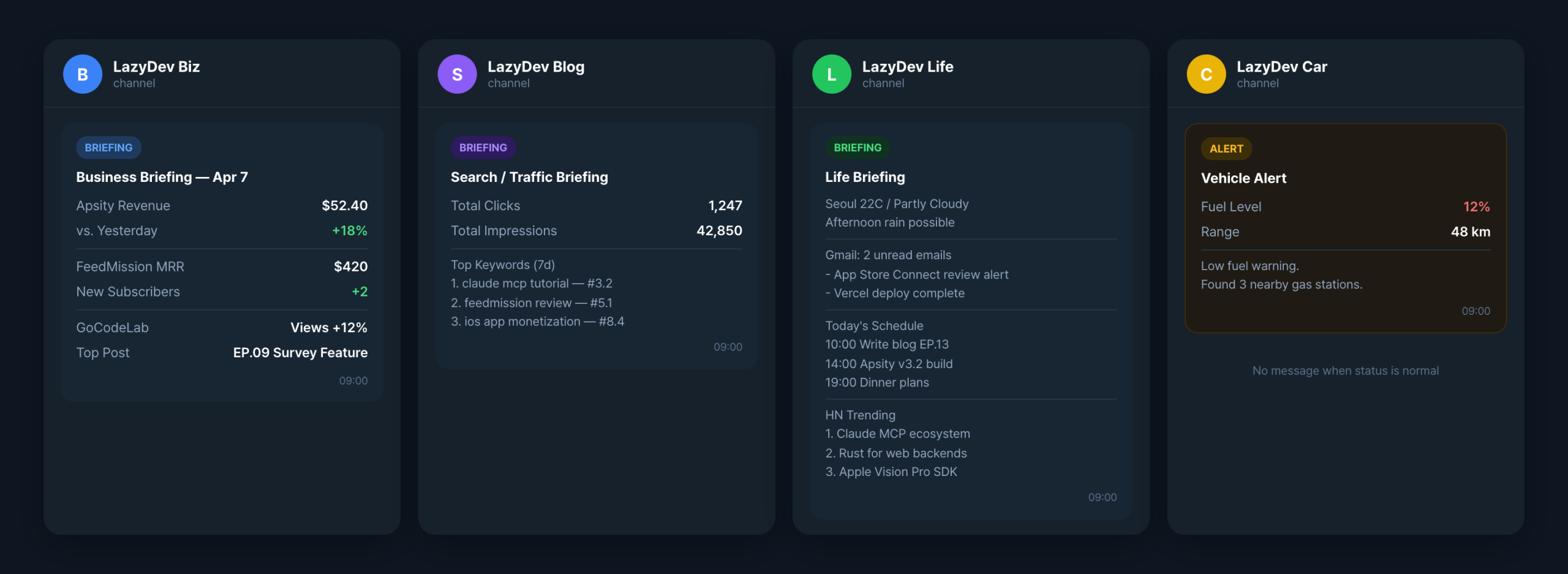
The split made a clear difference. In the morning, I open the biz channel and revenue check is done. The life channel has weather and schedule. If the car channel is silent, the car is fine. I set different notification sounds per channel too. Biz always rings. Car is on silent.
The Scheduler: An Alarm Clock in Code
I used node-cron. Think of it as a phone alarm. You set “run this code every day at 9 AM,” and it does. Just like a phone alarm goes off at a set time, node-cron calls a function at a set time.
The code looks like this.
cron.schedule(‘0 9 * * *’, runMorningBriefing, {
timezone: ‘Asia/Seoul’,
})
// Anomaly detection: 4 times a day (09, 13, 17, 21)
cron.schedule(‘0 9,13,17,21 * * *’, runAnomalyCheck, {
timezone: ‘Asia/Seoul’,
})
‘0 9 * * *’ is a cron expression. From left to right: minute, hour, day, month, day of week. It means “every day at 9:00.” That one line makes the briefing function run automatically every morning at 9.
Anomaly detection runs four times a day. 9 AM, 1 PM, 5 PM, 9 PM. If revenue suddenly tanks or a 1-star review drops, I need to know quickly. With 4-hour intervals, the worst-case detection delay is 4 hours.
What the Morning Briefing Does
At 9 AM, messages fire to all four channels simultaneously. Internally, it works like this.
const results = await Promise.allSettled([
sendBizBriefing(), // Apsity + FeedMission
sendBlogBriefing(), // Search Console
sendLifeBriefing(), // Weather + Gmail + Calendar + Trending
sendCarBriefing(), // Vehicle (only on anomaly)
])
I used Promise.allSettled for a reason. All four channels fire at once, and if one fails, the rest still go through. If the weather API is down, the revenue briefing still arrives normally. One failure should not take down the whole thing.
The biz channel pulls app revenue from Apsity and subscription stats from FeedMission. It connects to both services simultaneously, collects the numbers, and sends one combined message.
The car channel is different. It checks vehicle status via the Kia Connect API, but only sends a message when there is low fuel or a warning. If the car is fine, no message. I did not need a daily “car is normal” notification.
Anomaly Detection: Tell Me When Something Looks Off
Anomaly detection runs independently from the briefing. Four times a day, it checks five things.
1. Apsity revenue — 20%+ change from previous day
2. FeedMission revenue — 20%+ change from previous day
3. Low-rating reviews — new 1-2 star reviews
4. Keyword rankings — drop of 5 or more positions
The logic is simple. Save yesterday’s numbers, compare them to today’s. If the difference exceeds the threshold, send an alert. Revenue was $50 yesterday and $38 today? That is -24%, so an alert goes out.
Deduplication was important here. If the same anomaly fires every 4 hours, it gets annoying fast. The memory module handles this.
const alertId = `apsity_revenue_2026-04-07`
const alreadySent = await memoryTools
.memory_check_alert.handler({ alertId })
if (alreadySent === ‘not_sent’) {
// Send to Telegram + save record
await memoryTools.memory_log_alert.handler({
alertId,
type: ‘revenue_change’,
expiresInHours: 24,
})
}
The memory module stores alert history in a data/alerts.json file. When it records “this alert is valid for 24 hours,” the next check cycle skips that item if it was already sent. After 24 hours, the record expires and the alert can fire again.
Previous state tracking works the same way. data/state.json holds the last observed revenue figure and keyword rankings. The next check reads this file and compares it to the current values. File-based, so no database needed.
Running 24/7 on a Mac mini
A scheduler only works if the computer is on. I already use a Mac mini as a server, so I deployed it there.
I used pm2. It is a process manager. It runs my code in the background and automatically restarts it if it crashes. It even survives system reboots.
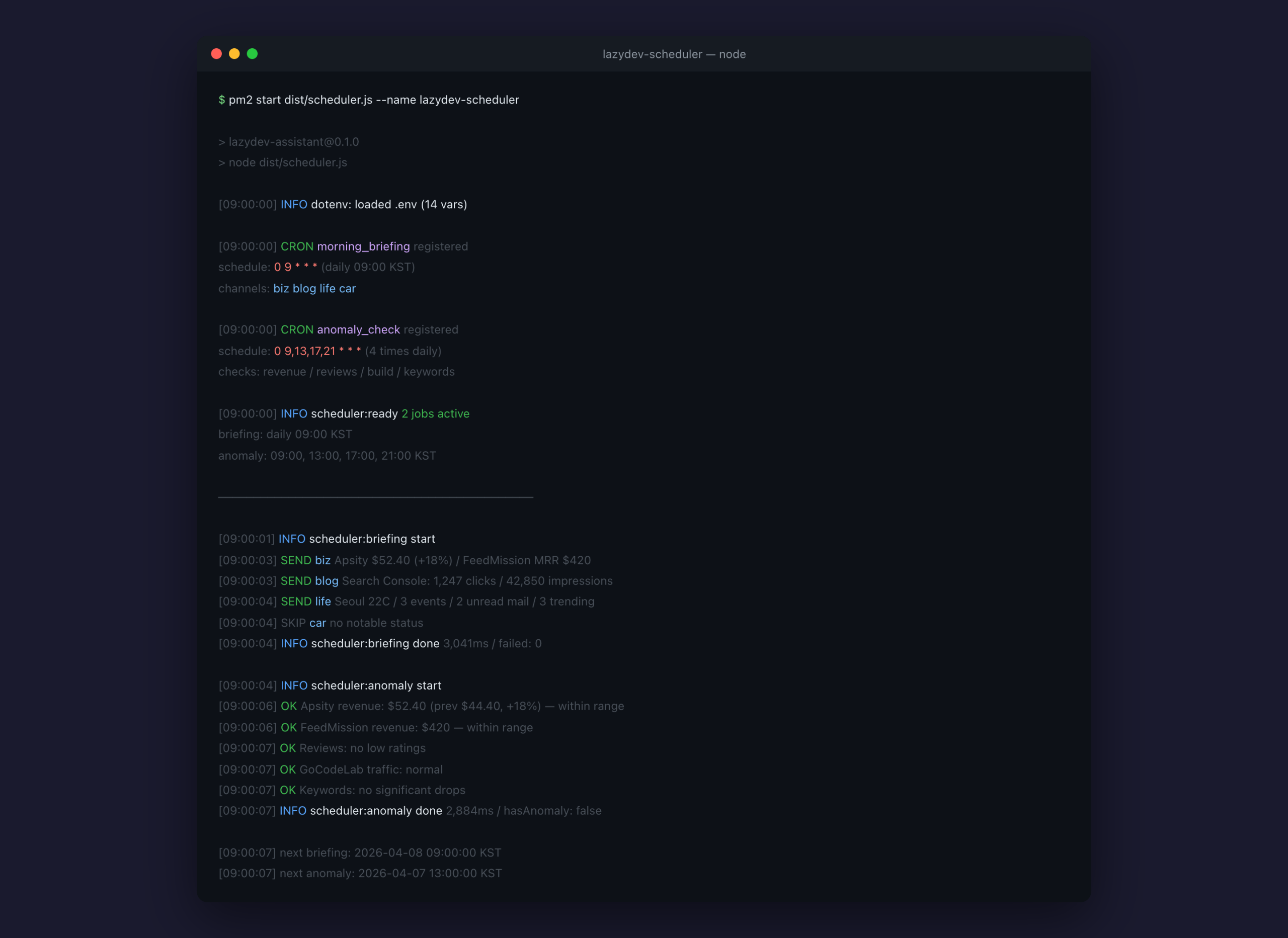
$ pm2 start dist/scheduler.js –name lazydev-scheduler
# Save current state (for recovery after reboot)
$ pm2 save
# Register auto-start on Mac boot
$ pm2 startup
The pm2 startup command is the key piece. It registers with macOS launchd, which is the system’s auto-start mechanism. When the Mac boots, launchd starts pm2, and pm2 starts my scheduler. A chain.
There was one snag. When pm2 launched the process, it could not read environment variables from the .env file. Environment variables hold sensitive values like the Telegram bot token and database credentials. Running directly from the terminal worked fine, but pm2 returned empty values.
The cause was straightforward. pm2 spawns a new process without inheriting the current terminal’s environment. The fix was equally simple: import dotenv at the top of the file.
import ‘dotenv/config’
// This single import reads the .env file
// and populates process.env
Importing dotenv/config makes the program load the .env file at startup and inject the values into process.env. Works regardless of whether pm2 or a direct terminal session launches it. Missing that one line cost me 30 minutes.
A Typical Day
My phone buzzes at 9 AM. Four Telegram notifications.
I open the biz channel. “Apsity revenue today $52.40, +18% from yesterday.” FeedMission MRR $420, 2 new subscriptions. Five seconds to read.
The life channel. Seoul, clear, 22 degrees, possible rain in the afternoon. Three events today. Two unread emails. I grab an umbrella on the way out.
The car channel has no notifications. Car is fine.
At 1 PM, another alert hits the biz channel. “Apsity revenue -22% from yesterday.” Anomaly detection caught it. I opened the dashboard and found that keyword rankings had dropped for one of the apps. I could respond right away.
Before this, I would not have noticed until I checked the dashboard in the evening.
What Did Not Work
pm2 environment variable issue. Solved with the dotenv/config import as mentioned above. But it took time to figure out. It worked in the terminal but not under pm2, so it took a while to realize it was an environment issue rather than a code issue.
Telegram message length. Telegram caps messages at 4,096 characters. I initially tried to fit the entire briefing in one message and it got truncated. Splitting into channels solved this naturally — each channel’s message was shorter.
First-run anomaly detection error. Anomaly detection compares against previous state, but on the very first run, there is no previous state. I added a guard to skip comparison if state.json does not exist. It works normally from the second run onward.
Architecture Summary
Here is the full picture.
– Briefing: daily at 09:00 KST
– Anomaly detection: 09:00, 13:00, 17:00, 21:00 KST
Briefing flow
– scheduler.ts fires at the cron time
– Each channel function calls MCP modules to collect data
– sendTelegram() dispatches per channel
– Four channels run in parallel (one failure does not block the rest)
Anomaly detection flow
– anomaly_check inspects 5 items sequentially
– Loads previous values from data/state.json
– Compares to current values; if threshold exceeded, registers an alert candidate
– Checks data/alerts.json for duplicates (skips if already sent)
– Sends to biz channel only when an anomaly is found
Always-on
– pm2 manages the process (auto-restarts on crash)
– pm2 startup + launchd for auto-recovery after Mac reboot
Why These Tools
Why node-cron. I could have used the Mac’s native crontab. But crontab lives outside Node.js. Environment variable setup is separate, error logging is separate. node-cron lives inside the codebase, so everything is managed in TypeScript in one place.
Why pm2. systemd and Docker both exist. But Docker is overkill for running a single Node.js process on a Mac mini. pm2 is one npm install. It handles logging and restarts out of the box.
Why file-based state. I could have used Redis or SQLite. But I am only storing two files: state.json and alerts.json. A few kilobytes each. Files are more than enough. If it grows, I will migrate then.
Current Status
It has been running for a week. Zero crashes. Four alerts arrive at 9 AM every morning. Anomaly detection has caught three issues so far. One revenue drop, one low-rating review, one keyword ranking decline. All three showed up in Telegram before I opened any dashboard.
My morning routine changed. The 15 minutes I spent opening five apps shrank to 30 seconds of reading Telegram. If nothing unusual happened, I do not even need to look. If something did, I know immediately.
Next up: extending this system to daily life, adding weather, nearby search, vehicle management, and more. Continues in EP.14.
FAQ
Q. What is node-cron?
Think of it as a phone alarm for code. Set “run this function every day at 9 AM,” and as long as the server is running, it fires on schedule. One npm package to install.
Q. What is pm2?
A process manager. It runs your code in the background and restarts it automatically if it crashes. It survives reboots too. It is the standard tool for keeping Node.js processes alive 24/7.
Q. What are environment variables (.env)?
A file that holds secrets. API keys, tokens, database credentials — anything sensitive lives here. Instead of putting passwords directly in code, you put them in this file and a tool called dotenv loads them at runtime.
Q. What is anomaly detection?
A feature that flags numbers that deviate from the norm. If revenue drops more than 20%, a 1-2 star review appears, or keyword rankings fall by 5+ positions, it sends a Telegram alert.
Q. Does this work without a server?
The scheduler needs a computer that stays on. A Mac mini, a Raspberry Pi, or any always-on machine works. Alternatively, a cloud server on AWS or DigitalOcean at around $5/month is enough.
Related posts
Lazy Developer · Automate Everything · EP.13